24
4
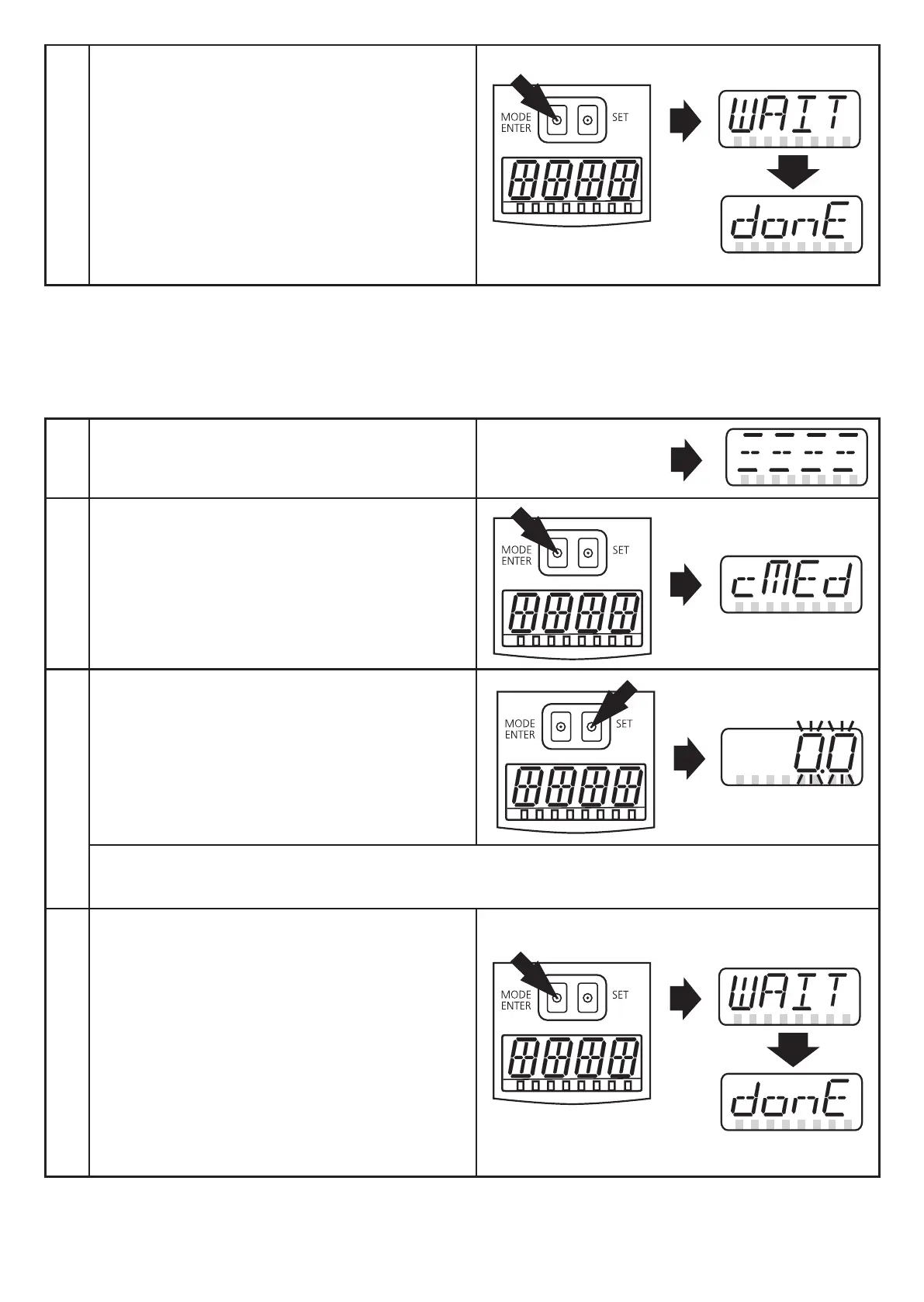
> After 5 s [WAIT] is displayed while
the measurement is being made�
> [donE] shows that the new setting
value has been stored�
If the setting was unsuccessful the
cause is displayed briefly and then
[FAIL] is displayed� The new reference
point is rejected�
10.2.3 Carry out the adjustment to the reference level
The current level of a partly filled tank can be entered as numerical value� On this
basis the reference level is calculated�
1
► Apply operating voltage�
> Initial display is shown�
2
► Press [MODE/ENTER] until [cMEd]
is displayed�
3
► Press [SET] and keep it pressed until
the display flashes�
► After 5 s the setting value can be set
incrementally be pressing the button
once or continuously be keeping the
button pressed�
The value is incremented continuously� For reducing the value: let the display move to
the maximum setting value� Then the cycle starts again at the minimum setting value�
4
► Confirm with [MODE/ENTER]�
> [WAIT] is displayed while the meas-
urement is being made�
> [donE] shows that the new setting
value has been stored�
If the setting was unsuccessful the
cause is displayed briefly and then
[FAIL] is displayed� The new reference
point is rejected�



 To Next Page