www.ikegps.com/quickstart Page 14 www.ikegps.com/support
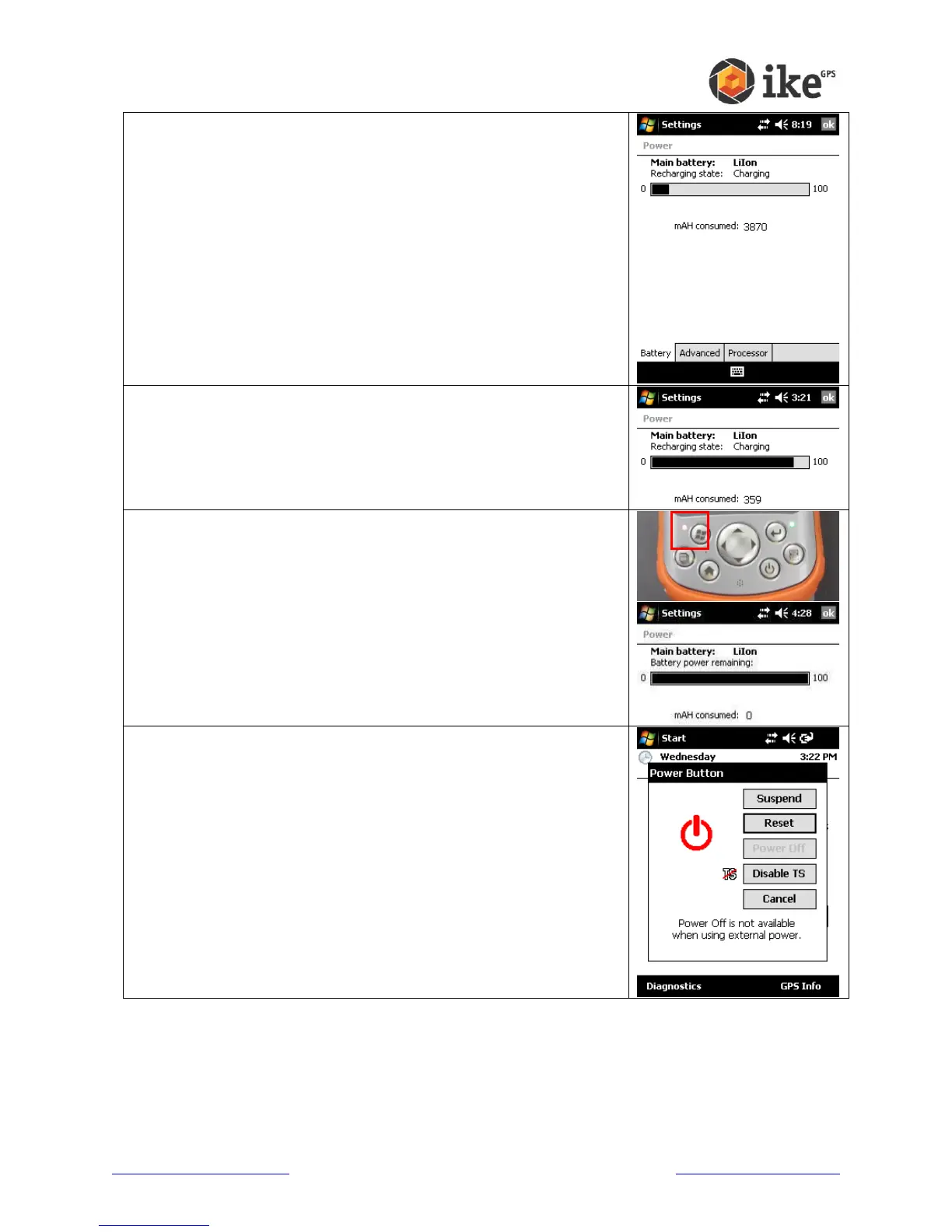
On the ‘Battery’ tab, the charge status of the battery is indicated as
follows:
The charge bar (0 to 100) indicates the level of charge. The closer
to 100 the fuller the charge
The ‘mAH consumed:’ value indicates how much capacity is still to
be charged. The lower the number the fuller the charge.
The red power/charge LED will blink if the unit is charging.
If the power/charge LED stop blinking this indicates that the charge
level is around 98%.
The ‘mAH consumed:’ value may slowly decrease as the battery
capacity is calibrated for optimal use.
Once the charge indicator (red LED) stops blinking and the ‘mAH
consumed:’ value stops decreasing then the battery has been fully
charged.
For fully-charged new batteries the ‘mAH consumed:’ value will be
near zero. For older batteries the ‘mAH consumed:’ may be above
zero due to natural charge/discharge cycle capacity degradation.
Press and hold the power button until the ‘Power Button’ options
appear, and then tap the [Reset] option. Resetting the ike unit will
reset the battery capacity



 To Next Page