Page 11 of 50
5.3 Selection of COM port on PC
For selection of COM Port the EPM-XP should be
connected via USB cable to PC
• Switch on EPM-XP
• Connect USB port of PC via USB cable to EPM-XP
• Run “Visualisation software“ with double click on
the desktop icon.
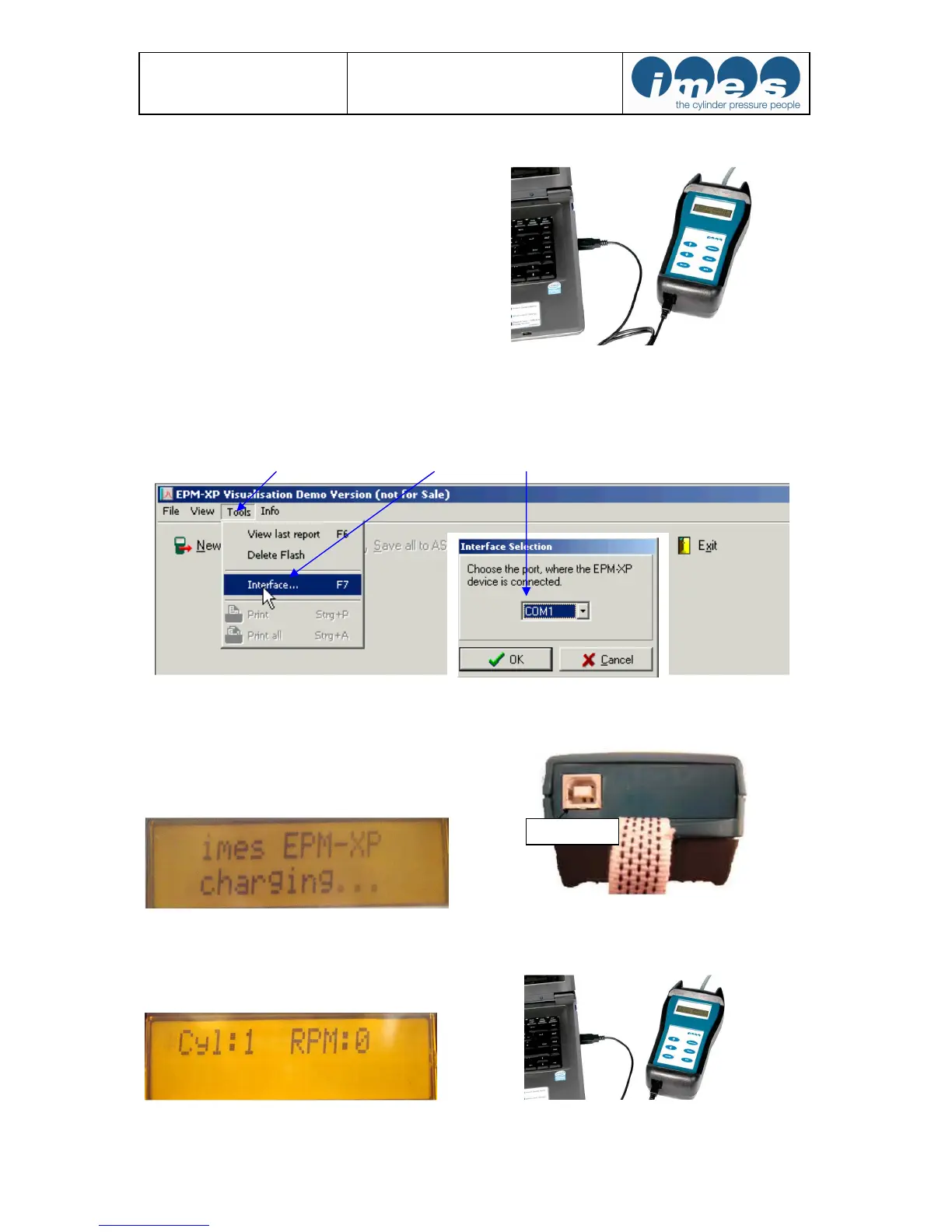
Fig.5: EPM-XP connected via USB cable to PC
For selection of COM Port the EPM-XP should be connected via USB cable to PC and visualisation software
should started with double click on desktop icon.
With mouse click on “Tools” and selection “Interface” the COM port of PC will be selected.
5.4 Charge battery
The EPM-XP has a re-chargeable battery. The battery
charging will start automatically after the EPM-XP unit
has been connected via USB cable from USB port to PC
(fig. 6,7,8,9)
Fig. 6: Indication during charging process Fig. 7: USB-port of EPM-XP
Fig. 8: Indication charging process completed Fig. 9: EPM-XP connected via USB cable to PC


 To Next Page