Page 48 of 50
11 Basic check for fault finding
Before contacting your local agency or service partner, check the problem guide below.
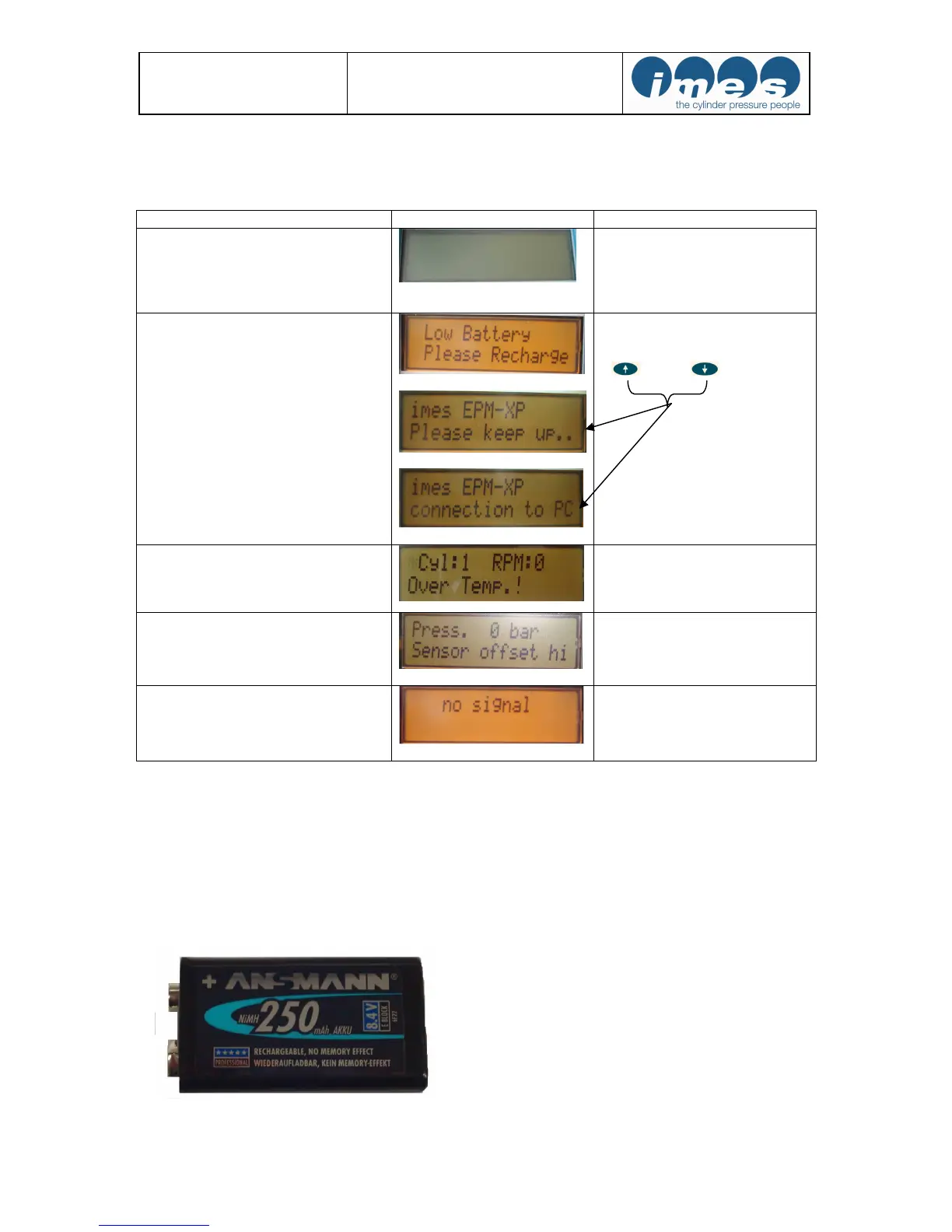
Problem Indication at EPM-XP Action
No display indication after switch “On”
Charge battery by connecting to
USB port from EPM-XP to PC
Low battery after full charging
If the battery status is low and charging
process finished after 5-10 minutes then
the user can charge battery manually 90
min. *
Connection to USB port of PC
Press 2 s both arrows
+ at EPM-XP
Over temperature indication
Indication after temperature of
measuring cell > 300 °C
Disconnect sensor from indicator
cock and wait 5-10 minutes
High offset
Sensor is defect.
Please send EPM-XP unit to IMES
workshop
No signal
Engine speed is lower than 10 RPM or
Indicator cock is not opened
Open indicator cock
* If battery of standard NiMh 250 mAh type Ansmann can not be charged or available than operator can use for
measurements Alkaline battery 9V for a short time. Please disconnect EPM-XP unit after transferring data to PC!
Note: It is not recommended to use the Forced Charging Mode when the battery charge
condition is more than 40%, due to the risk of overcharging. Please see chapter 5.2 for a
description how to check the charge state.
Note: Please only use re-chargeable battery E-block type “ANSMANN 250 mAh NiMh”
Fig.31: Re-chargeable E-block battery type: Ansmann


 To Next Page