Display Notes
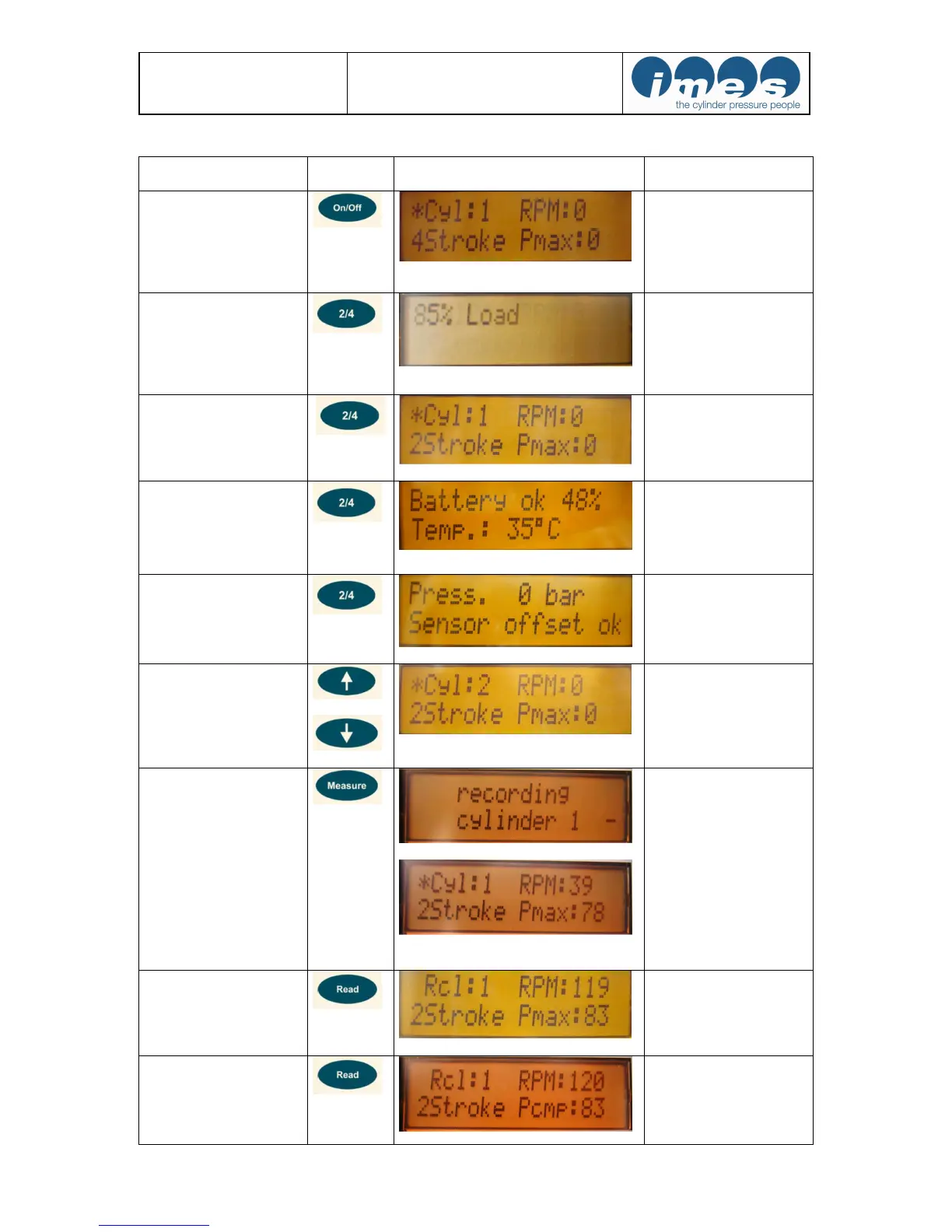
Switch On/Off
Basic settings will be dis-
played after switching on:
Cyl:1 = cylinder no.1
2 stroke = 2 stroke engine
4 stroke = 4 stroke engine
Pmax in bar ; RPM: speed
Selection of load on 2-
stroke engine
Push key “2/4“ for to set-
up load mode for measure-
ment. Steps: Load unde-
fined, 25 %-, 50%-, 75%-
,85%-, 90%-, 100%-,
110% load
Selection of 2 -stroke or 4
–stroke engine
Push key “2/4“ and
change mode of operation
to the desired value (4 or
2 stroke application).
Battery check
Push key “2/4“ two times
to check the battery status.
Also temperature at mea-
suring element will be dis-
played.
Sensor check
Push key “2/4“ three
times to check the sensor
status at 0 bar.
Selection of cylinder
Push arrow key “
“ and
change the displayed value
to the number of the
selected cylinder.
Start measurement
During measurement the
following information
“Recording cylinder” will
be indicated.
Display indication (1-2 s)
of measured cylinder
values. Then EPM-XP
unit switches auto-
matically to the next
cylinder.
Read Pmax
The measured value for
Pmax of the selected
cylinder will be displayed.
Read Pcomp (only on two
stroke engines)
Press 2x
The measured value for
Pcomp of the selected
cylinder will be displayed


 To Next Page