3.7.3 Measure mode
The mode is commonly used in the wire cable, pipe and other industries requiring
labelling of number of meters , the encoder must be used .
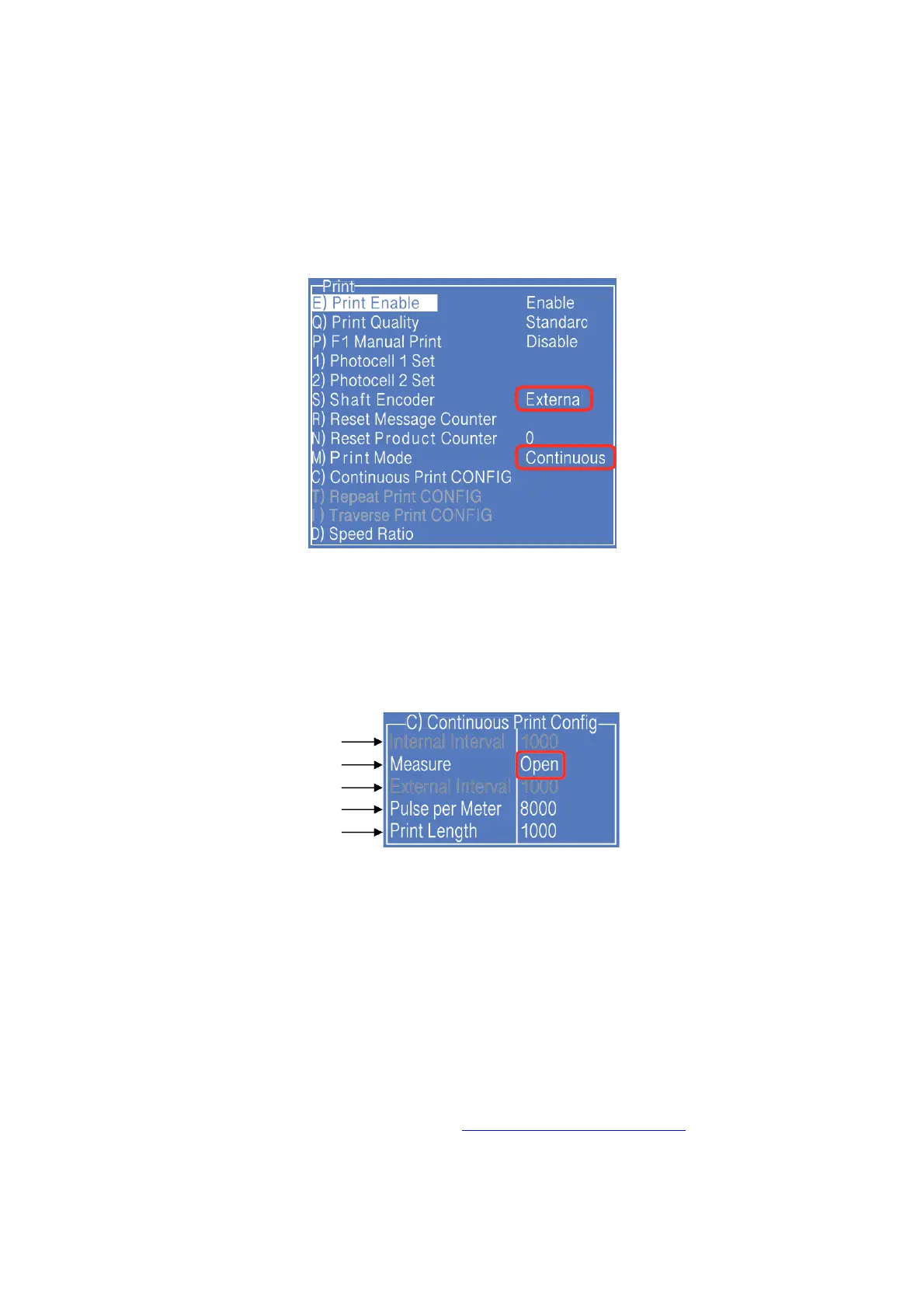
1. Press PRINT SET button to enter the following setting interface:
* The GRAY options indicate that the setting is invalid for the Measure Mode.
2. Select the "Shaft Encoder" as "external", and select "Print Mode" as “Continuous";
3. Enter " Continuous Print Configure " submenu, as shown in the following figure:
a
b
c
d
e
Setting analysis:
a. The setting is invalid for the "Measure Print” mode.
b. Measure: The item shall be set as "Open"
c. The setting is invalid for the "Measure Print" mode.
d. For example, if the perimeter of the wheel is 250mm, the encoder with 2000 pulses
then the value of pulse per meter is: (1000÷250) x 2000 = 8000.
e. After the value of pulse per meter set, the length of each message interval within
1000mm can be set in this option.
4. Other valid settings please refer to "2.6.3 PRINT SET Menu Analysis".



 To Next Page