3.7.4 Traverse Printing Mode
The mode is commonly used in electronics, label printing, egg and other industries, and
provides highly-efficient production mode for the array type printing.
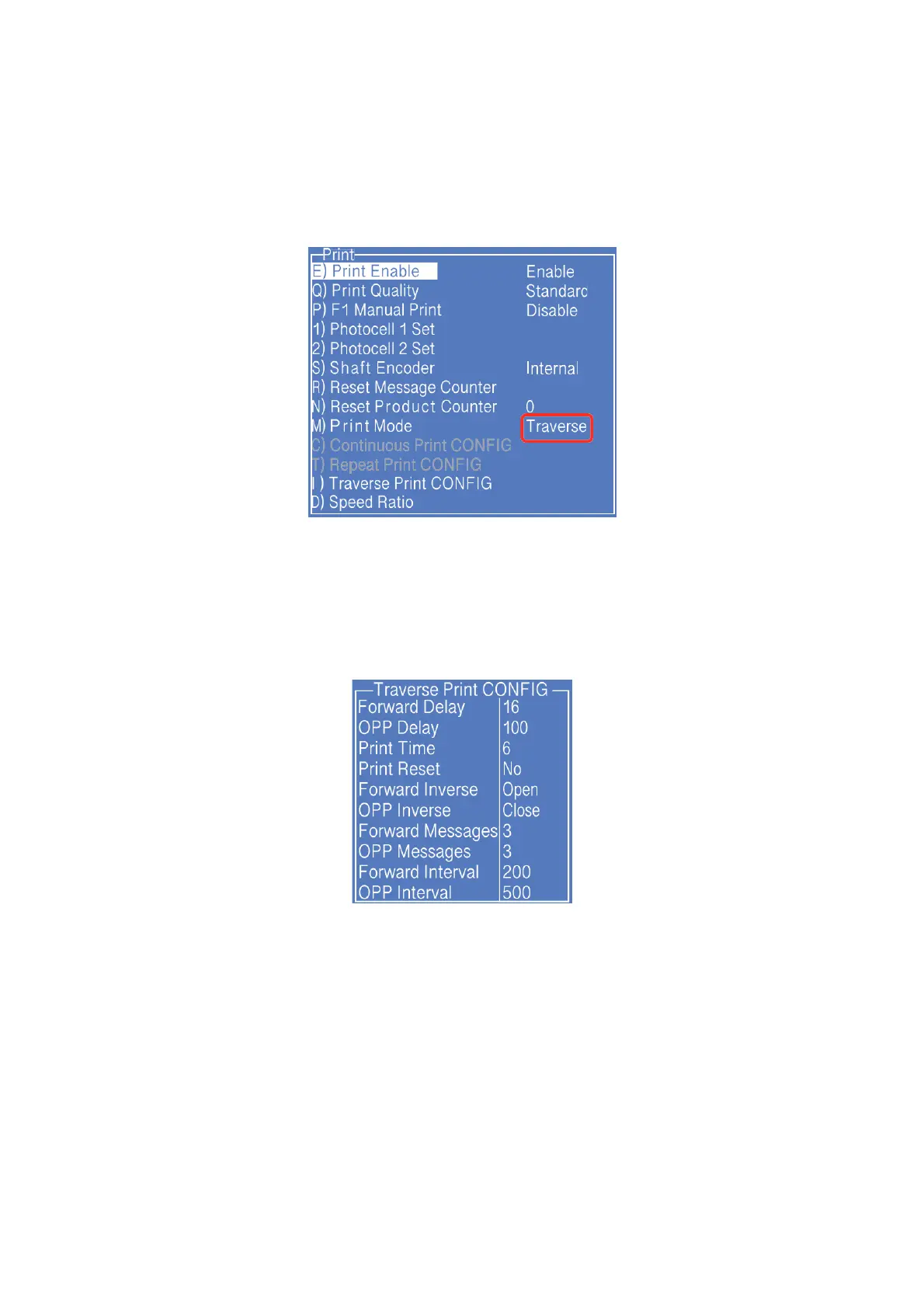
1. Press PRINT SET button to enter the following setting interface:
* The GRAY options indicate that the setting is invalid for the Traverse Mode.
2. Switch the "Print Mode" to “Traverse" then the printer is in the traverse printing mode.
3. Enter " I) Traverse Pint CONFIG " submenu, as shown in the following figure:
The setting of the figure is the traverse printing mode achieved by only 1 sensor.
The printing effect is:
When the photocell obtains 1 signal, the printer will print 6 times, 3 of them are
forward printings (each printing interval is 200), 3 times opposite printings (each
printing interval is 500), the delay of the first printing is 16 and the delay of the
fourth printing is 100.
If the printing sequence is disturbed, can try to use Print Reset to reset the forward
and opposite printings.



 To Next Page