EasyManua.ls Logo

Innovative Technology BV50 - Hardware Setup

Innovative Technology BV50
63 pages
Print Icon
To Next Page IconTo Next Page
To Previous Page IconTo Previous Page
Loading...
<< Back to Contents
Copyright © Innovative Technology Ltd 2020 Doc: BV50 User Manual
Version: 1.0
Page 18 of 63
this happens you will need to add a
rule to your antivirus to allow the
file to run.
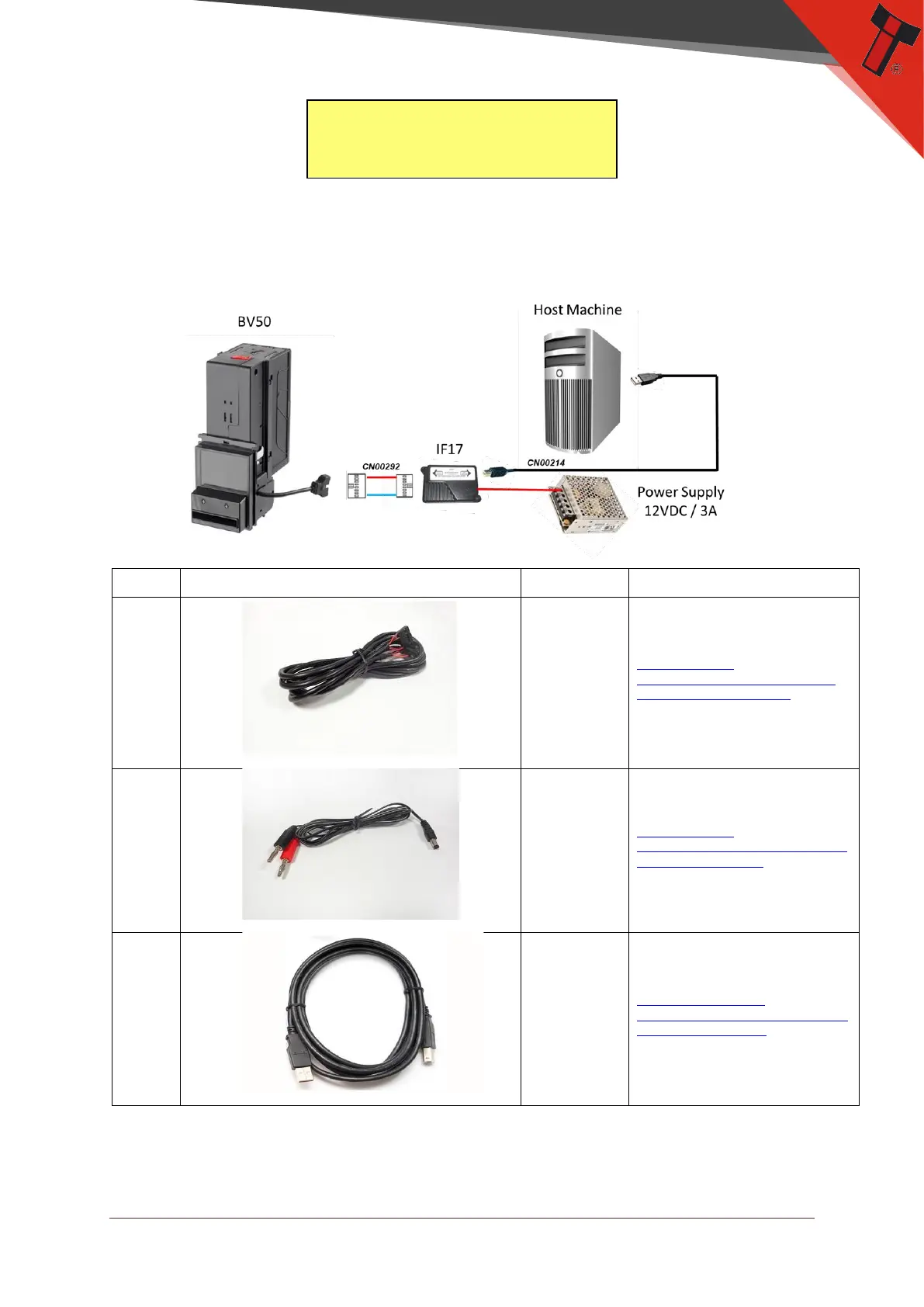
5.4.1.3 Hardware Setup
Connect the power supply to the DA2/IF17. Connect the USB cable to the DA2/IF17
and to your computer or laptop. Connect the BV50 to the DA2/IF17.
Type
ITL Part Number
Description
Details
Cable
CN00292
SSP Cable
http://innovative-
technology.com/shop/cables/ssp-to-
binary-interface-cable-detail
Cable
CN00345
IF17 Power
Cable
http://innovative-
technology.com/shop/cables/da3-if17-
if18-power-cable-detail
Cable
CN00214
USB Type A to B
http://www.innovative-
technology.com/shop/cables/usb-a-to-
b-cable-assembly-detail

Table of Contents

Other manuals for Innovative Technology BV50