EasyManua.ls Logo

Innovative Technology BV50 - Page 53

Innovative Technology BV50
63 pages
Print Icon
To Next Page IconTo Next Page
To Previous Page IconTo Previous Page
Loading...
<< Back to Contents
Copyright © Innovative Technology Ltd 2020 Doc: BV50 User Manual
Version: 1.0
Page 52 of 63
5. Calibration
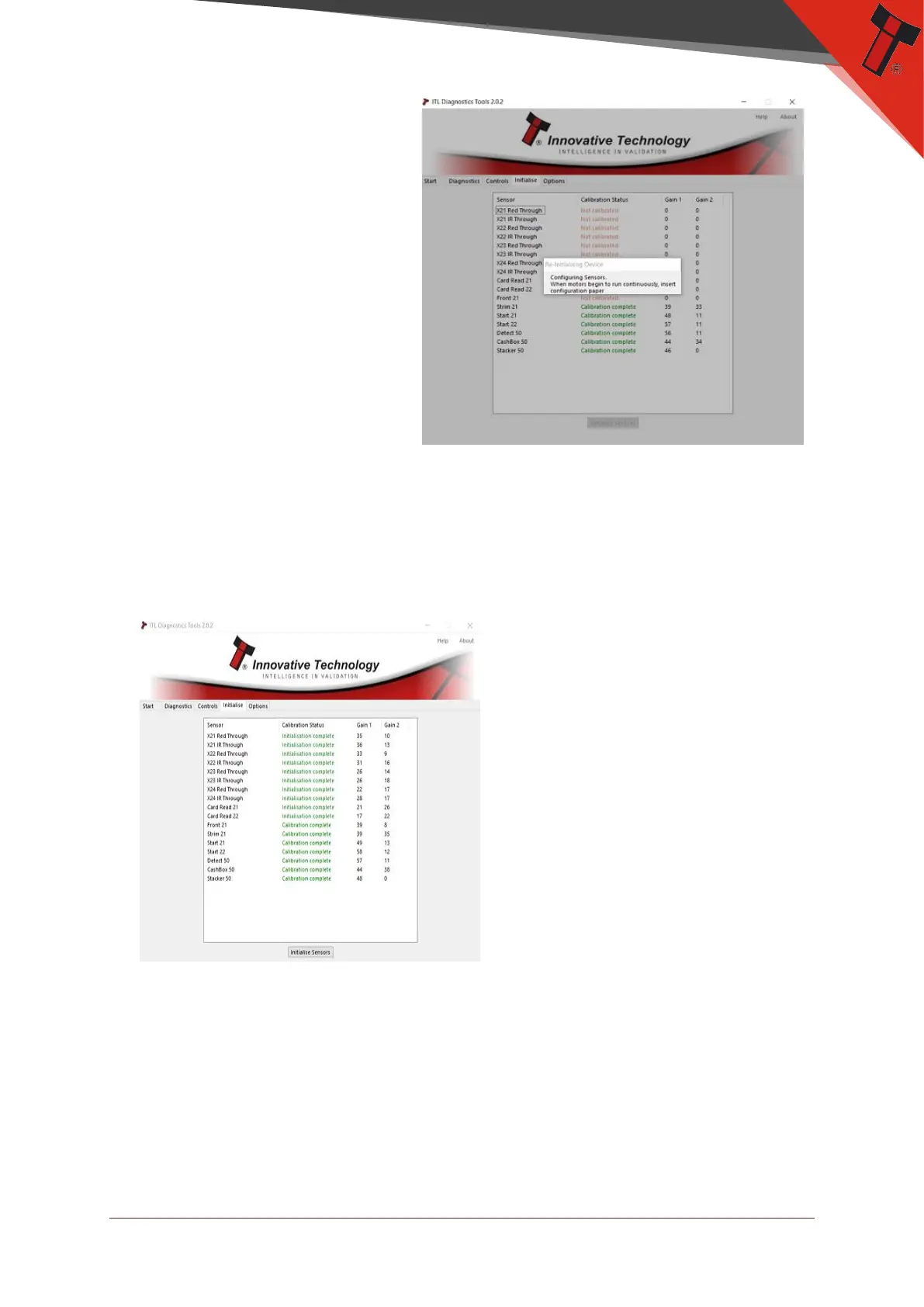
At this time the you will
need to be ready with the
calibration paper. A
message will display stating
to insert calibration paper
when motors start to run
continually. Only calibration
paper from ITL can be used
and cannot be photo
copied.
6. Calibration Complete
When the calibration is completed check the results and make sure they are
green. If you have failed sensors make sure there is no foreign debris and clean
the sensors and re-calibrate the unit again. If you are still getting error the unit
may need to be returned to an authorised service facility for repairs.

Table of Contents

Other manuals for Innovative Technology BV50