NV9 Spectral Range Manual
<< Back to Contents
Copyright © Innovative Technology Ltd 2019 Doc: GA02156 NV9S Range User Manual
Version: 1.1
Page 44 of 54
7.4.4 Setup Example Drawing/s
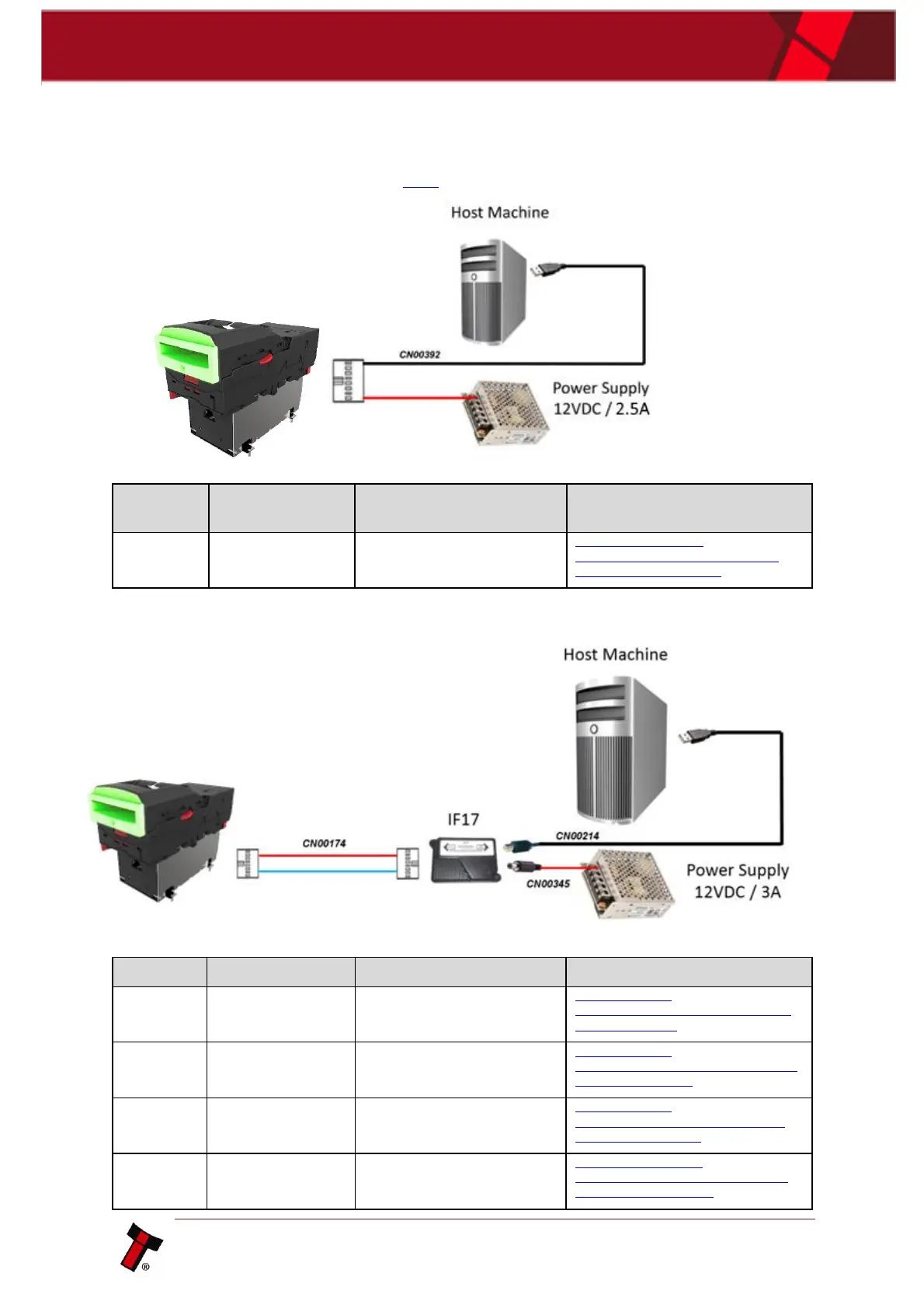
The drawings below highlight’s how to connect the NV9 Spectral to an SSP or eSSP
host machine using available cables and interfaces from Innovative Technology Ltd.
For cable drawings refer to section 10.1.
7.4.4.1 Direct UBS Cable
7.4.4.2 IF17 Set up
http://innovative-
technology.com/shop/cables/nv9-nv10-
ribbon-cable-detail
USB A to B cable assembly
http://innovative-
technology.com/shop/cables/usb-a-to-b-
cable-assembly-detail
DA3 / IF17 / IF18 Power Cable
http://innovative-
technology.com/shop/cables/da3-if17-
if18-power-cable-detail
http://www.innovative-
technology.com/shop/accessories/if17-
interface-converter-detail
http://www.innovative-
technology.com/de/shop/cables/nv9-
nv10-usb-host-cable-detail















 To Next Page