- 111 -
Setting Power Save Mode
AppendixSetting Up
2
Printing
3
Before use
1
Basic Device Operations
4
Index
Setting Up
2
Printing
3
Before use
1
Basic Device Operations
4
Appendix Index
- 110 -
Setting Power Save Mode
Network function restrictions
In sleep mode, the following restrictions apply to
the network functions.
Sleep mode is disabled
In the following cases, the device cannot enter
sleep mode.
IPSec is enabled.
A TCP connection has been established.
Example: A connection has been established
using Telnet or FTP, etc.
After the period for entry to power save mode
has elapsed in energy save mode, the printer will
enter sleep mode when the connection is cut.
E-mail receiving is enabled.
Memo
To enable sleep mode, disable IPSec/E-mail.
Unable to print
While in sleep mode, printing using the following
protocols is disabled.
NBT
EtherTalk*
WSD Print
*: For Mac OS X, printing while in sleep mode is possible if
connected using Bonjour (Rendezvous) protocols or "LPD
protocols (TCP/IP)".
For setup methods, see either “Using Bonjour
(Rendezvous)” (P.72) or “Adding Printers Using LPD
(TCP/IP) Protocols” (P.117).
Unable to search/setup
While in sleep mode, searches and settings
using the following functions and protocols are
disabled.
PnP-X
UPnP
LLTD
MIB*
*: Referencing using the parts of MIB (Get command) that
are supported is possible is sleep mode.
Protocols with client functions do
not operate
While in sleep mode, the following protocols with
client functions do not operate.
E-mail alert
*1
SNMP Trap
WINS
*2
*1: The elapsed time while in sleep mode does not include
the intervals between periodic communications times for
e-mail alerts.
*2: The elapsed time while in sleep mode does not include
the intervals between WINS refresh times.
WINS is not periodically refreshed while in sleep mode,
so the names registered to the WINS server may be
deleted.
Moving automatically from sleep
mode to power save mode
In network environments with fl ows of large
packet quantities, the device may move
automatically from sleep mode to power save
mode and respond.
Subsequently, if the period for moving to
sleep mode elapses, sleep mode is entered
automatically.
Restrictions in sleep mode
This section explains the restrictions when the device is in sleep mode.
When the device is displaying an error, entering sleep mode may be disabled.
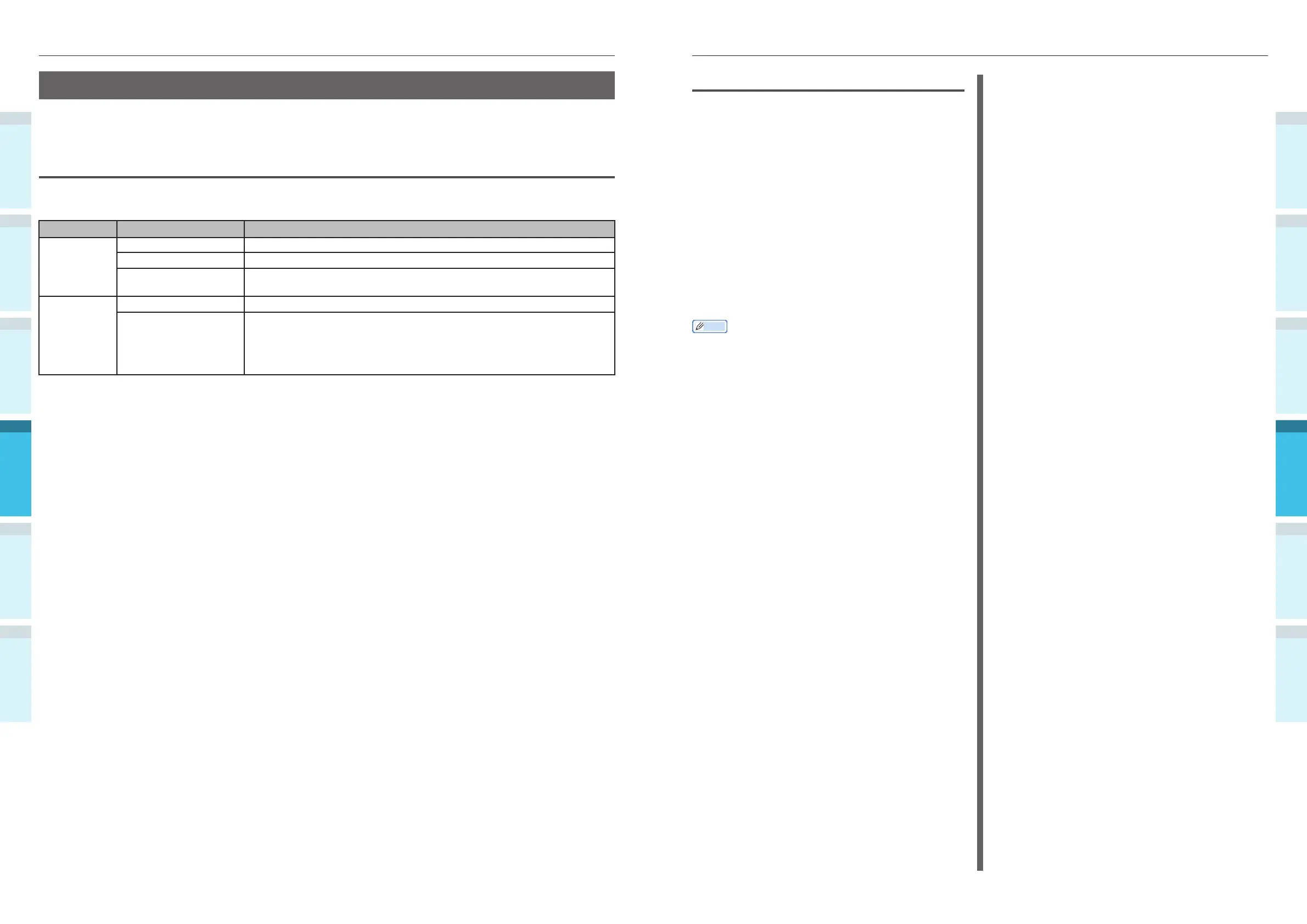
Printer driver utility restrictions
When the device enters sleep mode, the printer driver and utility functions are restricted as described
below.
OS Software name Restrictions in sleep mode
Windows Confi guration Tool Network settings for the Network Setting plug-in are disabled.
Network Extension
Cannot connect to
device
.
Driver installer
When connected to a network, the
device
options information cannot be
acquired while installing the printer drivers.
Mac OS X NIC Setup Tool
Printer
searches and settings are disabled.
Printer drivers Printing is disabled when connected using EtherTalk. Connect to the
device using either Bonjour (Rendezvous) protocols or LPD protocols
(TCP/IP).
For advanced setup methods, see either “Using Bonjour (Rendezvous)”
(P.72) or “Adding Printers Using LPD (TCP/IP) Protocols” (P.117).
When the device enters sleep mode, press the [POWER SAVE] button on the control panel to check that
"Printing enabled" is displayed on the liquid crystal panel.
When "Printing enabled" is displayed, the restrictions described above do not apply.



 To Next Page