- 37 -
Installing the Device
AppendixPrinting
3
Setting Up
2
Before use
1
Basic Device Operations
4
Index
- 36 -
Installing the Device
AppendixPrinting
3
Setting Up
2
Before use
1
Basic Device Operations
4
Index
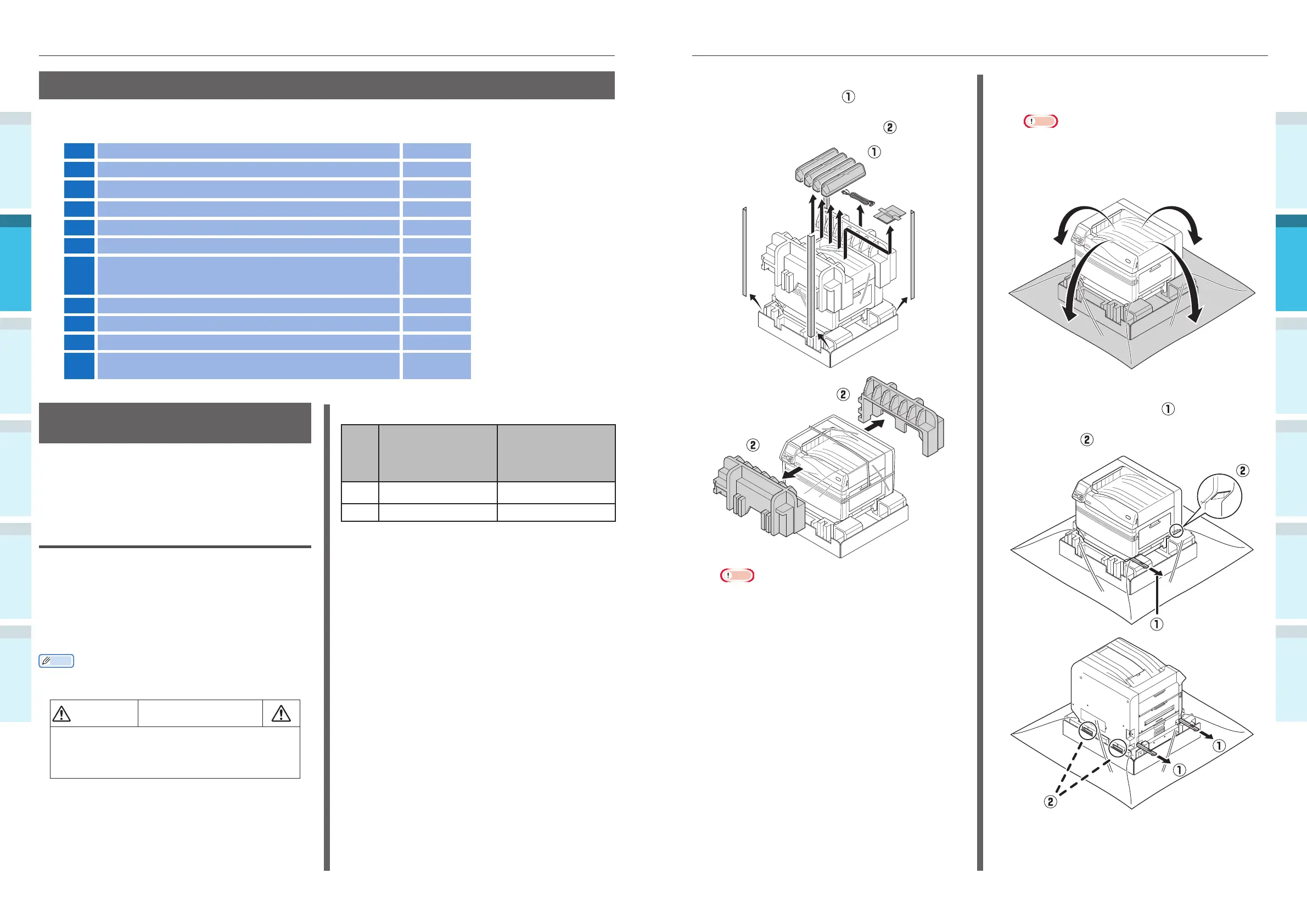
1
Open the package, and remove the
device accessories (
), and enclosed
manual, protective equipment, and
shock-absorbing material (
).
Note
�
The packing and protective equipment are used
when shipping the device, so store them carefully.
2
Remove the cover bag enclosing the
main printer unit.
Note
�
Do not remove the tape securing the protective
equipment, paper feed trays, and side covers before
transporting the device to its installation location.
The trays and covers opening during transport may
cause unexpected injury.
3
Remove the three carrying levers at the
bottom of the printer (
), and check
the three locations of the carrying
handles (
).
Installation Procedure
Work according to the relevant procedures and the customer installation conditions. If not mounting
any options, skip the reading of the procedures described as "Optional".
1
Opening the Package and Installation
2
Mounting Consumables (P.38)
3
Mounting the Expansion Tray Unit (Optional) (P.42) (Optional)
4
Mounting the Built-in HDD (Optional) (P.46) (Optional)
5
Connecting Using LAN Cable (P.57)
6
Connecting Using USB Cable (P.58)
7
Installing and Connecting the Color Management Server
("Fiery
®
for
Intec Installation Guide")
(Sold
separately)
8
Connecting Power Cables (P.51)
9
Connecting to PC (P.55)
10
Adding Options (P.76) (Optional)
11
Printing from Trays (P.89)
Printing from the Multi-Purpose Tray (P.95)
Opening the Package and
Installation
This section explains the procedure from opening
the package to removing and installing the
product.
Opening the Package and Moving
the Device
Make sure to install in a suffi ciently robust
location that can support the weight of the
device and its options. Do not install in unstable
locations such as on unsteady tables or slanted
locations, or in locations with strong vibrations.
Doing so risks causing injury due to the device
falling or toppling.
Memo
�
For device installation locations, see “Installation
Conditions” (P.33).
CAUTION
There is a risk of injury.
�
The weight of the device is approx. 97kg* for
model CS4000, and approx. 110kg* for model
CS5000, so make sure to use at least 4 people
to lift.
*: Includes consumables such as image drums and toner
cartridges, etc.
The main unit weights are as described below.
With the toner
cartridge and
image drum
mounted
With the toner
cartridge and
image drum
removed
CS4000
Approx. 97kg Approx. 82kg
CS5000
Approx. 110kg Approx. 91kg



 To Next Page