Intermec EasyCoder 501 – Service Manual Ed. 7
100
Chapter 12 Paper Cutter
12.4 Installation, cont.
LinerLess Cutter, cont.
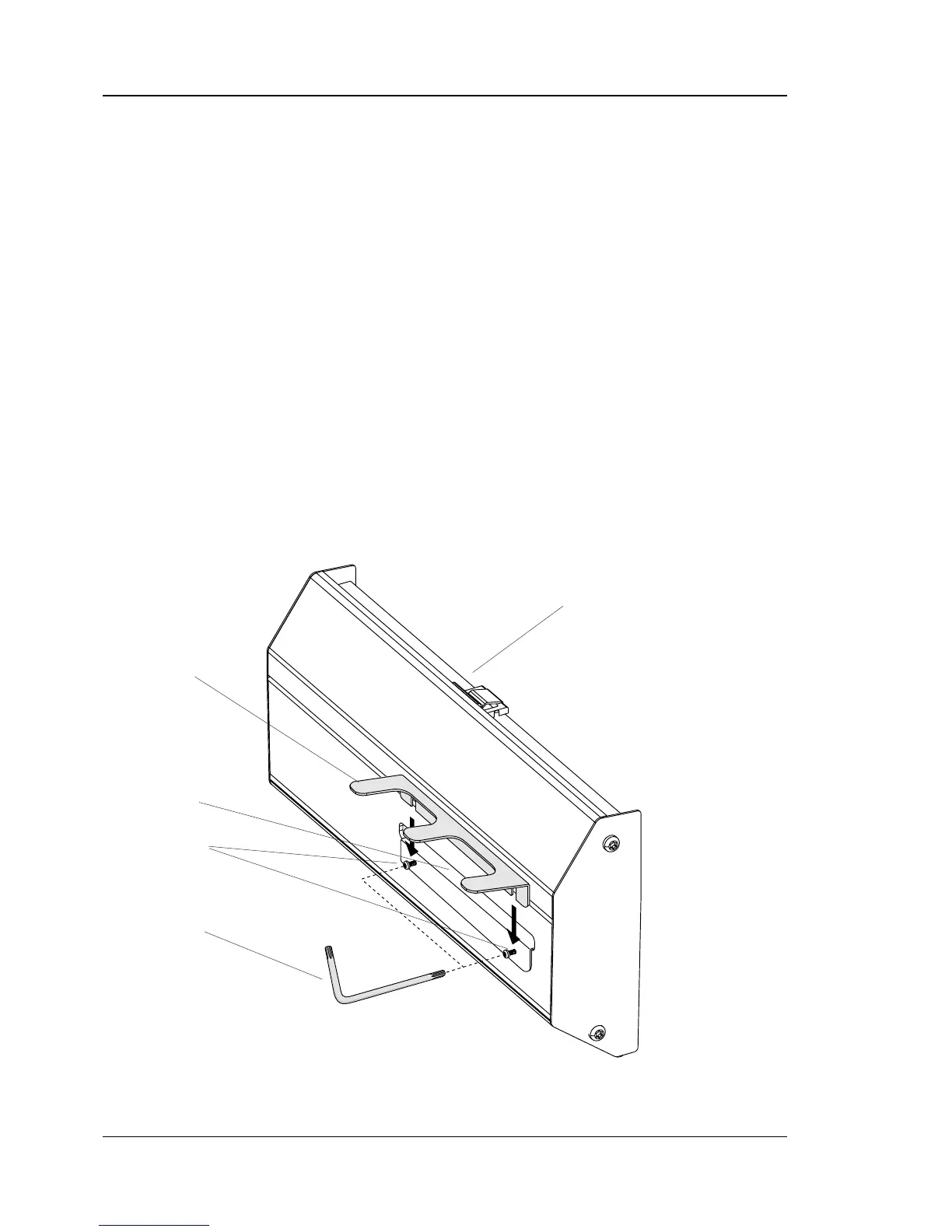
The guide plate is intended to be fi tted at the front of the linerless
cutter. It prevents labels up to a length of 120 mm (4.75 inches)
from falling off after cutting and for example stick to the front of
the cutter, or to the table where the printer stands. It is not neces-
sary to fi t the guide plate, but we recommend to fi t it unless some
other means of taking care of the label are provided, such as an
applicator.
The guide plate has a special plasma coating that prevents labels
from getting stuck.
To prevent damage during transportation, the guide plate is not
fi tted at delivery, but is easy to fi t using an #T10 Torx key:
• Loosen the two #T10 Torx screws, that hold the plate beneath
the cutter’s outfeed slot, a few turns.
• Slip the guide plate onto the screws from above.
• Make sure to press the guide plate down as far as the U-shaped
indents allow.
• Tighten the screws.
Linerless Cutter Unit
Guide Plate
Outfeed Slot
#T10 Torx Key
#T10 Torx Screws



 To Next Page