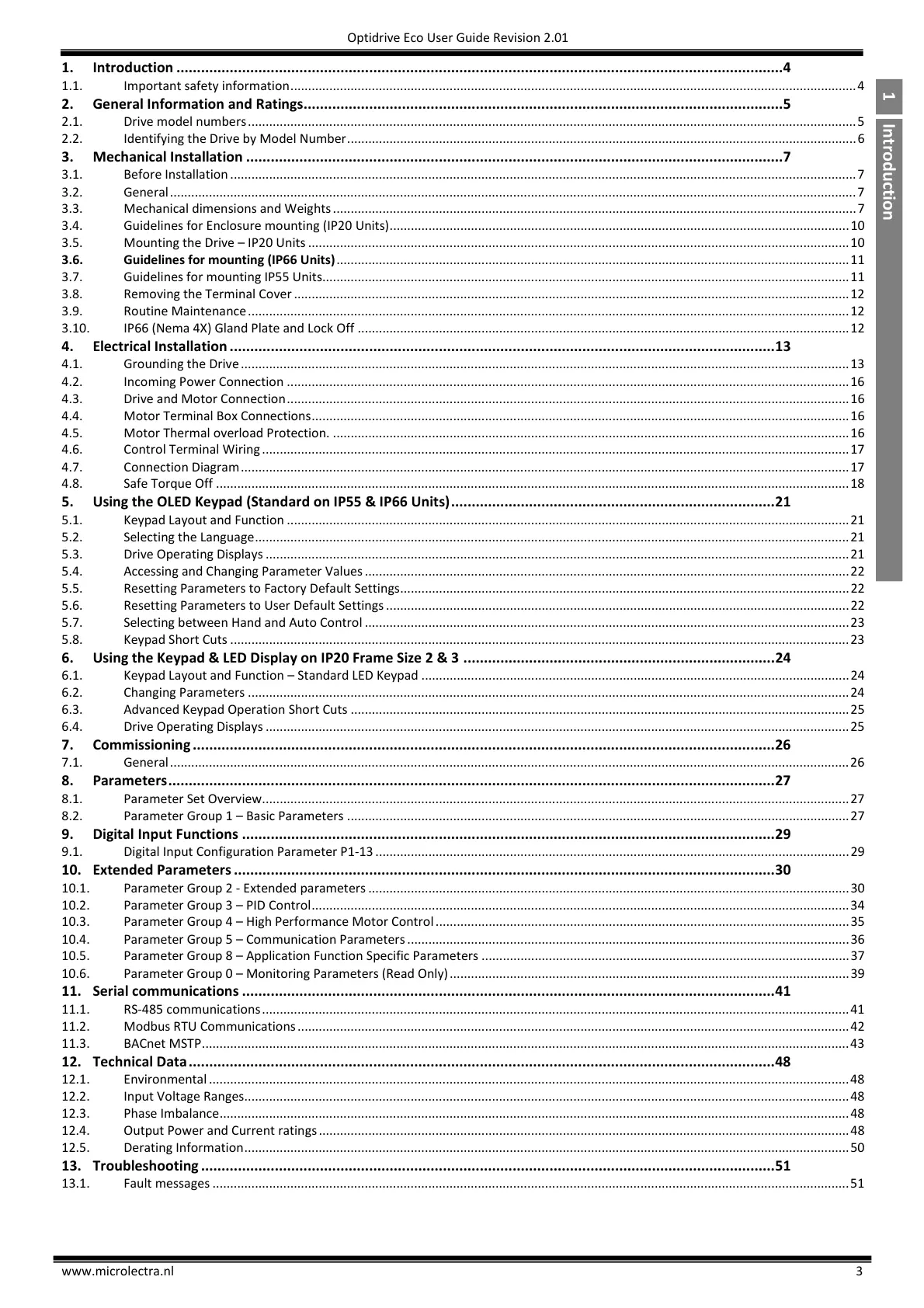
1. Introduction ....................................................................................................................................................4
1.1. Important safety information ................................................................................................................................................................ 4
2. General Information and Ratings.....................................................................................................................5
2.1. Drive model numbers ............................................................................................................................................................................ 5
2.2. Identifying the Drive by Model Number ................................................................................................................................................ 6
3. Mechanical Installation ...................................................................................................................................7
3.1. Before Installation ................................................................................................................................................................................. 7
3.2. General .................................................................................................................................................................................................. 7
3.3. Mechanical dimensions and Weights .................................................................................................................................................... 7
3.4. Guidelines for Enclosure mounting (IP20 Units) .................................................................................................................................. 10
3.5. Mounting the Drive – IP20 Units ......................................................................................................................................................... 10
3.6. Guidelines for mounting (IP66 Units) ................................................................................................................................................. 11
3.7. Guidelines for mounting IP55 Units..................................................................................................................................................... 11
3.8. Removing the Terminal Cover ............................................................................................................................................................. 12
3.9. Routine Maintenance .......................................................................................................................................................................... 12
3.10. IP66 (Nema 4X) Gland Plate and Lock Off ........................................................................................................................................... 12
4. Electrical Installation ..................................................................................................................................... 13
4.1. Grounding the Drive ............................................................................................................................................................................ 13
4.2. Incoming Power Connection ............................................................................................................................................................... 16
4.3. Drive and Motor Connection ............................................................................................................................................................... 16
4.4. Motor Terminal Box Connections ........................................................................................................................................................ 16
4.5. Motor Thermal overload Protection. .................................................................................................................................................. 16
4.6. Control Terminal Wiring ...................................................................................................................................................................... 17
4.7. Connection Diagram ............................................................................................................................................................................ 17
4.8. Safe Torque Off ................................................................................................................................................................................... 18
5. Using the OLED Keypad (Standard on IP55 & IP66 Units) ............................................................................... 21
5.1. Keypad Layout and Function ............................................................................................................................................................... 21
5.2. Selecting the Language ........................................................................................................................................................................ 21
5.3. Drive Operating Displays ..................................................................................................................................................................... 21
5.4. Accessing and Changing Parameter Values ......................................................................................................................................... 22
5.5. Resetting Parameters to Factory Default Settings ............................................................................................................................... 22
5.6. Resetting Parameters to User Default Settings ................................................................................................................................... 22
5.7. Selecting between Hand and Auto Control ......................................................................................................................................... 23
5.8. Keypad Short Cuts ............................................................................................................................................................................... 23
6. Using the Keypad & LED Display on IP20 Frame Size 2 & 3 ............................................................................ 24
6.1. Keypad Layout and Function – Standard LED Keypad ......................................................................................................................... 24
6.2. Changing Parameters .......................................................................................................................................................................... 24
6.3. Advanced Keypad Operation Short Cuts ............................................................................................................................................. 25
6.4. Drive Operating Displays ..................................................................................................................................................................... 25
7. Commissioning .............................................................................................................................................. 26
7.1. General ................................................................................................................................................................................................ 26
8. Parameters .................................................................................................................................................... 27
8.1. Parameter Set Overview...................................................................................................................................................................... 27
8.2. Parameter Group 1 – Basic Parameters .............................................................................................................................................. 27
9. Digital Input Functions .................................................................................................................................. 29
9.1. Digital Input Configuration Parameter P1-13 ...................................................................................................................................... 29
10. Extended Parameters .................................................................................................................................... 30
10.1. Parameter Group 2 - Extended parameters ........................................................................................................................................ 30
10.2. Parameter Group 3 – PID Control ........................................................................................................................................................ 34
10.3. Parameter Group 4 – High Performance Motor Control ..................................................................................................................... 35
10.4. Parameter Group 5 – Communication Parameters ............................................................................................................................. 36
10.5. Parameter Group 8 – Application Function Specific Parameters ........................................................................................................ 37
10.6. Parameter Group 0 – Monitoring Parameters (Read Only) ................................................................................................................. 39
11. Serial communications .................................................................................................................................. 41
11.1. RS-485 communications ...................................................................................................................................................................... 41
11.2. Modbus RTU Communications ............................................................................................................................................................ 42
11.3. BACnet MSTP ....................................................................................................................................................................................... 43
12. Technical Data ............................................................................................................................................... 48
12.1. Environmental ..................................................................................................................................................................................... 48
12.2. Input Voltage Ranges........................................................................................................................................................................... 48
12.3. Phase Imbalance .................................................................................................................................................................................. 48
12.4. Output Power and Current ratings ...................................................................................................................................................... 48
12.5. Derating Information ........................................................................................................................................................................... 50
13. Troubleshooting ............................................................................................................................................ 51
13.1. Fault messages .................................................................................................................................................................................... 51


 To Next Page
 Loading...