TempScan / MultiScan User's Manual Chapter 2: TempScan/1100 & MultiScan/1200 23
Calibration Protection Configuration
The chassis calibration constants and the calibration password are stored by the TempScan/1100 or
MultiScan/1200 in Non-Volatile RAM (NV-RAM). The password is a safety feature used to prevent
unauthorized personnel from entering calibration mode and altering the calibration constants.
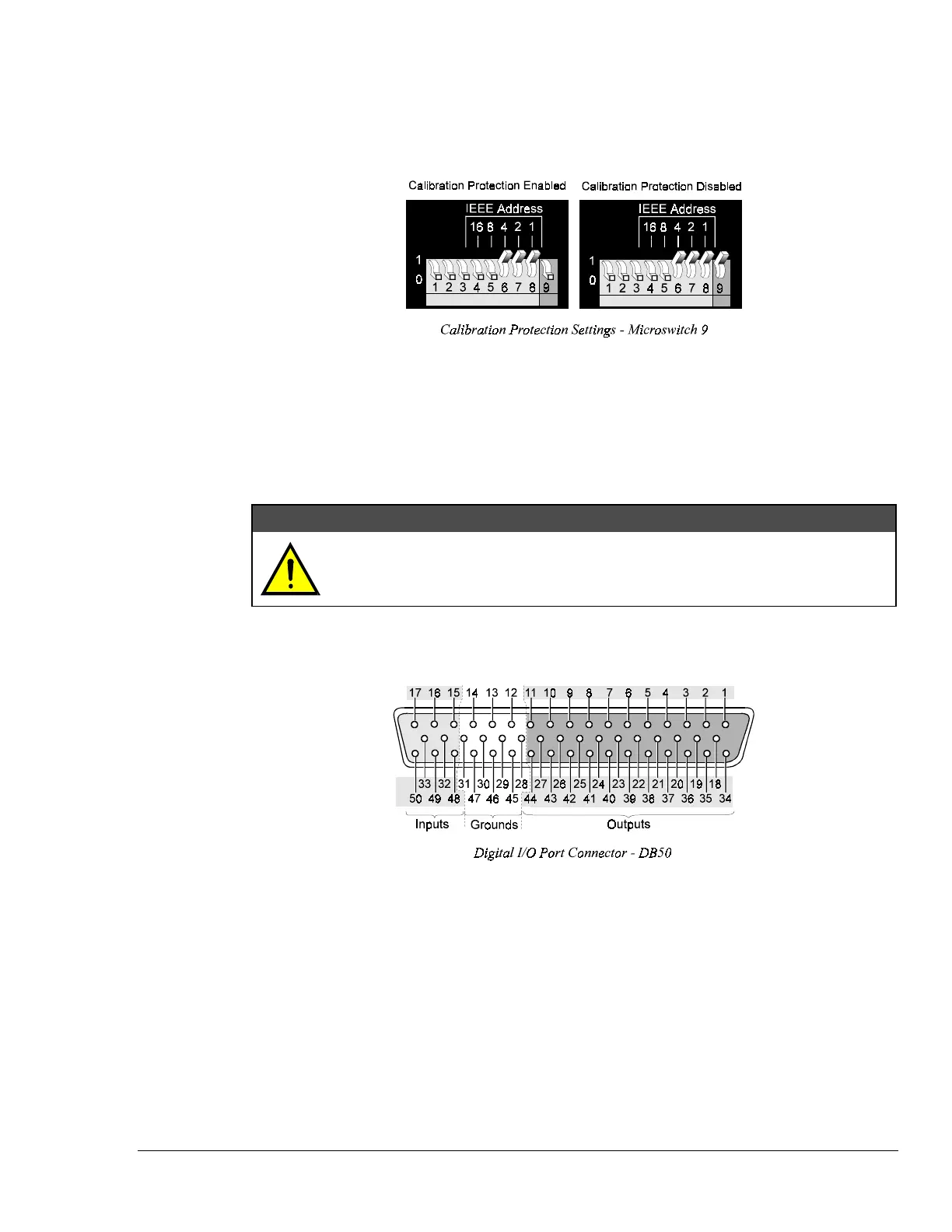
As a safeguard, the calibration password and chassis calibration constants are hardware protected. This
protection is enabled by setting the microswitch 9 to the down (0) position on the rear panel DIP
switch. This is the default factory setting and should remain in this position unless purposely
attempting to change the password or chassis constants.
If it is necessary to change the calibration password (via the
*K command) or to recalibrate the chassis,
this hardware write protection can be disabled by setting microswitch 9 to the up (1) position. For
details on calibration, see chapter System Calibration.
CAUTION
CAUTIONCAUTION
CAUTION
Do not forget to set back the DIP microswitch 9 to the down (0) position when
calibration is complete. Otherwise, the calibration password and calibration
constants may be corrupted and normal operation may be disrupted.
Digital I/O Configuration
Located on the TempScan/1100 or MultiScan/1200 rear panel, the DB50 digital I/O connector provides
eight (8) digital input lines and thirty-two (32) digital output lines. The figure and table locate and
describe the input, output, and ground lines of this connector.



 To Next Page