76 Chapter 8: ChartView & ChartView Plus TempScan / MultiScan User's Manual
Device …¾
¾¾
¾ Interface ¾
¾¾
¾
Setup IEEE 488
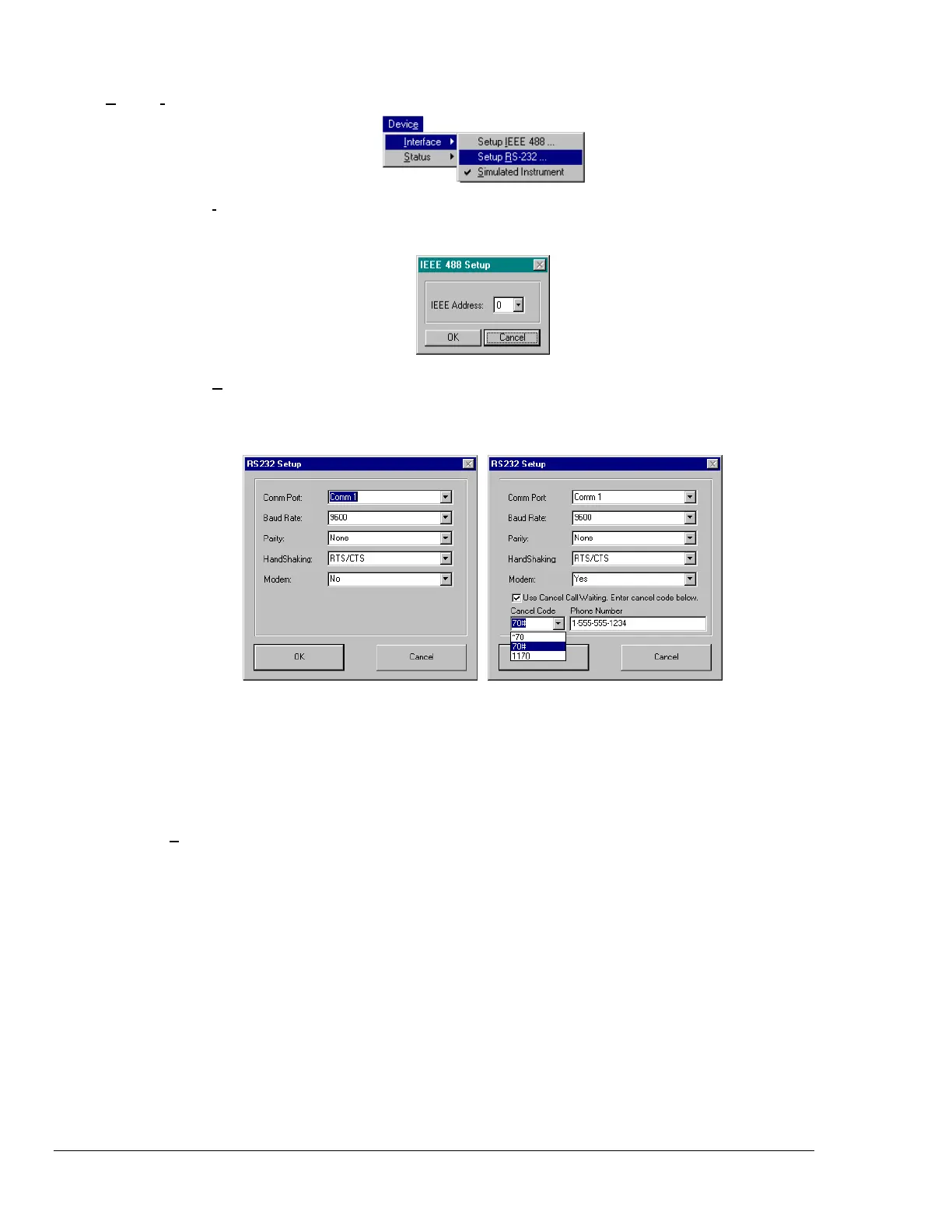
The IEEE 488 Setup dialog box appears. Valid addresses are 0 to 30. DIP switch
settings must agree with this setup. Note that a PC/IEEE 488 interface card is required
for use of the TempScan/1100's or MultiScan/1200's IEEE 488 interface.
Setup RS-232
The RS-232 Setup dialog box appears. If “Yes” is chosen for modem, the RS-232
Setup window changes, allowing you to cancel your call waiting service by entering your
cancellation code and your modem phone number. The Cancel Code pull-down list
provides three common codes from which you can make a selection, or you can simply
type in the applicable code. Note that DIP switch settings must match.
Comm Port
1-16
Baud Rate
300, 600, 1200, 2400, 4800, or 9600
Parity
None, Odd, or Even
Handshaking
None or RTS/CTS
Modem
No or Yes
Cancel Codes
for Call Waiting
*70, 70#, 1170, or type in other acceptable code
Note: Use the appropriate code for the phone system in your area.
Simulated
Instrument
The program will generate data from a simulated instrument with no actual hardware
concerns.



 To Next Page