36 Chapter 4: Exp/11A Expansion Unit TempScan / MultiScan User's Manual
Hardware Configuration
Master/Slave Connection
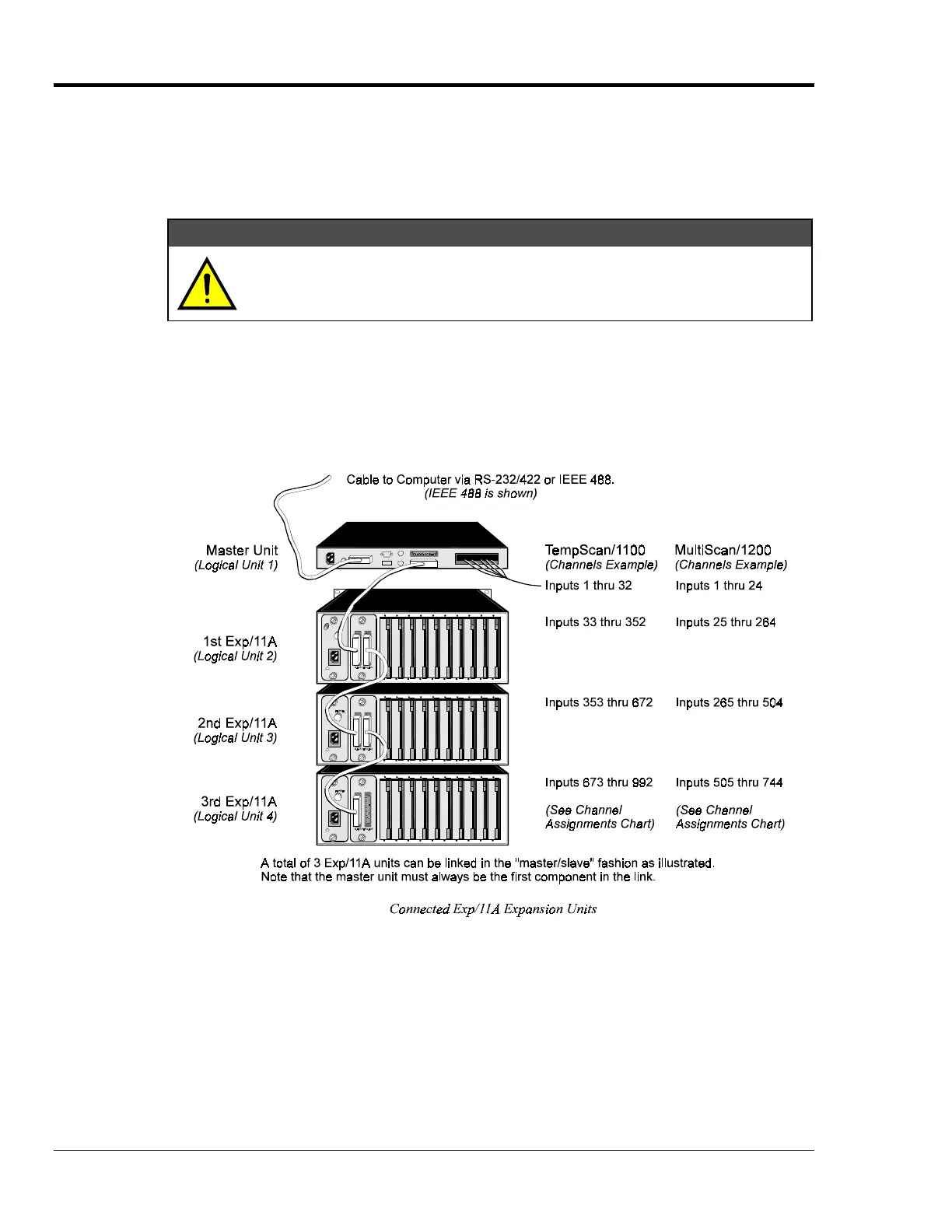
Up to three Exp/11A expansion units can be connected to the TempScan/1100 or MultiScan/1200
master unit, giving options of up to 30 expansion scanning cards. Connect the expansion unit as
described in the following steps:
CAUTION
CAUTIONCAUTION
CAUTION
Before connecting an Exp/11A expansion unit to its master unit, or to another
expansion unit, power down all devices that are connected or to be connected.
Failure to do so could damage the equipment.
To Connect the Exp/11A Expansion Unit
1. Turn power off and unplug the master unit and all devices connected to the system.
2.
If not already done so, turn power off and unplug the Exp/11A unit(s) which are to be connected.
3. Connect the master/slave cable(s) (CA-35-1) as depicted in the following illustration.
4. Plug in all system devices.
5.
Set the slave address on the rear panel DIP switch. See next section Slave Configuration.
6. Turn power on to the master unit.
7.
Turn power on to the remaining system devices.



 To Next Page