TempScan / MultiScan User's Manual Chapter 8: ChartView & ChartView Plus 57
As a default, when a to-disk acquisition is armed, ChartView constantly polls the instrument, uploading
available scans and storing them to disk. This polling operation, however, can be disabled so that the
instrument will operate in a totally stand-alone mode, buffering scans in its internal buffer indefinitely.
As its internal buffer becomes full, it posts a buffer overrun error and continues to store scans,
overwriting the oldest data in the buffer.
If ChartView's polling feature has been turned off, ChartView can be directed at any time to upload the
instrument's current buffer contents and save it to the disk file. If you turn on the polling feature,
ChartView will upload the instrument's current buffer contents, then continue to poll the instrument,
uploading the instrument's newly buffered data periodically.
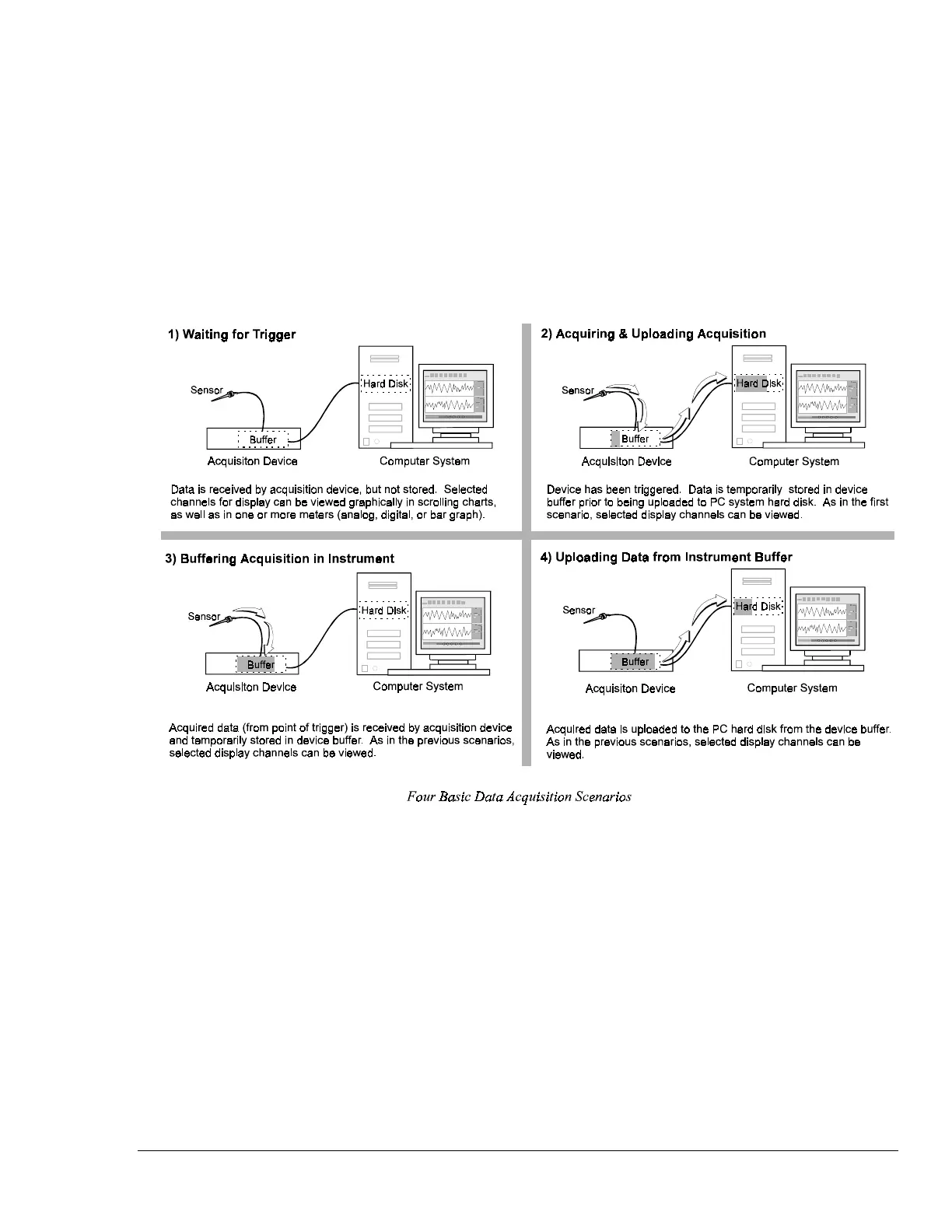
Some of the data acquisition scenarios that pertain to ChartView are as follows:



 To Next Page