Image Size (cont'd)
15
Zoom Function
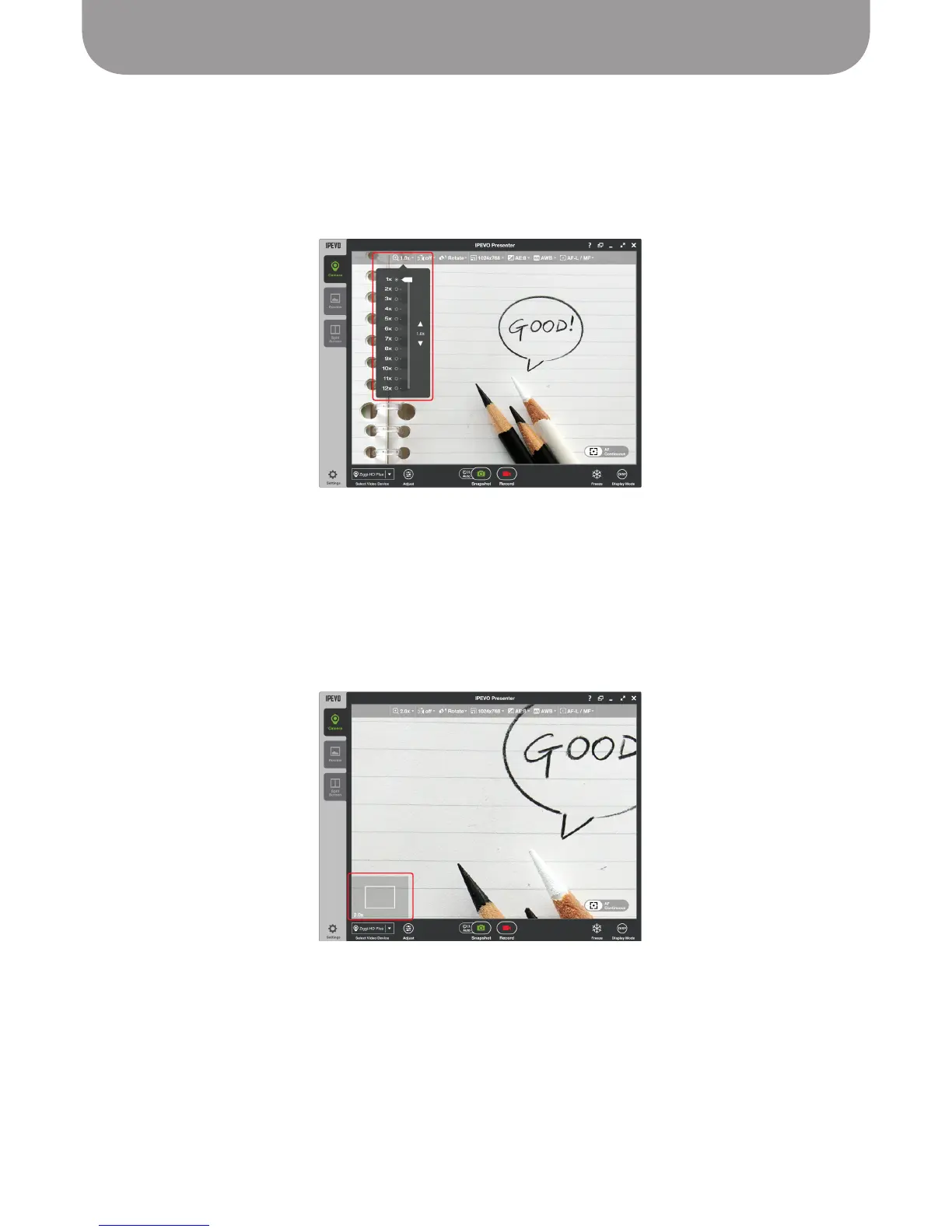
In the Camera mode of the Presenter software, the Zoom tab allows you to digitally “zoom in” to your
subject to make it appear bigger, anywhere from 1x (default, or no zoom) to 12x (or 12 times normal) in
whole number increments.
Zoom Box
– When zoomed in, a gray box appears in the lower-left of the capture window with a
smaller box inside it. The large box represents the original field of vision (the 1x zoom), while the
smaller box represents the zoomed-in area you are currently viewing. You can click and drag the
smaller box to selectively zoom to different portions within the original field of vision.
Note: Focusing while zoomed in will focus according to the center of the original full image, and not the
partial zoomed-in area.
Capturing a Standard Sheet of Paper
At full extension, Ziggi-HD Plus is designed to be high enough to capture an entire standard (A4) sheet
of paper. However, you might elect to bring the camera closer to capture details from a particular
document. Note that while the Ziggi-HD Plus has ample resolution to capture larger A3-sized paper,
Ziggi-HD Plus would need to be placed on something (such as a stack of books) to make the camera high
enough to completely capture an A3 document.



 To Next Page