28
a.
Language Selection:
•
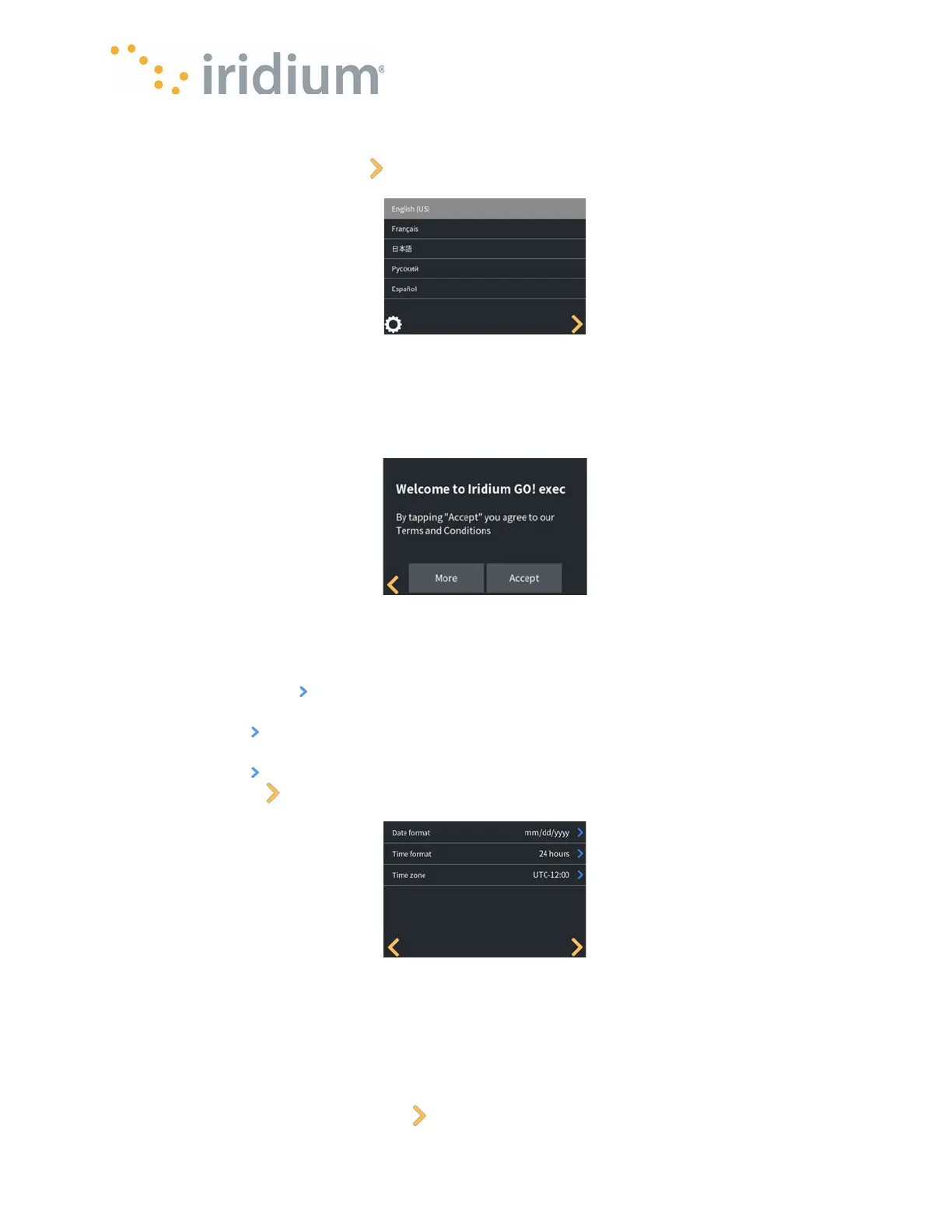
The Iridium GO! exec supports multiple languages. Select the desired language via the scroll
bar and press the next, yellow button.
Language Selection
b.
Accept Terms and Conditions:
•
The Terms and Conditions of use must be accepted before the Iridium GO! exec is used.
Select the "More" button to read the details of the Terms and Conditions. And then press the
"Accept" button to accept the terms and conditions.
Accept Terms
c. Select Time and Date Localizations:
• The Iridium GO! exec date format can be configured as either mm/dd/yyyy or dd/mm/yyyy.
Press the blue arrow and select the desired format.
• The Iridium GO! exec time format can be configured as either 12-hour or 24-hour format. Press
the blue arrow and select the desired format.
• The Iridium GO! exec time zone can be configured within the range [UTC-12: UTC+14]. Press
the blue arrow and select the desired time zone.
• Press the yellow button for the next settings.
Date and Time Menu
d. Admin PIN:
• The Iridium GO! exec supports an administrator PIN to prevent key features being controlled by
anyone other than the Device Administrator. By default, the Admin PIN is disabled.
• Sensitive settings can be protected by enabling the Administrator PIN
• Toggle the Enable Admin PIN option as desired.
• Enter a 4-digit PIN. Press the yellow button to accept.



 To Next Page