41
English/ Chapter 07
Restricting wireless access by MAC address
When a wireless card access list is configured and enabled, the router
checks the MAC address of any wireless device attempting a connection
and allows only connections to computers identified on the trusted
computer list. The MAC address is a network device’s unique 12-charac-
ter physical address,containing the hexadecimal characters 0–9, a–f, or
A–F only. The MAC address is in the format of XX:XX:XX:XX:XX:XX.
To restrict wireless access by MAC address:
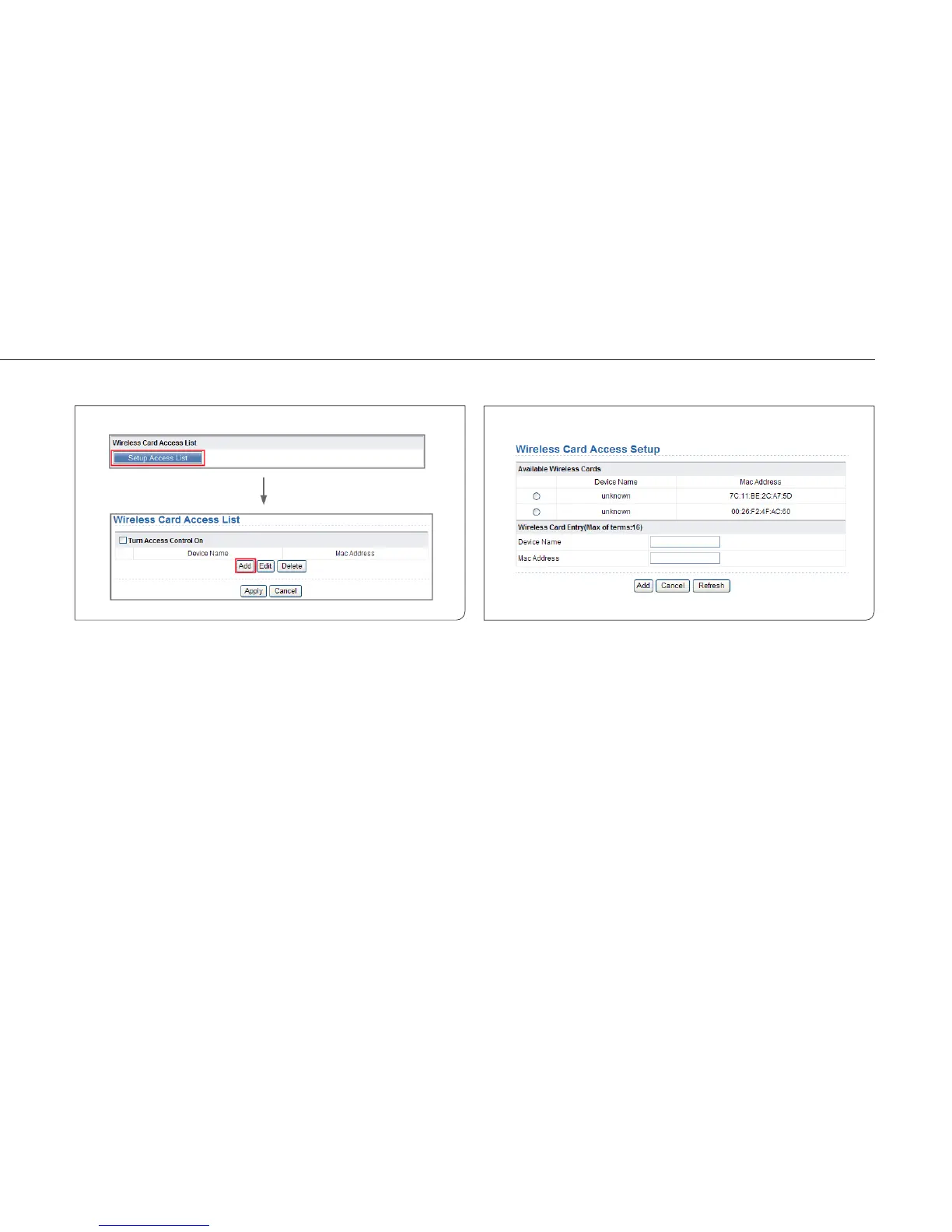
Step 1 Click Setup Access List button in the Wireless Advanced
Settings page to display the Wireless Card Access List page.
Step 2 Click Add to add a wireless device to the wireless access
control list. The Wireless Card Access Setup page is dis-
played.
Step 3 If the computer you want appears in the Available Wireless
Cards list, you can select the radio button of that computer
to obtain its MAC address. Otherwise, you can manually
enter a name and MAC address of the computer to be
authorized. Generally, the MAC address is labeled on the
bottom of the wireless device.
Step 4 Click Add to add this wireless device to the wireless card
access list. The page jumps to the list page.



 To Next Page