星火全自动缝纫控制系统使用说明书
Operation Instruction for Xing Huo Automatic Sewing Control System
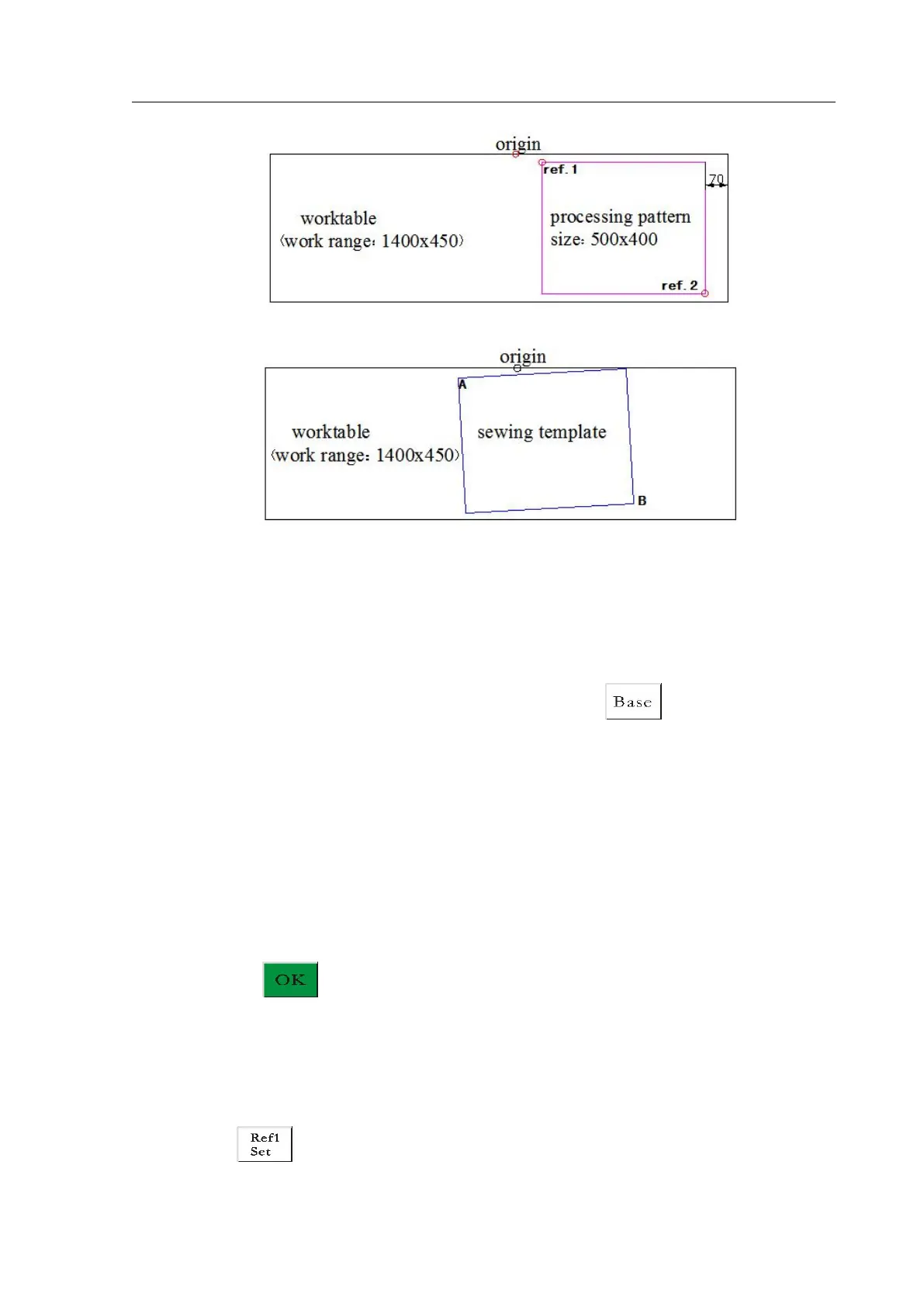
While position of the template actually made on the workbench may be as follow:
So align base point 1 and A, base 2 and B, and adjust the position of processing pattern in
the system to correspond to the position of template slotting.
Detailed steps are as follows:
1) Select the file which needs to be aligned with the base point in the processing main
interface, and place the corresponding template. Click to enter the base point
settings interface, the system will move the frame to the base point 1 position
automatically.
2) If upper computer editing software has set double base points, “Set the First Base
Point” will be prompted the top left of the interface; check whether base point 1 is in
template slot position A at this time; if there is any deviation, click the direction keys
to move for overlap.
3) Click on , and complete base point 1 setting. The system will move the frame
to the base point 2 position automatically, and “Set the Second Base Point” will be
prompted the top left of the interface; click the direction keys to make the positions
of base point 2 and template B overlapping. If it needs to return to reset base point 1,
click to switch to the base point 1 setting.



 To Next Page