星火全自动缝纫控制系统使用说明书
Operation Instruction for Xing Huo Automatic Sewing Control System
If you want to cancel the bartack, click to enter zig-zag setting page; click on the
zig-zag sewing icon with yellow background to make it become white, click "OK" to return to
collection.
4.10 Multiple Sewing and Complementary Sewing
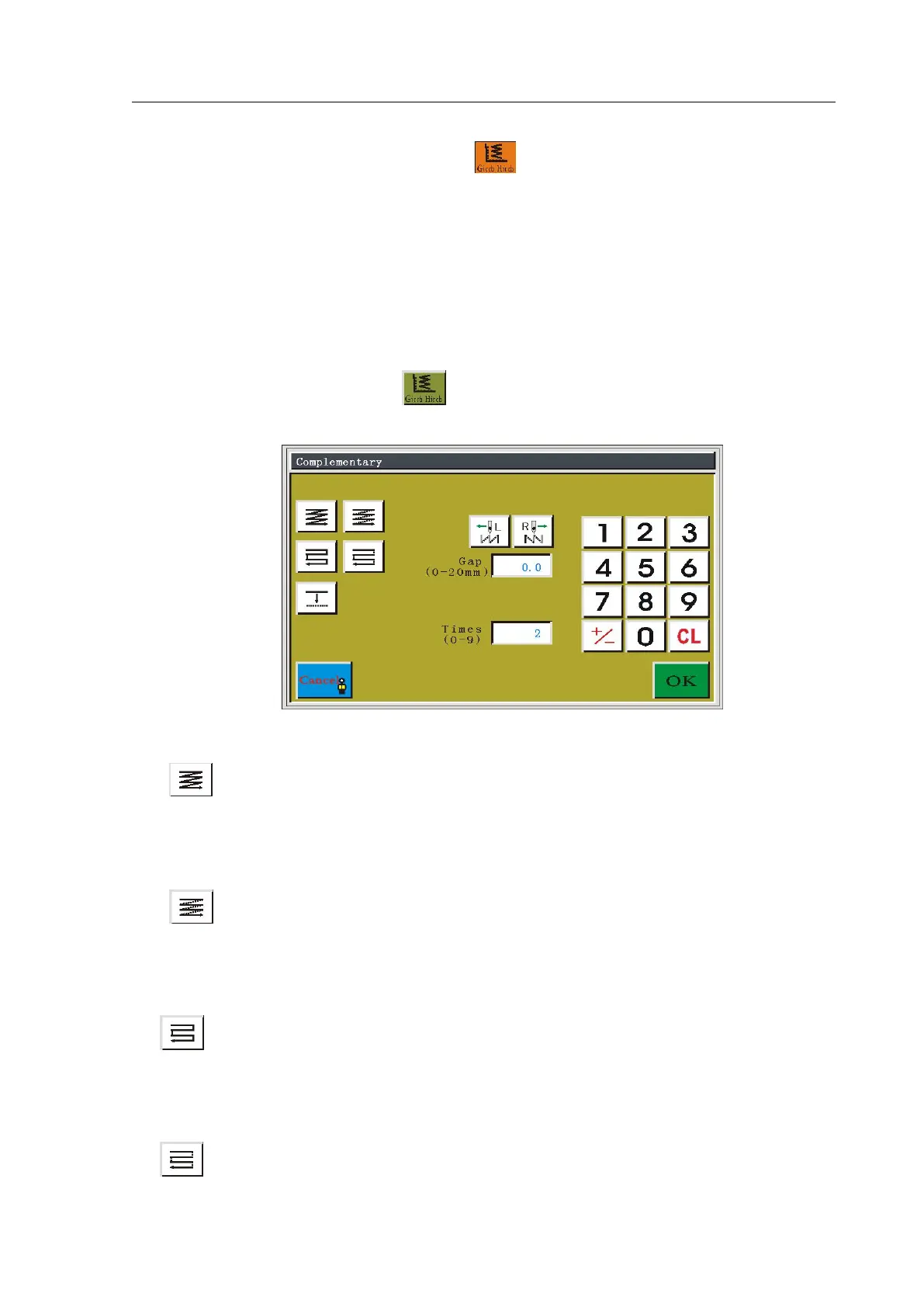
In file collection, if the current collection section needs multiple sewing or
complementary sewing, press the key to enter complementary setting interface, as
shown in figure:
There are 5 kinds of multiple sewing ways, as shown below:
Homodromous multiple sewing - sewing: does not trim thread after sewing of the
first thread, and sews continuously to the sewing start point of the second thread to carry out
homodromous continuous sewing.
Homodromous multiple sewing - empty sending: after trimming thread of sewing
of the first thread, empty sending to the sewing start point of the second thread to carry out
homodromous sewing.
Reverse multiple sewing - sewing: does not trim thread after sewing of the first
thread, and sews continuously to the sewing start point of the second thread to carry out
reverse continuous sewing.
Reverse multiple sewing - after trimming thread of sewing of the first thread,



 To Next Page