3938
ADJUSTING THE FOCUS-CONT'D
55
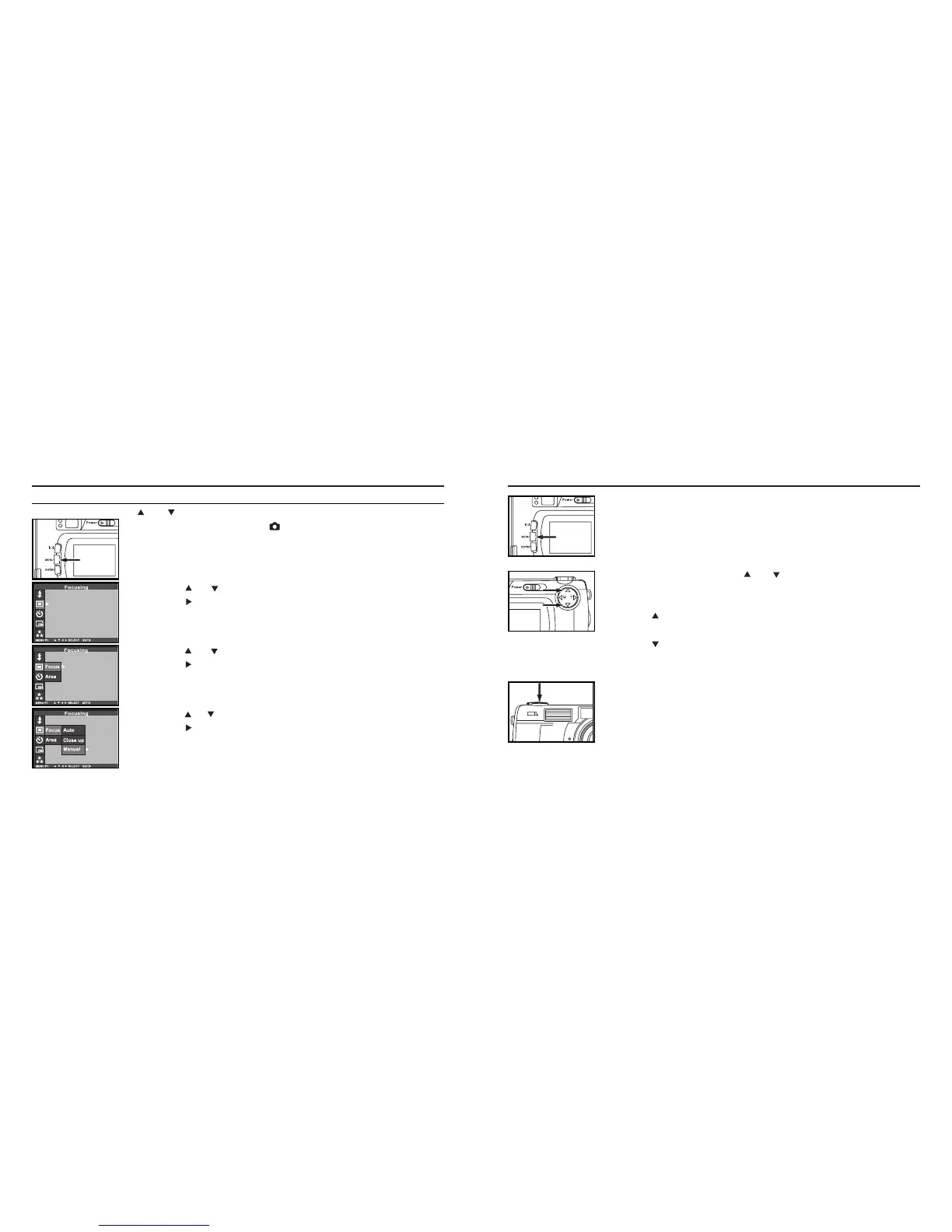
Press the MENU button.
• "MANUAL" is displayed on the upper right side of the LCD monitor and the
display shows that the manual focus mode is selected.
6 Adjust the focus with the or key while looking into
the LCD monitor.
• Adjust the focus so that the subject is displayed clearly on the LCD monitor.
• When the key is pressed, the focus position is moved to the part in a long
distance.
• When the key is pressed, the focus position is moved to the part in a
far,near distance.
7 Press the shutter-release button all-the-way down to take
picture.
• Even after taking a picture, the manual focus mode is not cancelled. The aut-
ofocus mode returned when the camera is turned off and on again.
4 Press the or key so that [MANUAL] is highlighted and
press the key to finish the setting.
ADJUSTING THE FOCUS MANUALLY (Manual Focus Mode)
Adjust the focus with the or while looking into the LCD monitor.
1 Rotate the function dial to and press the MENU button.
• The recording mode menu is displayed on the LCD monitor
2 Press the or key so that [FOCUSING] is highlighted and
press the key.
ADJUSTING THE FOCUS - CONT'D
3 Press the or key so that [FOCUS] is highlighted and
press the key.



 To Next Page