79Modul-AIR Exhaust Air Heat Pump Installation Guide
Ventilation RF accessories Setup
The Modul-AIR has three ventilation settings to be inputted. These values are to be set during the initial
commissioning of the unit and le unchanged for the operating lifespan of the Modul-AIR system, unless
there is significant change to the heating/ventilation demands of the dwelling. The first two values inputted
are the Low and High speed fan settings for the Modul-AIR unit. If joules RF accessories are installed on the
Modul-AiIR system the unit can vary its ventilation flow rate between these two values based on the 0-10V
input voltages from the RF sensors. The third ventilation flow rate that is set is the default minimum heat
pump flow rate for the Modul-AIR system. When the RF accessors are installed on the Modul-AIR system and
the Modul-AIR is placed in Auto the units ventilation flow rate will be regulated automatically.
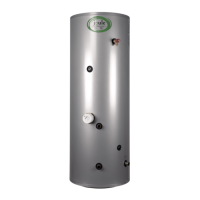
On systems that have sensors the “Auto” mode is
recommended to be used at all times.
For systems without sensors the unit should be le
to “Home” during normal operation conditions.
This is the standard trickle flow setting for the Heat
Pump.
The “Absent” setting is designed to be used when
the dwelling will be le empty of occupation.
The “Timer” setting is a boost mode, this is
generally used during times of high requirements
for ventilation from situations like excess humidity
or fumes/odours from activities like cooking.
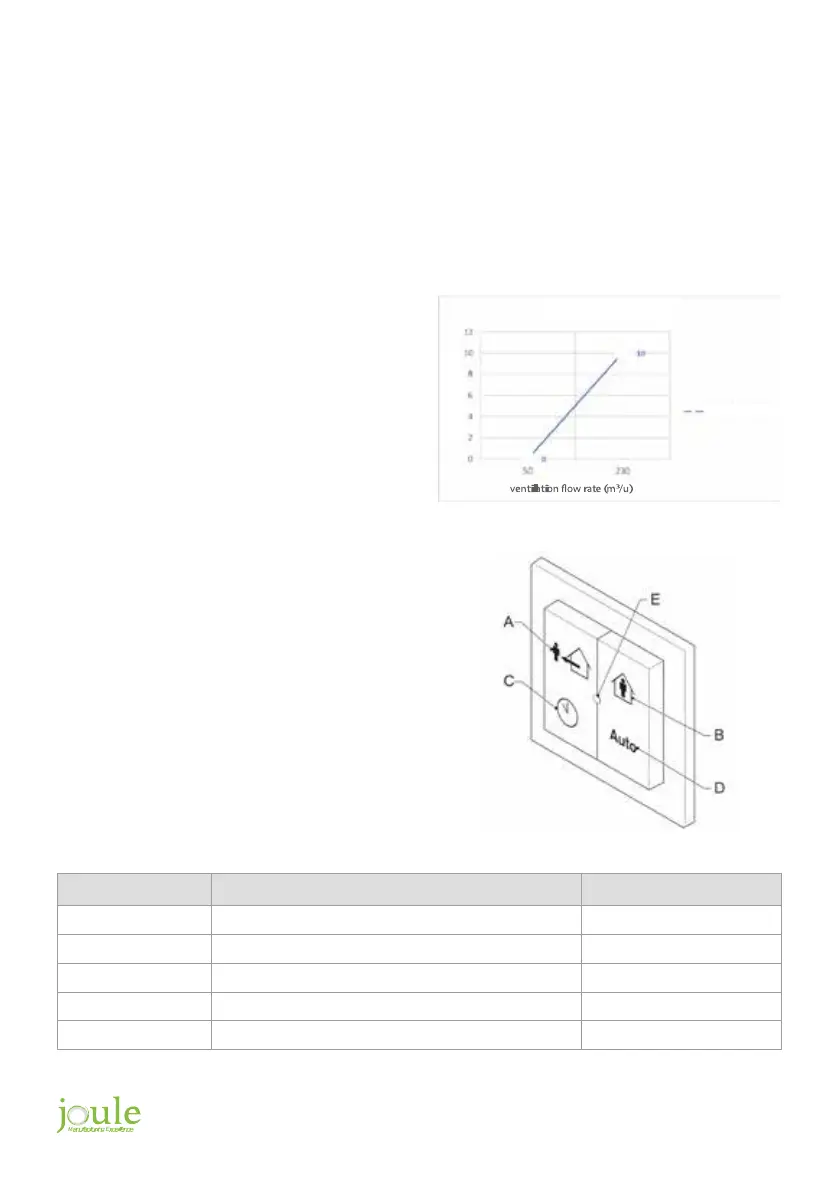
The RF receiver is designed to interpret the signals
from the CO
2
and/or Humidity sensors and
convert these to a 0 – 10V voltage. The strength
of this voltage is determined by the receiver
depending on how high or how low the CO
2
concentrations or humidity percentages are that
the sensors are detecting. This voltage signal is
translated into a corresponding ventilation flow
rate that is between the low and high positions
that were previously set on the Modul-AIR unit
during commissioning.
Setting Fan Speed Default Setting
A = absent Low 20%
B = present Average 50%
C = timer High for some time 100%
D = auto Low - High, based on measured values
E = Status LED
input voltage (v
)
fan speed
VENTILATION GRAPH


 To Next Page