2322
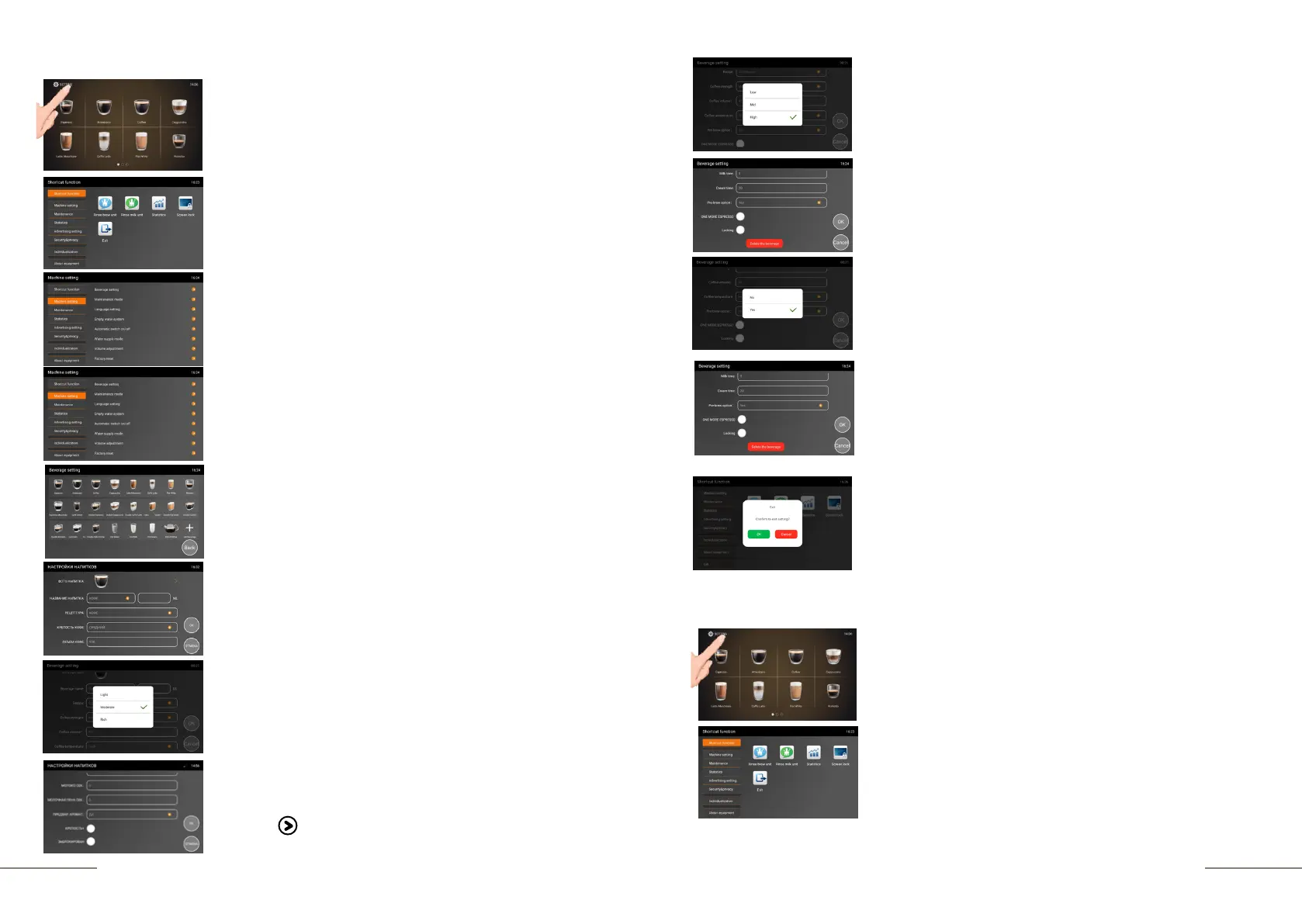
To enter programming mode, do the following:
The coffee machine is ready. Beverage preparation touch
icons are lit.
Press and hold the "SETTINGS" button for 2 seconds to
enter the programming menu.
The SHORTCUT FUNCTION tab is highlighted.
On the right, the shortcut function touch icons are
lit.
Select the MACHINE SETTINGS tab and activate it.
The MACHINE SETTINGS tab is highlighted.
Choose the BEVERAGE SETTINGS tab.
Touch the ESPRESSO icon.
The BEVERAGE SETTINGS window will open.
Press the COFFEE STRENGTH tab.
Choose the needed strength and touch the tab
(LIGHT / MODERATE / RICH).
Press the COFFEE VOLUME tab. to activate it. Fill in the
value you need and confirm your choice by touching the
symbol -
Press the COFFEE TEMPERATURE tab. Check the box next
to the value you need (LOW/MID/HIGH).
By pressing on the field, activate the PRE-BREW OPTION tab
(pre-wetting) and check the box next to the value you need.
Note: For smaller drinks (espresso, ristretto), select YES for a
richer taste and aroma.
You can also block or delete a beverage.
When the beverage is locked, the “LOCK” symbol will appear
next to it, and when you press the touch button of the
beverage, the message will appear: BEVERAGES ARE
LOCKED, PLEASE CONTACT THE OPERATOR.
Press "OK" to save the drink recipe.
To exit the beverage setting, press "BACK".
To exit the menu, press the EXIT touch icon and confirm your
choice by pressing the OK button.
Example: creating a new recipe. Activation of the STRENGTH+ function.
The coffee machine is ready. Beverage preparation touch
icons are lit.
Press and hold the "SETTINGS" button for 2 seconds to
enter the programming menu.
The SHORTCUT FUNCTION tab is highlighted.
On the right, the shortcut function touch icons are
lit.



 To Next Page