Product Manuals/Man-1096M_SyncroAS Marine 16 Page 24 of 38
etc.
Note: Special display screening is required to ensure that the correct indicators are mapped to the appropriate zone label.
18.1.14 – Display Invert
This option is used to change the LCD status display format. By default, black lettering is shown on a green background.
Selecting this option will change the display to green lettering on a black background. This is useful in reducing the brightness
of the display when the panel is installed in darkened locations, such as control rooms and ships bridges.
18.1.15 – Any 2 devices to bypass delays – Def Ring Mode outputs only
When this option is set, any delayed outputs configured to respond to the Default Ring Mode pattern will operate immediately
upon the activation of any second fire signal.
This applies to any combination of two detection device types anywhere on the Syncro network.
18.1.16 – Resound for fire in same zone
When a fire occurs in a zone and the sounders have been silenced, by default the sounders will not activate when a second
detector in the same zone goes to fire.
Selecting this option will cause the silenced sounders to activate from a second detection device fire in the same zone.
18.1.17 – Resound for fire in other zone
When a fire occurs in a zone and the sounders have been silenced, by default the sounders re-sound when new fire
event is reported from a different zone.
Deselecting this configuration option will stop the silenced sounders from activating on the new zone fire event.
18.1.18 – Hide Disablement Event for active delays
This option applies to V5.xx firmware control panels only. EN54-2 required that systems configured with delayed outputs
there should be the facility to “disable” the immediate operation of the outputs, to turn the delay function on. The standard
specified that this facility was a disablement event and therefore the general disablement indicator had to be illuminated
whilst the delay facility is active, which was unpopular in some markets. Selecting this option suppressed the General
Disablement indication and the “Immediate operation disabled” event.
Amendment A1 of EN54-2 revised the requirements for the switching on/off delays so that the disablement event was no
longer necessary. V6.xx firmware panels are designed to the revised EN54-2 standard and therefore this option is obsolete.
18.1.19 – Delays active on initialisation
This option will switch delays on by default when the panel is restarted or powered on. It is recommended that this option
is selected on any system where delayed outputs are configured.
18.1.20 – Ignore Global C&E Disablement
When disablement cause and effects are configured and activated, they are shown in the status windows of all networked
panels regardless of the network interface settings or whether any items are disabled on the panels by the cause and effect.
Selecting this option will only show the disablement cause and effect active event on networked panels that have inputs
or outputs disabled as result of the disablement cause and effect.
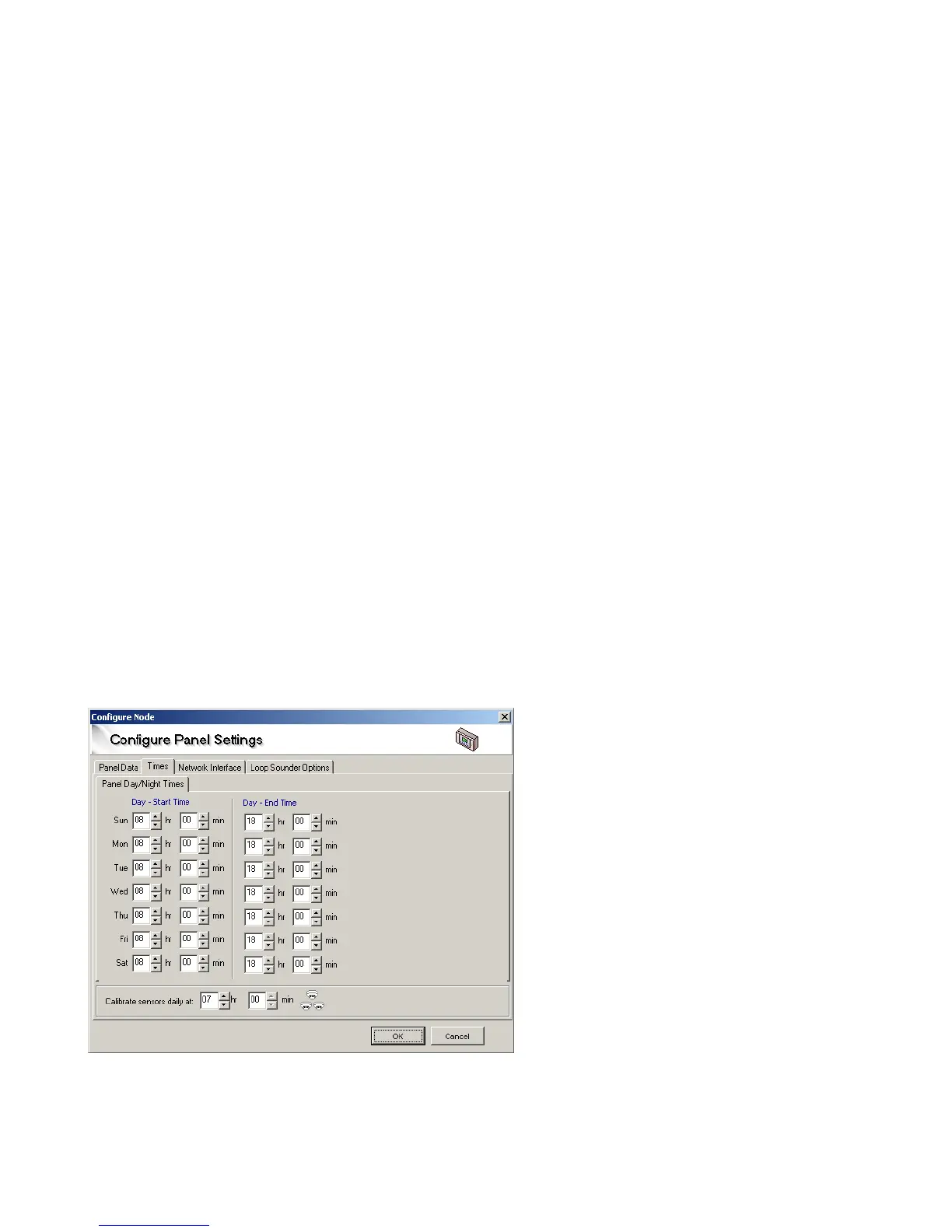
18.1.21. Day/Night times
Day night change times can be set for each day of the week by selecting the Times tab on the panel settings screen.
The sensitivity of detectors can be varied during a 24-
hour period. This is commonly known, as Day/Night mode
but can be either or both as any period in any 24 hours
can be selected as day or night.
It is only necessary to set the day start and end times for
each day of the week.
18.1.22. Calibration time
All sensors are re-calibrated every 24 hours. This time is selectable, so that sensors are not calibrated at a time when there is a high
background pollution level. The calibration time should be set to a time when the building is quiet, with little air movement.



 To Next Page