Product Manuals/Man-1096M_SyncroAS Marine 16 Page 30 of 38
20. Networking
It is possible to connect control panels such that information can be shared between them and for control panels to operate outputs
on other control panels in response to alarm conditions or cause and effects configurations.
To do this, each panel must be fitted with a networking board, which plugs onto the main display board into connectors X7 and X8
on single loop panels or onto the loop 2 board on 2 loop panels.
To fit a networking board, the panel must have both its mains and battery power removed.
The PCB chassis should be removed from the enclosure by removing the two fixing screws holding it in place.
Remove the screws and washers from the two fixing pillars located in the network boards fitted position on the left side of the
chassis looking at it from the back.
Locate the network board over connectors X7 and X8 and push the board firmly into place until it is fully located in the connectors.
Fit the screws and washers through the two holes in the network board and into the fixing pillars to hold the board in place.
The PCB chassis can then be fixed back into the enclosure and held in place by the two fixing screws removed earlier.
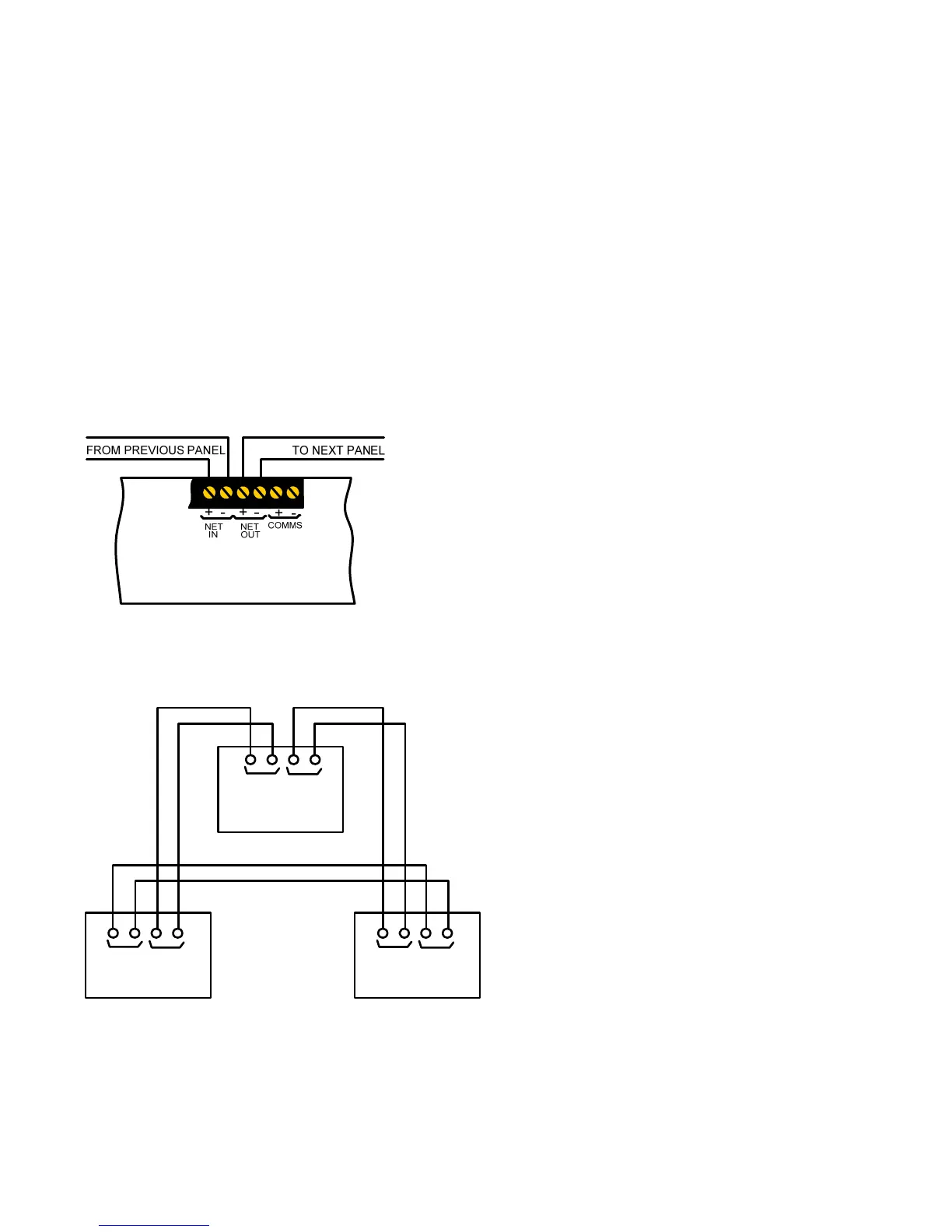
Each control panel has two pairs of terminals on the terminal board for connection of the network cable in and out. It is
recommended that a cable such as Belden 9841 suitable for transmission of EIA RS-485 data be used.
The network connection must come into each panel on the "Network In” terminals and go to the next panel on the “Network Out”
terminals, returning to the first panel “In” from the last panel “Out” terminals.
Network boards are fitted with isolators, which disconnect faulty sections of cable and allow the network to continue working by
using the return path so it is most important that this wiring configuration be adhered to.
A more detailed description of networking capabilities can be found in the Syncro ASM Networking Manual.
MAX DISTANCE
BETWEEN ALTERNATE
CABLE SEGMENTS IS
1200 METRES
+-+-
IN OUT
NETWORK
+-+-
NETWORK
+-+-
NETWORK
A
BC
IN
OUT
IN
OUT



 To Next Page