Product Manuals/Man-1096M_SyncroAS Marine 16 Page 31 of 38
21. Panel Settings
21.1. Contrast Adjust
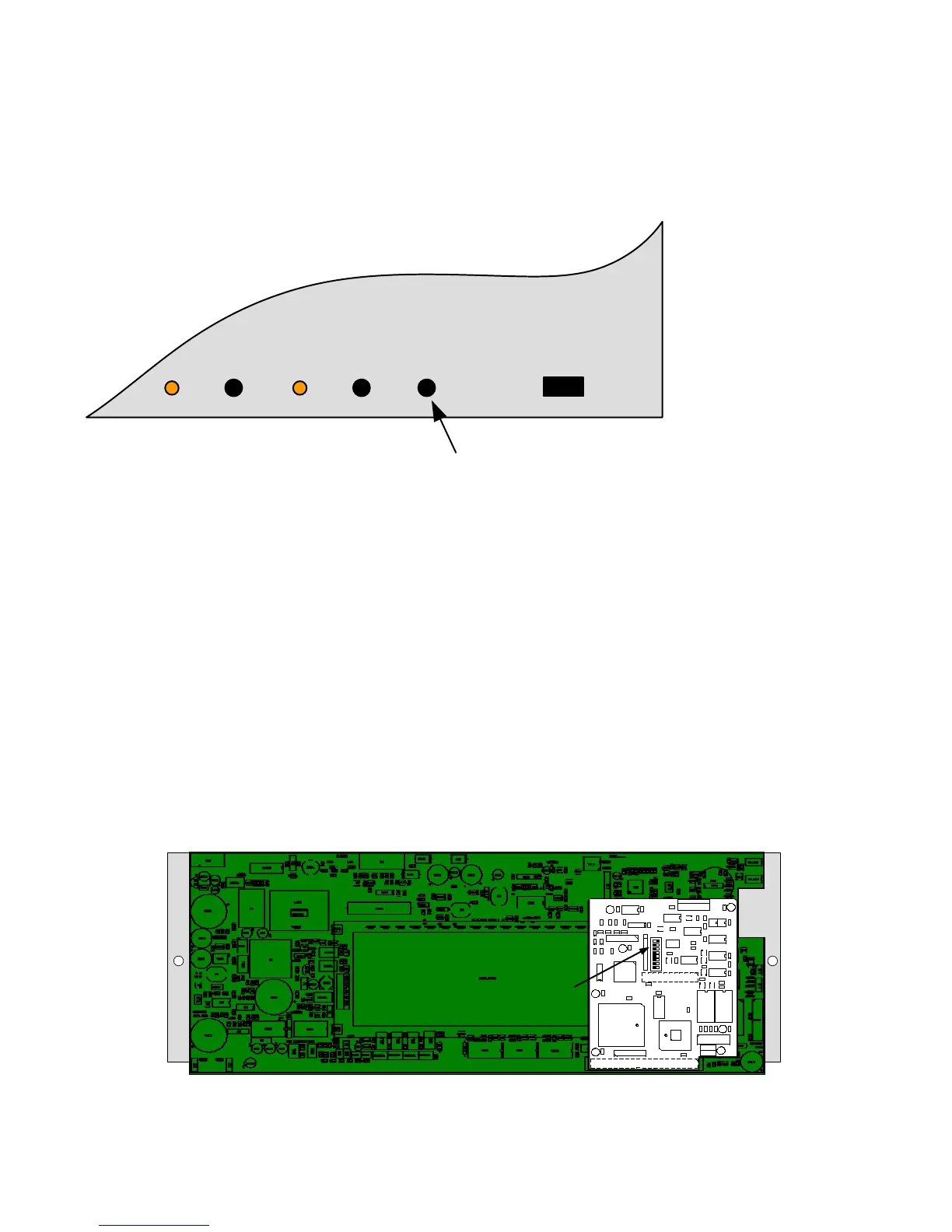
The viewing angle/contrast of the Syncro ASM front panel display may be adjusted by turning the CONTRAST adjust potentiometer.
The contrast adjust potentiometer can be accessed by opening the front cover of the control panel and is labelled CONTRAST.
21.2. Network address setting
If there is more than one panel on the system, or the panel is communicating with a network repeater panel, then a network card
will need to be installed within each panel in the network.
Each panel will need to be allocated separate network address identification. This is performed by use of a binary coded DIL switch
on the network card.
The network card is fitted to the back of the main PCB. The plate to which the main PCB is attached must be removed from the
control panel to access the address switch.
Turn off the mains power and disconnect the batteries before removing the plate from the panel. Remove the two fixing screws that
hold the plate in position and store them safely so that they can be replaced.
Turn the plate upwards towards the top of the enclosure to expose the network card and address DIL switch.
Set the required binary address on the network card DIL switch.
Put the plate back into its original position and fix with the two screws that were previously removed.
After a network card has been added, it will be necessary to auto configure the panel, to clear the "unexpected network card" fault
message. This action will also save the panel address in non-volatile memory and allow the site configuration file to be transferred to
the panel at the set address.
+
+
+
+
+
+
+
SERIAL NUMBER
K6005
ISSUE 04
C3
C4
C5
C
6
C7
C
8
C
9
C10
C11
C12
C13
C14
C15
R1
R2
R3
R4
R5
R6
R7
R8
R9
R10
R11
R12
R13
R14
R15
R16
R17
R
1
8
R19
R20
R21
R
2
2
R
2
3
R24
R25
R26
R27
R28
C1
C2
C16
C17 C18
C19
C20
D1
D2
FB1
FB2
J3
J
4
O
P
1
O
P
2
O
P
3
O
P
4
U2
U3
U8
OP5
OP6
RL1
RL2
S1
T
R
1
T
R
2
TR3
TR4
TR5
TR6
U1
U4
U5
U6
U7
U9
SW2
J2
LED1
LED2
PSU1
J1
LK1 LK2LK4LK3
RP1
R29
R30
NETWORK CARD ADDRESSING DIL SWITCH
WRITE
ENABLE
CONTRASTRESETW/DOGRESET
W/DOG
FAIL
FUSE
DISPLAY CONTRAST ADJUST



 To Next Page