Features of your vehicle
124
Keys
Start-up
You can start the vehicle without
inserting the key.
* For more information, refer to
"ENGINE START/STOP button (if
equipped)" on page 5-13.
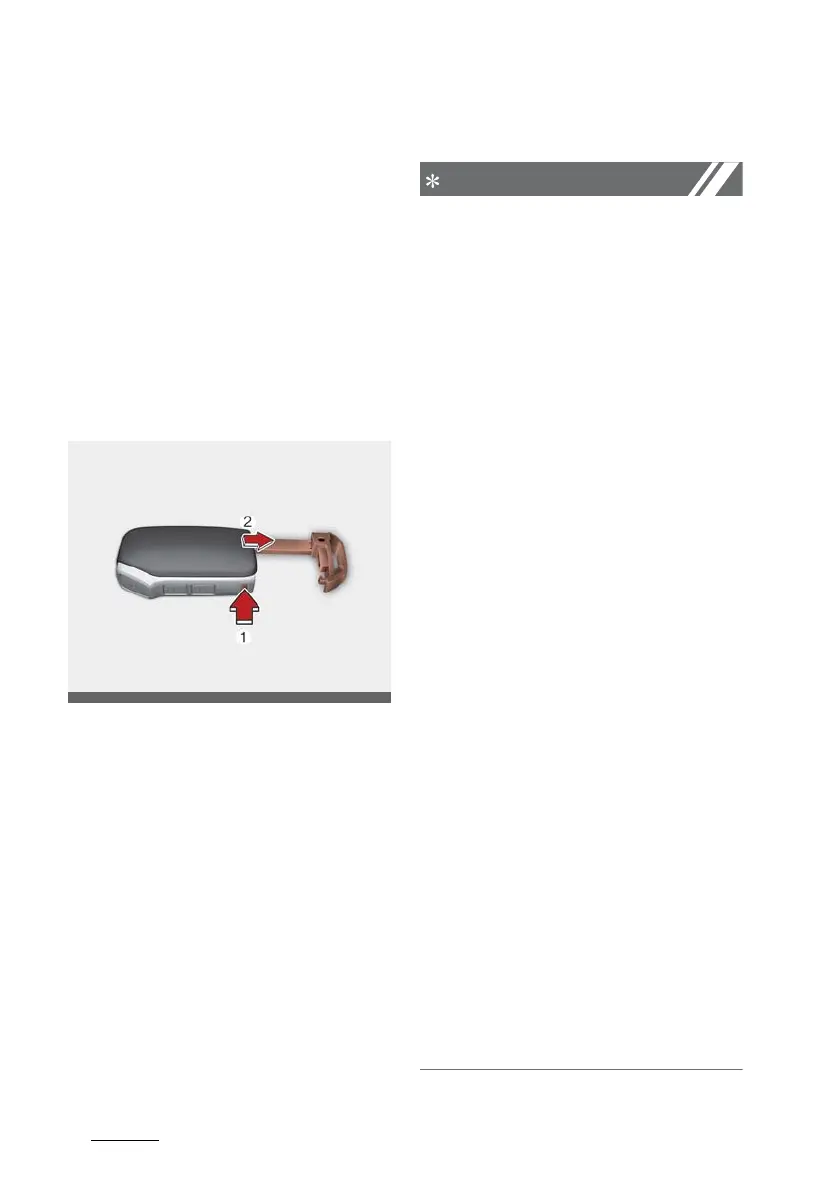
Mechanical key
If the smart key does not operate
normally, you can lock or unlock the
door by using the mechanical key.
To pull out the mechanical key:
䳜 press and hold the release button
(1) and remove the mechanical
key (2).
To reinstall the mechanical key:
䳜 put the key into the hole and push
it until a click sound is heard.
Smart key precautions
䳜 If, for some reason, you happen to
lose your smart key, you will not
be able to start the engine. Tow
the vehicle, if necessary, contact a
professional workshop. Kia rec
-
ommends to contact an
authorised Kia dealer/service
partner.
䳜 A maximum of 2 smart keys can
be registered to a single vehicle. If
you lose a smart key, Kia recom
-
mends to contact an authorised
Kia dealer/service partner.
䳜 The smart key will not work if any
of the following occurs:
- The smart key is close to a
radio transmitter such as a
radio station or an airport
which can interfere with normal
operation of the smart key.
- The smart key is near a mobile
two-way radio system or a
mobile phone.
- Another vehicle's smart key is
being operated close to your
vehicle.
When the smart key does not
work properly, open and close
the door with the mechanical
key. If you have a problem with
the smart key, Kia recommends
to contact an authorised Kia
dealer/service partner.









 To Next Page