Features of your vehicle
1704
Windscreen defrosting and defogging
Windscreen defrosting and
defogging
When the windscreen is covered
with frost or moisture, the front
view is blurred, so you should
remove the frost and moisture.
Windscreen heating
Do not use the or position
during cooling operation in
extremely humid weather. The dif
-
ference between the temperature
of the outside air and the wind
-
screen could cause the outer sur
-
face of the windscreen to fog up,
causing loss of visibility. In this case,
set the mode selection to the
position and fan speed control to
the lower speed.
䳜 For maximum defrosting, set the
temperature control to the
extreme right/hot position and
the fan speed control to the high
-
est speed.
䳜 If warm air to the floor is desired
while defrosting or defogging, set
the mode to the floor-defrost
position.
䳜 Before driving, clear all snow and
ice from the windshield, rear win
-
dow, outside rear view mirrors,
and all side windows.
䳜 Clear all snow and ice from the
hood and air inlet in the cowl grill
to improve heater and defroster
efficiency and to reduce the prob
-
ability of fogging up the inside of
the windscreen.
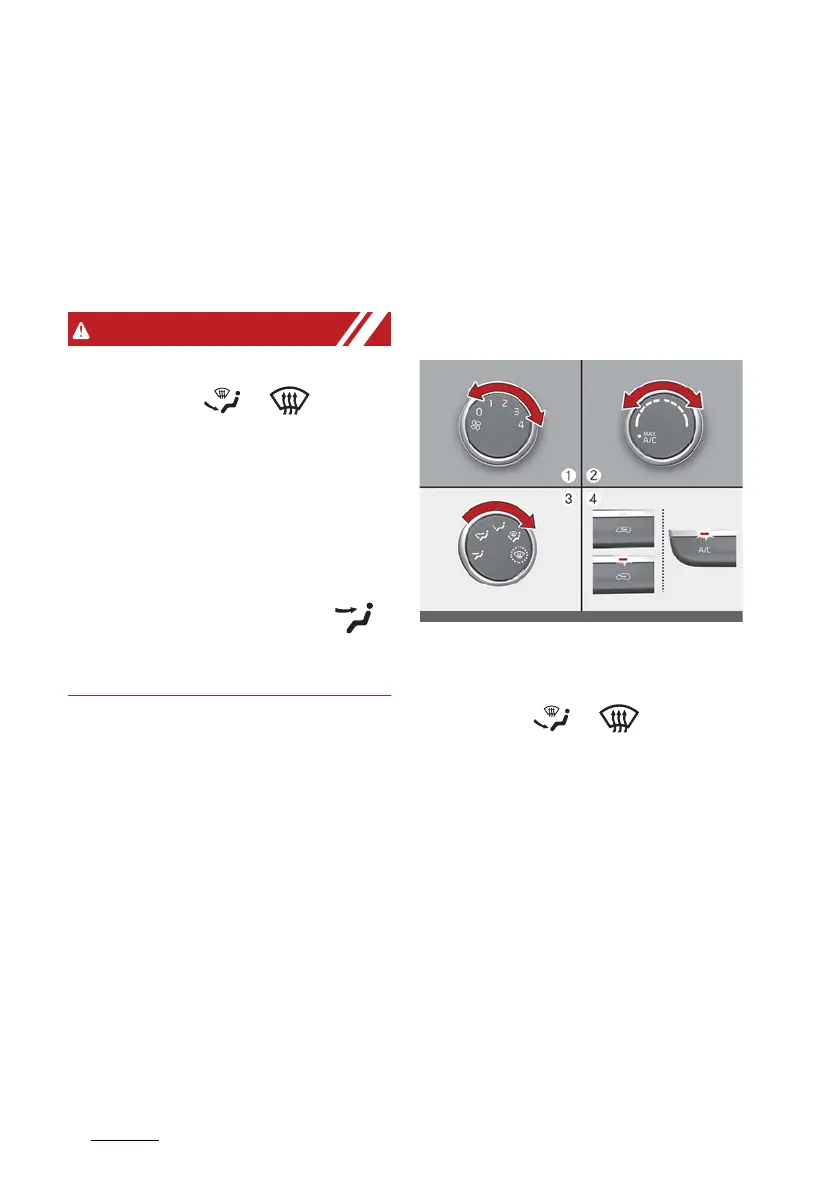
Defogging inside windscreen with
manual climate control system
1. Select any fan speed except "0"
position.
2. Select desired temperature.
3. Select the or position.
4. The outside (fresh) air and air
conditioning will be selected auto
-
matically.
If the air conditioning and outside
(fresh) air position are not selected
automatically, press the corre
-
sponding button manually.














 To Next Page