125
4
4
Features of your vehicle Forward/Reverse Parking Distance Warning
(PDW)
With the ENGINE START/STOP but
-
ton in the ON position, select 'Driver
Assistance → Warning Volume' from
the Settings menu to change the
warning volume to 'High', 'Medium',
'Low' or 'Off' for Forward/Reverse
Parking Distance Warning.
However, even if 'Off' is selected,
the system volume will not turn off
but the volume will sound as 'Low'.
If you change the Warning Volume,
the Warning Volume of other Driver
Assistance systems may change.
Function operation
Operating conditions
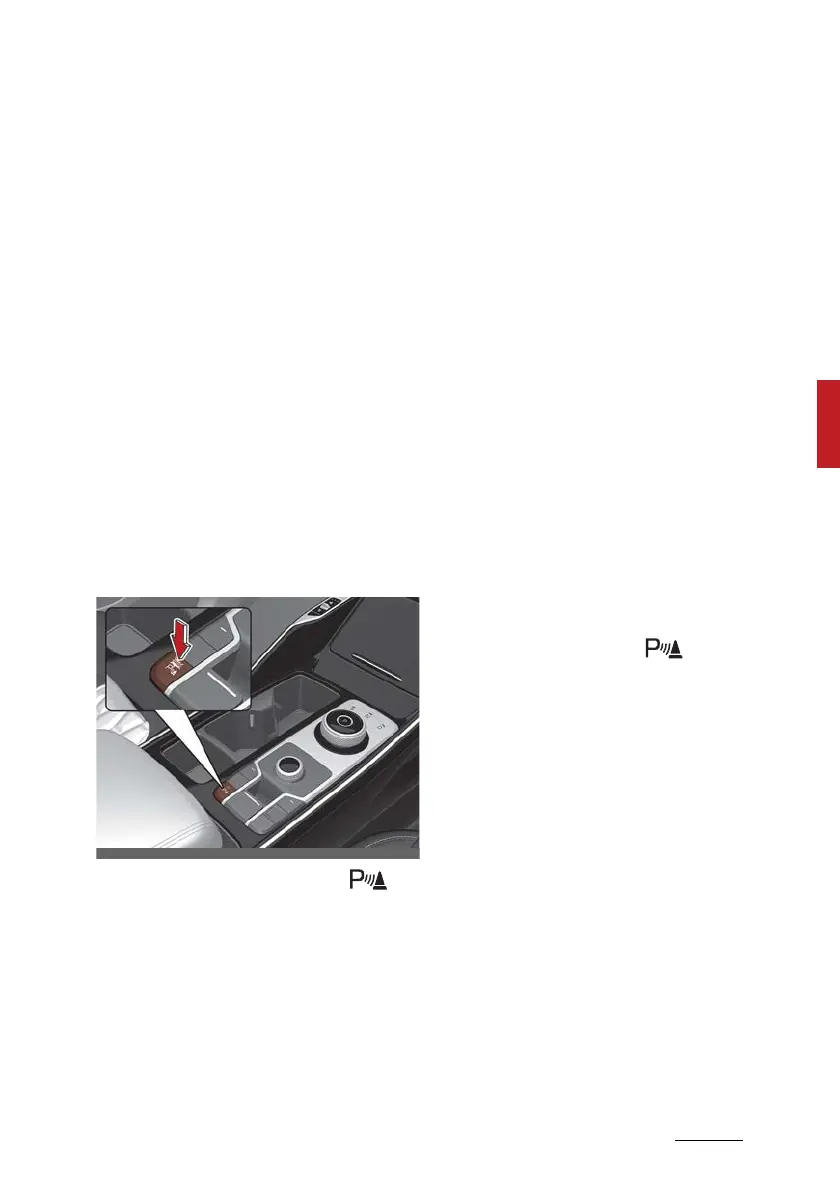
䳜 When the Parking Safety ( )
button is pressed whilst the
engine running, the button indica
-
tor light will illuminate and will
operate when the vehicle moves
forward or backward.
䳜 When the button is off (button
indicator light off), if you change
the gear to R (Reverse), the func
-
tion will automatically turn on.
䳜 Forward/Reverse Parking Dis
-
tance Warning may not operate
properly at speeds above 5 km/h
(3 mph). If vehicle speed is above
10 km/h (6 mph), the function will
not warn the driver, and if vehicle
speed is above 20 km/h (12 mph),
the function will turn off (button
indicator light off).
䳜 If equipped with Reverse Parking
Collision-Avoidance Assist, For
-
ward/Reverse Parking Distance
Warning will turn off (button indi
-
cator light off) when vehicle speed
is above 30 km/h (18 mph).
Although you drive below 20 km/h
(12 mph) again, the system will
not turn on. If necessary, press
the Parking Safety ( ) button.
䳜 When an obstacle is detected, it is
displayed on the cluster and info
-
tainment system screen.
䳜 When more than two objects are
detected at the same time, the
closest one will be warned with an
audible warning.











 To Next Page