6-22 Applied Operation PLZ-4W
Creating the program
Here, we will create program 1 and then program 2.
Programs can be created in any order. Therefore, you can create program 2 first and
then program 1.
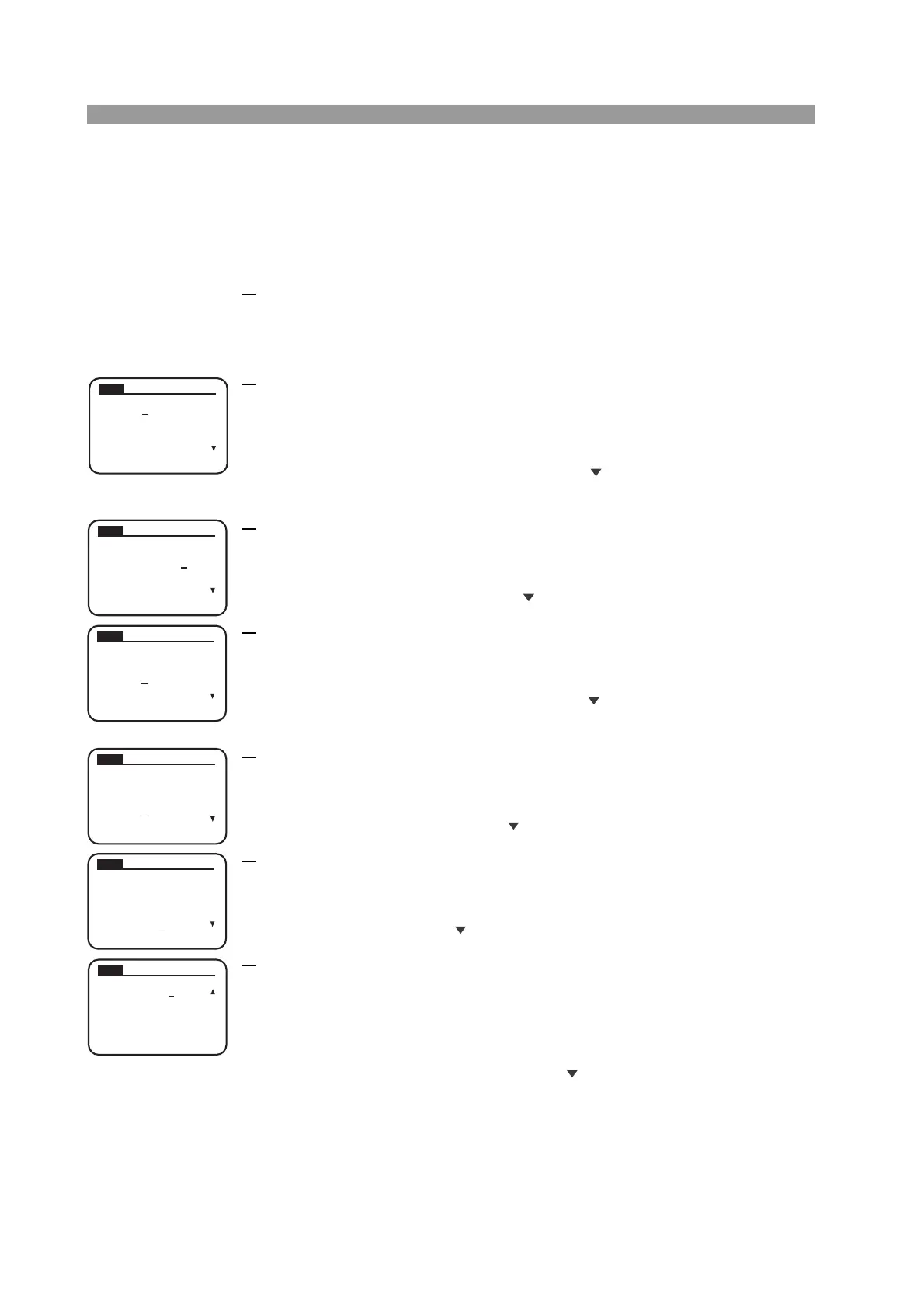
1.
Select sequence edit.
Press the EDIT (SHIFT+A) key to display the program edit (SEQ) screen.
■ Setting the operation of program 1
2. Set the program number. (No. :)
Turn the rotary knob to set the program number.
In a normal sequence, you can select a number between 1 and 10. In sequence
1, set program number 1.
After setting the program number, press the CURSOR key to move to the
next item.
3.
Enter a memo. (Memo :)
When adding a memo, turn the rotary knob to enter the characters.
In program 1, enter “Program1”.
After entering the memo, move the CURSOR key to move to the next item.
4.
Select the operation mode. (Mode :)
Turn the rotary knob to show the operation mode to be executed.
In program 1, select NCC (CC mode).
After setting the operation mode, move the CURSOR key to move to the
next item.
5.
Sets the range. (Range :)
Turn the rotary knob to select the current range and voltage range.
In program 1, set 33 A, 150 V (PLZ164W).
After setting the range, move the CURSOR key to move to the next item.
6.
Set the number of program loops. (Loop :)
Turn the rotary knob to show the number of program loops.
Since program 1 is executed once, set 0001.
At the last line, move the CURSOR key to move to the next item.
7.
Set the load condition after the end of the program. (Last Load :)
Turn the rotary knob to select the load condition.
Since the load is turned off at the end of program 1, select OFF. However,
because the sequence continues to program 2 in this example (step 9), this set-
ting is ignored.
After setting the load condition, move the CURSOR key to move to the next
item.
SEQ
PREV NEXT
No.
:
1
Memo
:
Mode
: NCC
Loop
: 0001
Ran
g
e
: 33A, 150V
SEQ
PREV NEXT
No.
:
1
Memo
:
Mode
: NCC
Loop
: 0001
Ran
g
e
: 33A, 150V
Program1
SEQ
PREV NEXT
No.
:
1
Memo
:
Mode
: NCC
Loop
: 0001
Ran
g
e
: 33A, 150V
Program1
SEQ
PREV NEXT
No.
:
1
Memo
:
Mode
: NCC
Loop
: 0001
Ran
g
e
: 33A, 150V
Program1
SEQ
PREV NEXT
No.
:
1
Memo
:
Mode
: NCC
Loop
: 0001
Ran
g
e
: 33A, 150V
Program1
SEQ
PREV NEXT
Last Load : OFF
Last Set :
0.000
A
Chain : OFF



 To Next Page