4-4
Remove the racks. (See page 4-1)
Remove the tracks. (See page 4-2)
UW / BC: Remove the separator. (See page
4-3)
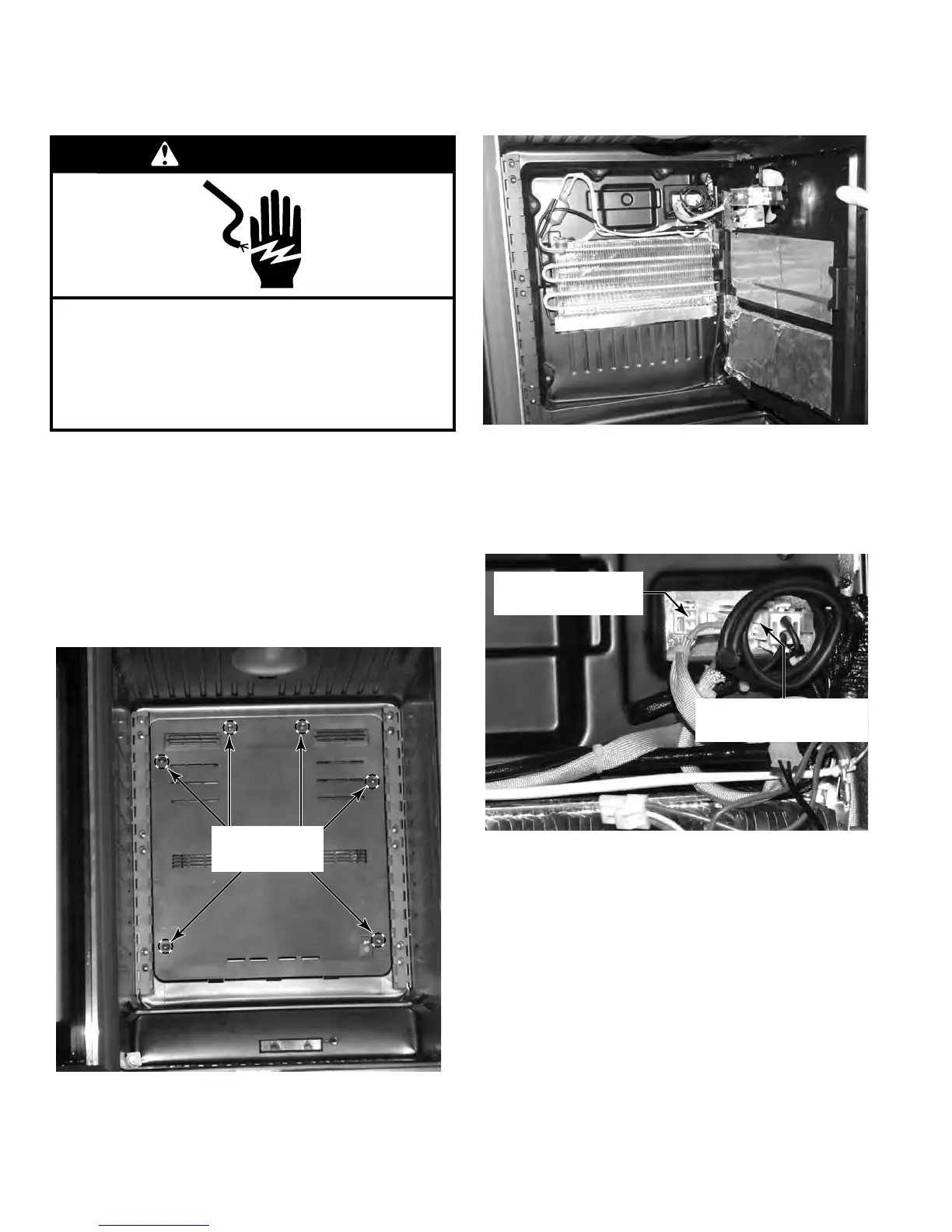
Remove the six screws that secure the evap-
orator cover to the unit.
Pull the cover away from the evaporator and
turn it to the side to gain access to the com-
ponents behind the cover.
1.
2.
3.
4.
5.
To remove the cover completely, disconnect
the connectors from the back of the unit. The
evaporator fan connector is on the left, the
separator display on UW / BC is on the right,
and one ground wire from the evaporator is
on the right on all models. (See page 4
-9)
Components accessible with the evaporator
cover removed are:
Evaporator Fan & Motor (Page 4-5)
Main thermostat (Pages 4-6, 4-7 & 4-8)
Defrost heater (Page 4-9)
Defrost thermostat & thermal fuse (Page
4
-10)
Evaporator (Page 4-11)
6.
7.
•
•
•
•
•
REMOVE THE EVAPORATOR COVER
WARNING
Electrical Shock Hazard
Disconnect power before servicing.
Failure to do so can result in death or
electrical shock.
Replace all parts and panels before operating.
Evaporator Fan
Connector
Separator Display
Connector
Remove Six
Screws


 To Next Page