4-5
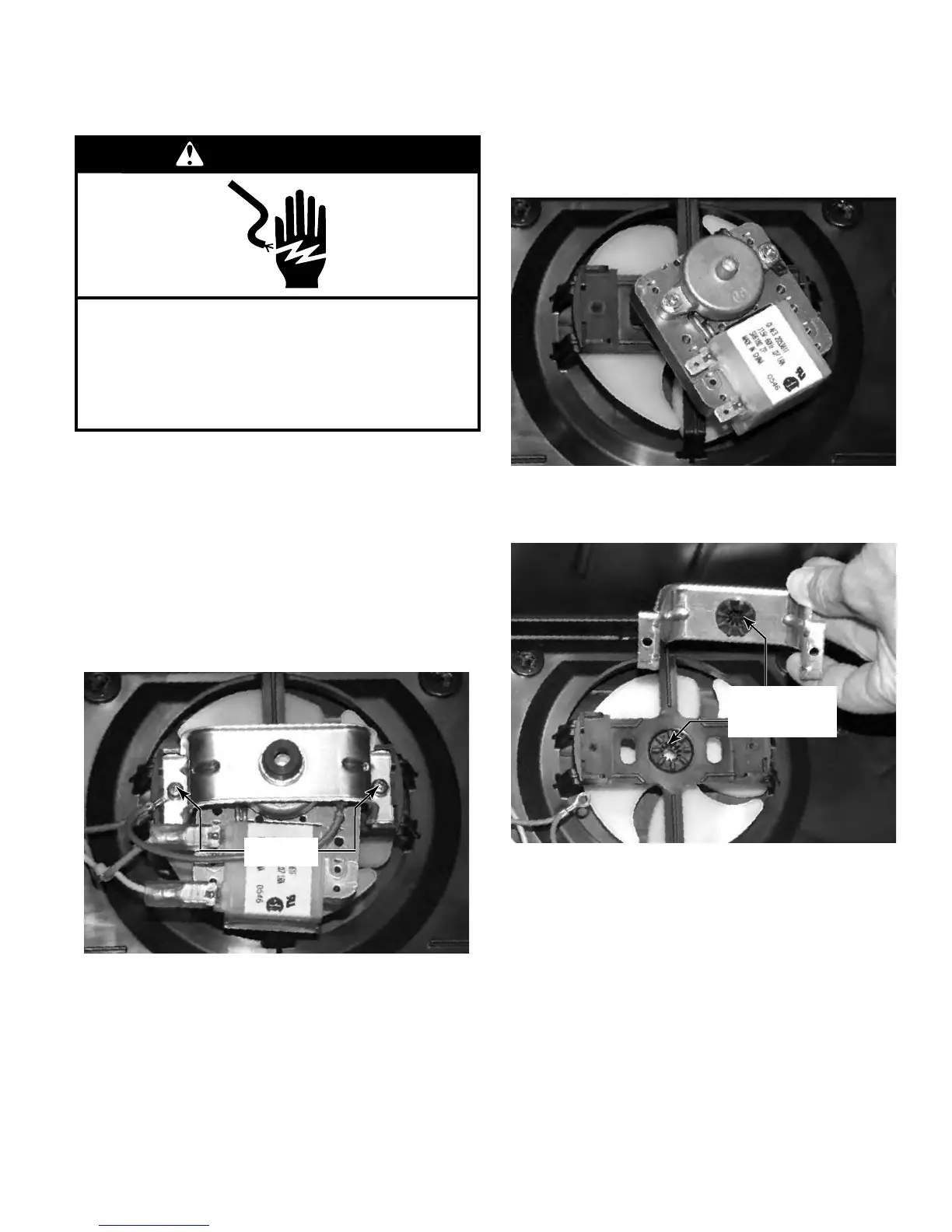
Remove the Evaporator cover. (See page
4-4)
Disconnect three spade wire connectors
from the evaporator fan, two power connec-
tors and one ground connector.
Remove the two screws that secure the evap-
orator fan bracket to the evaporator cover. A
second ground wire is also secured with one
of these screws.
1.
2.
3.
After removing the wires and bracket, pull the
motor shaft out of the fan blade to remove
the motor.
Be sure to reinstall the rubber grommets into
the brackets
When reassembling the motor to the fan,
push the shaft of the motor through the hole
of the fan blade until the shaft is flush with
the front of the fan. Be sure to reinstall both
the ground wires removed earlier.
4.
5.
6.
REMOVE THE EVAPORATOR FAN AND MOTOR
WARNING
Electrical Shock Hazard
Disconnect power before servicing.
Failure to do so can result in death or
electrical shock.
Replace all parts and panels before operating.
Rubber
Grommets
Screws


 To Next Page