4-8
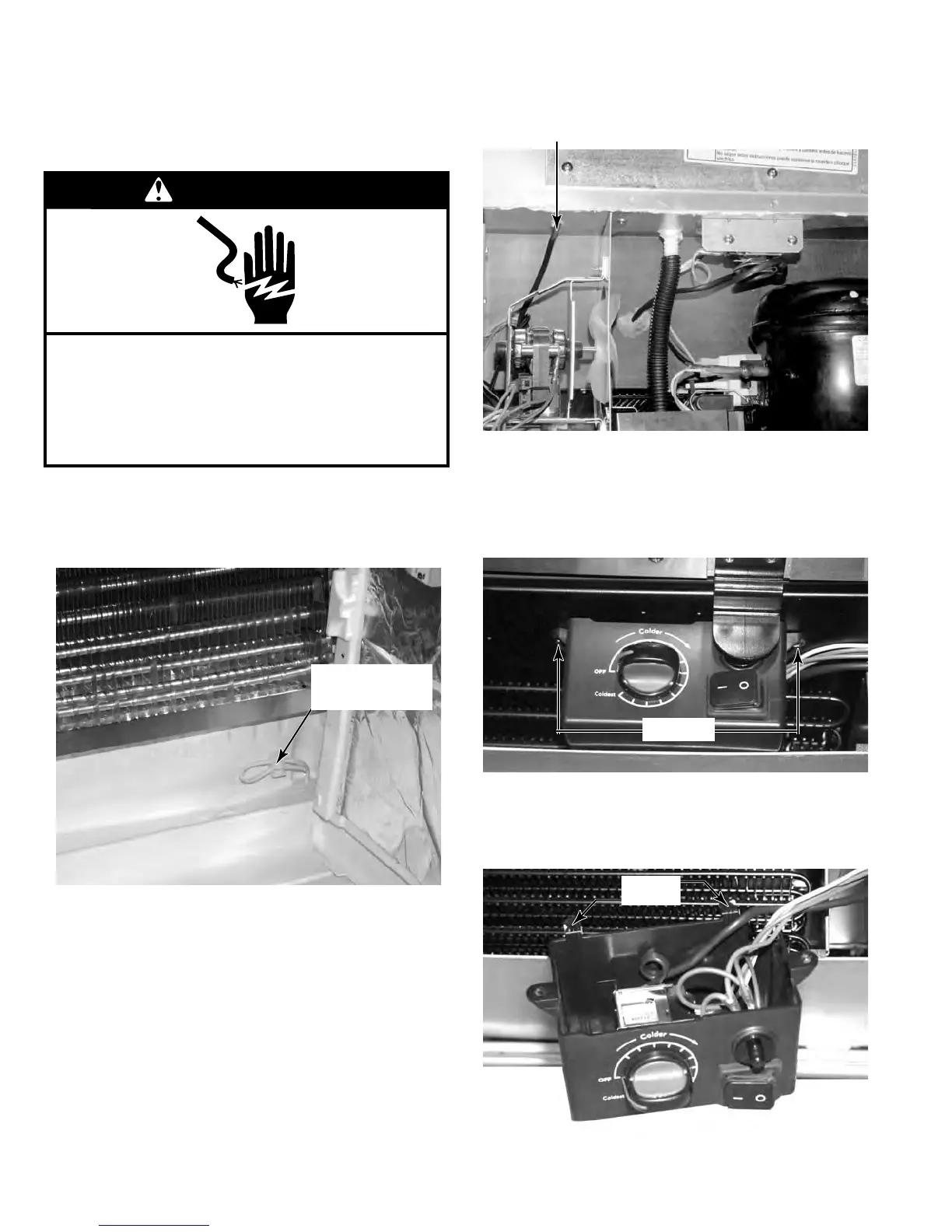
The main thermostat bulb in the Undercounter
Refrigerator is located in the lower right hand
corner behind the evaporator cover. It is a
single loop.
To remove this thermostat, first remove the
evaporator cover. (See page 4-4)
The thermostat bulb runs through the inte-
rior liner and is sealed in place with a mastic
sealant around the bulb. Be sure to replace
the sealant when reinstalling the thermostat
to seal the hole from leaking cold air.
1.
2.
3.
REMOVE THE MAIN
THERMOSTAT (UR)
WARNING
Electrical Shock Hazard
Disconnect power before servicing.
Failure to do so can result in death or
electrical shock.
Replace all parts and panels before operating.
Thermostat
Bulb
Pull the thermostat bulb through the liner into
the component compartment from the back
of the unit.
Remove the base grill. (See page 4-13)
Remove the two screws that secure the Con-
trol box to the bottom of the unit.
Lower the front of the control box and slide
the rear tabs out of the slots that hold the
back of the control box.
4.
5.
6.
7.
Tabs
Screws


 To Next Page