Service ManualService Manual
Operating Lights marLEDOperating Lights marLED
®®
E9 / E9i / E9 / E9i / E15E15
58 58 V V 1.01.0
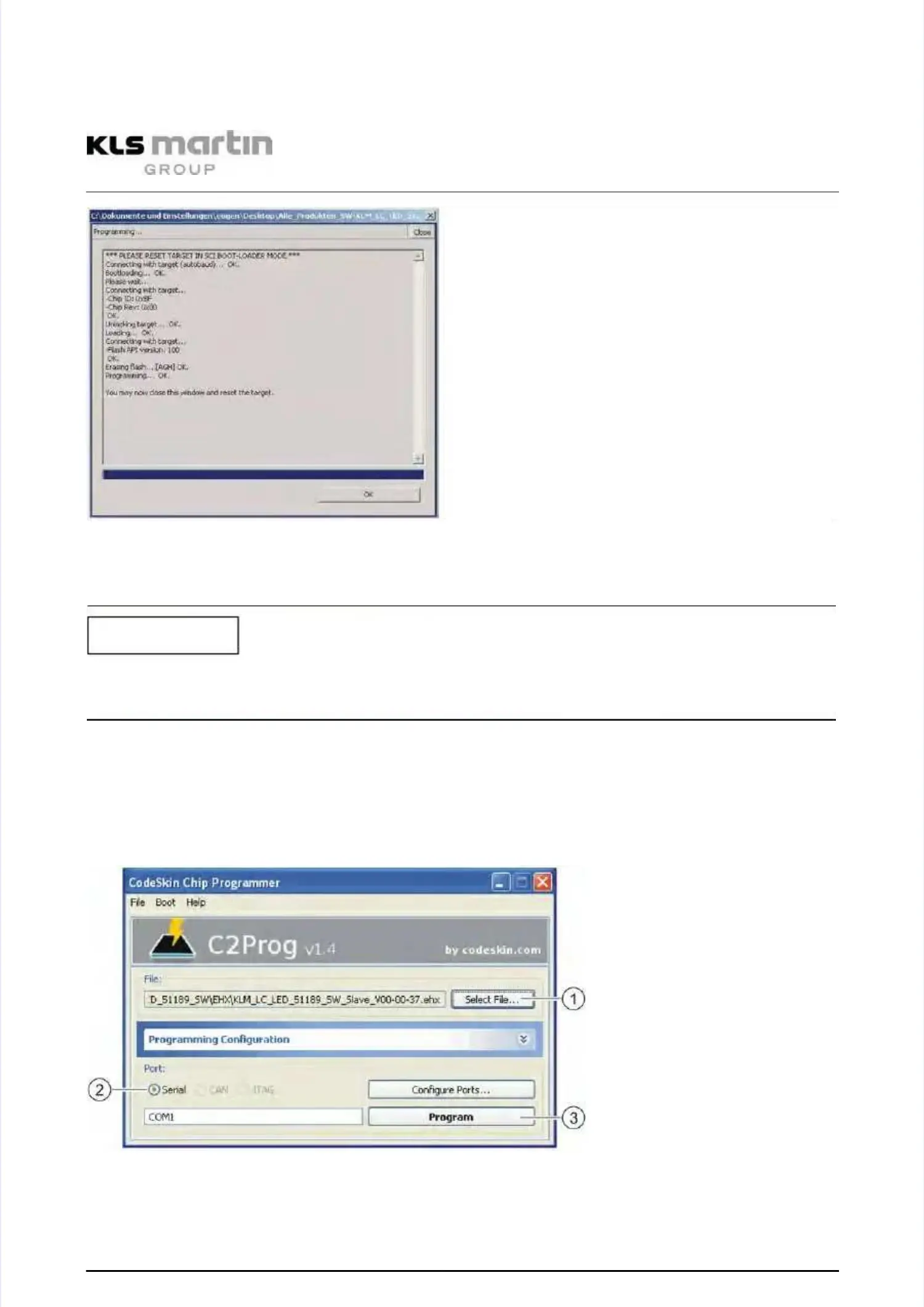
•• After successful update of the Master DSP close the window by clicking “OK”.After successful update of the Master DSP close the window by clicking “OK”.
Programming instructions SlaveProgramming instructions Slave
The program update for the Slave DSP can be performed directly after the program update ofThe program update for the Slave DSP can be performed directly after the program update of
the Master without reset.the Master without reset.
••
Use the left switch to select Slave (4) DSP.Use the left switch to select Slave (4) DSP.
•• For the update of the Slave DSP, under “File” select the *.ehx file to be programmed.For the update of the Slave DSP, under “File” select the *.ehx file to be programmed.
••
Make the settings shown below under “Programming Configuration”.Make the settings shown below under “Programming Configuration”.
••
Select the interface (2) under “Port”.Select the interface (2) under “Port”.
•• Click the button “Program”.Click the button “Program”.
Program update Slave DSP starts.Program update Slave DSP starts.
NOTICENOTICE


 To Next Page