E2-26 Electrical Propulsion Components 2/02 E02016
CONFIGURATION (CFG) FILE
CONVERSION
When new GE software code is installed on the PTU to
replace older versions of software, it will not contain the
existing truck configuration data (overspeeds, serial
numbers, option choices etc.) already in current truck
files.
The Configuration Conversion Tool (“UPDATE CFG
VERSION” option on the main menu) eliminates the
need for any truck configuration data retyping. It will
convert this truck data from the previous software
release configuration files.
CONVERSION PROCEDURE
Use the following procedure to convert configuration
files used with previous versions of software for use in
the current version:
Search for old CFG filenames:
1. Select the previous software version by typing
“
oldge
” at the DOS “C:>” prompt.
2. Select “TRUCK SETUP (CFG)” from the GE OHV
STATEX III MENU and press [ENTER].
3. The cursor should be at number 1. Press
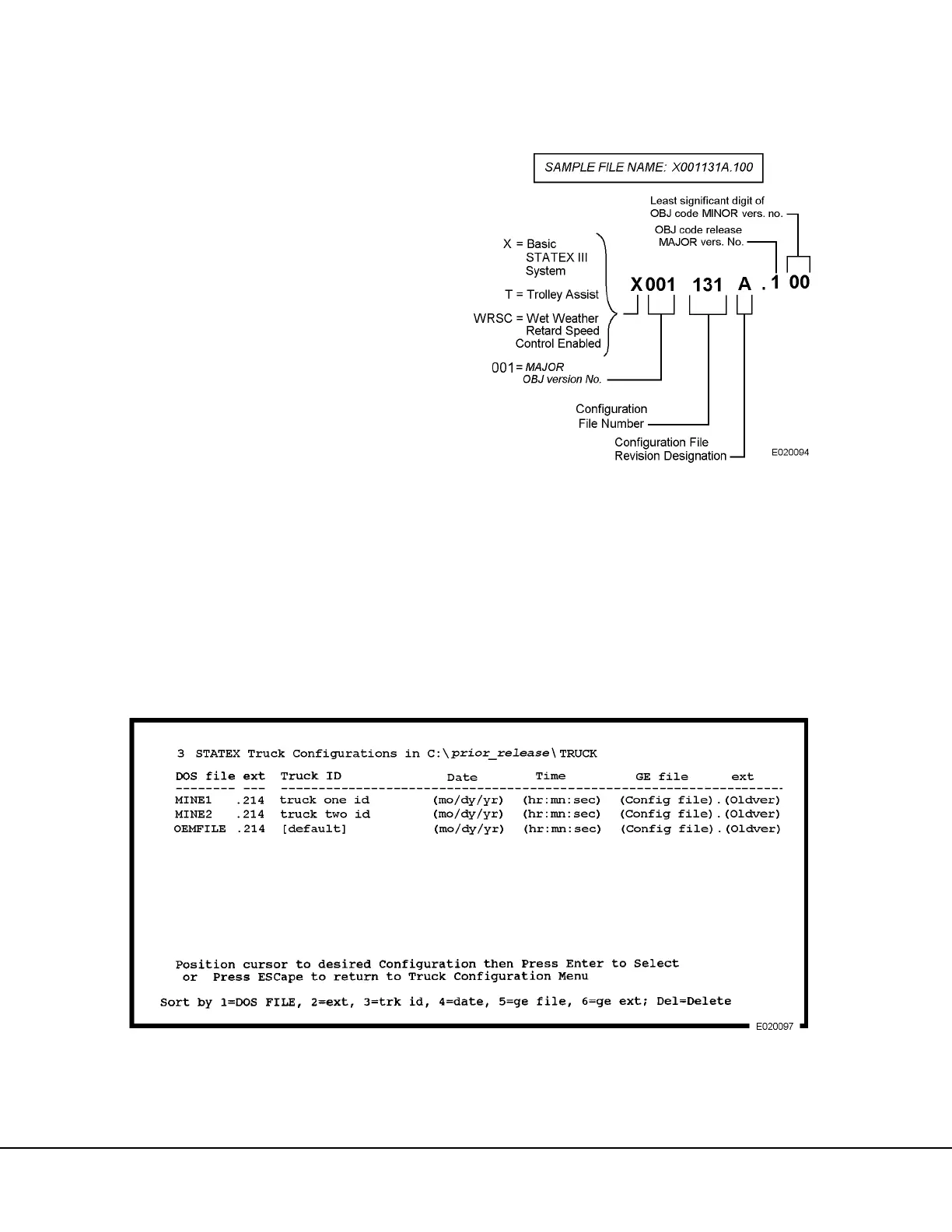
[ENTER]. The screen shown in Figure 2-5 is a
typical example. Make a list of the files listed on
your screen.
NOTE: Refer to Figure 2-4 for an explanation of the
elements of a GE file name. This information can be
used to determine the release version of files stored on
the PTU.
FIGURE 2-4. ELEMENTS OF A GE FILE NAME
FIGURE 2-5. SAMPLE CFG FILES CREATED IN EARLIER SOFTWARE RELEASE



 To Next Page