E02016 2/02 Electrical Propulsion Components E2-35
“5) Change/View Truck Specifics . . .”
NOTE: If values are changed on the TRUCK SPECIF-
ICS SCREEN, the truck MUST be re-programmed
before the changes will be in effect.
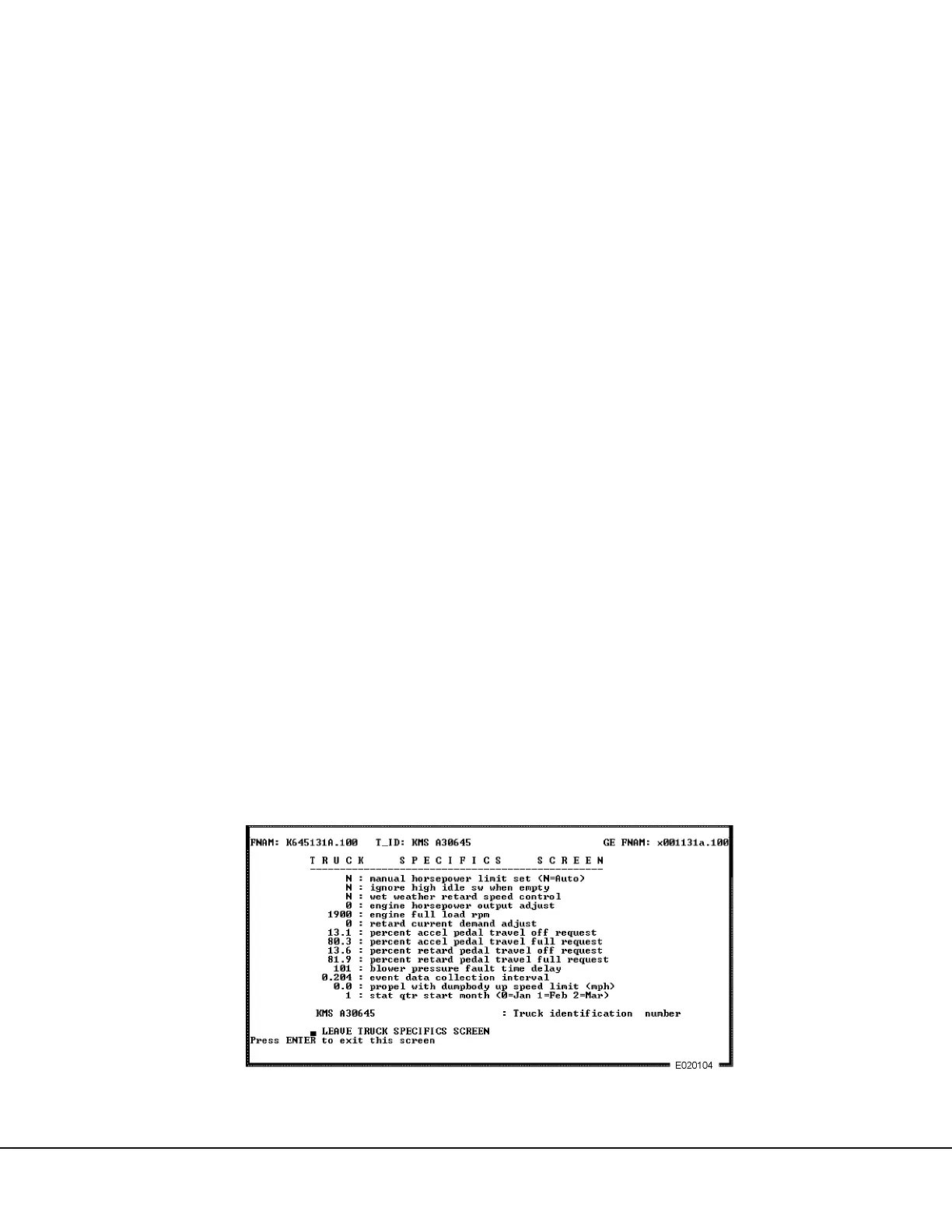
The TRUCK SPECIFICS SCREEN is used to enter the
desired values of engine horsepower, engine load rpm,
accelerator and retard pedal calibration, the blower
pressure fault time delay, the fault data collection inter-
val, statistical data quarter start month, and the mine
truck identification.
1. Use the Down arrow to move the cursor to the
menu position “CHANGE\VIEW TRUCK SPECIF-
ICS” and press [ENTER], or press [5].
2. The TRUCK SPECIFICS SCREEN, Figure 2-14,
will be displayed. Move the cursor to the line
where a change is desired. Enter the values
desired as a permanent value in the truck code.
(Type the value and press [ENTER].) A note at
the bottom of the screen shows the range of val-
ues that may be entered.
a. Manual horsepower limit set
Used to select manual or automatic horse-
power limit.
Y: Manual
N: Automatic
NOTE: It is recommended that this value is always set
to “N” to select automatic. In this condition the system
will automatically adjust the electrical system load to
maintain the ENGINE FULL LOAD RPM value
specified in step d.
b. Ignore high idle switch when empty
Y: Operator request for high idle is ignored if
sensors indicate truck is empty.
N: Load weighing sensors do not affect idle
selection.
Note: This option is only applicable when OEM-options
“GE engine control is set to “N” and “two speed
overpseed system installed” is set to “Y”.
c. Wet weather retard speed control
Y: Enables wheel slide compensation option.
N: Disables option.
d. Engine horsepower output adjust
This line allows entering the reducer or adder
to the nominal horsepower that was deter-
mined in the manual load box screen. For
example, if in the manual mode load box
screen the nominal HP is set at 2350 NHP,
use the increment/decrement keys to load the
engine to the point where it starts to bog the
engine. The horsepower output adjust value
shown at the bottom of the screen is entered
here. The available range is displayed at the
bottom of the screen when this line is selected
with the cursor. This allows modification of the
value of the horsepower pre-programmed in
the configuration data tables.
FIGURE 2-14. TRUCK SPECIFICS SCREEN



 To Next Page