E3-10 Statex III Electrical Checkout Procedure 2/02 E03012
PTU SETUP
• If not done previously, Set up PTU using the communication port in the electrical cabinet.
• Select the MONITOR REAL TIME DATA screen as follows:
a. From the GEOHV STATEX III MENU, select “PTU TALK TO TRUCK” and press [ENTER].
b. At PTU LOGON screen, enter your name and assigned password. Press [ENTER].
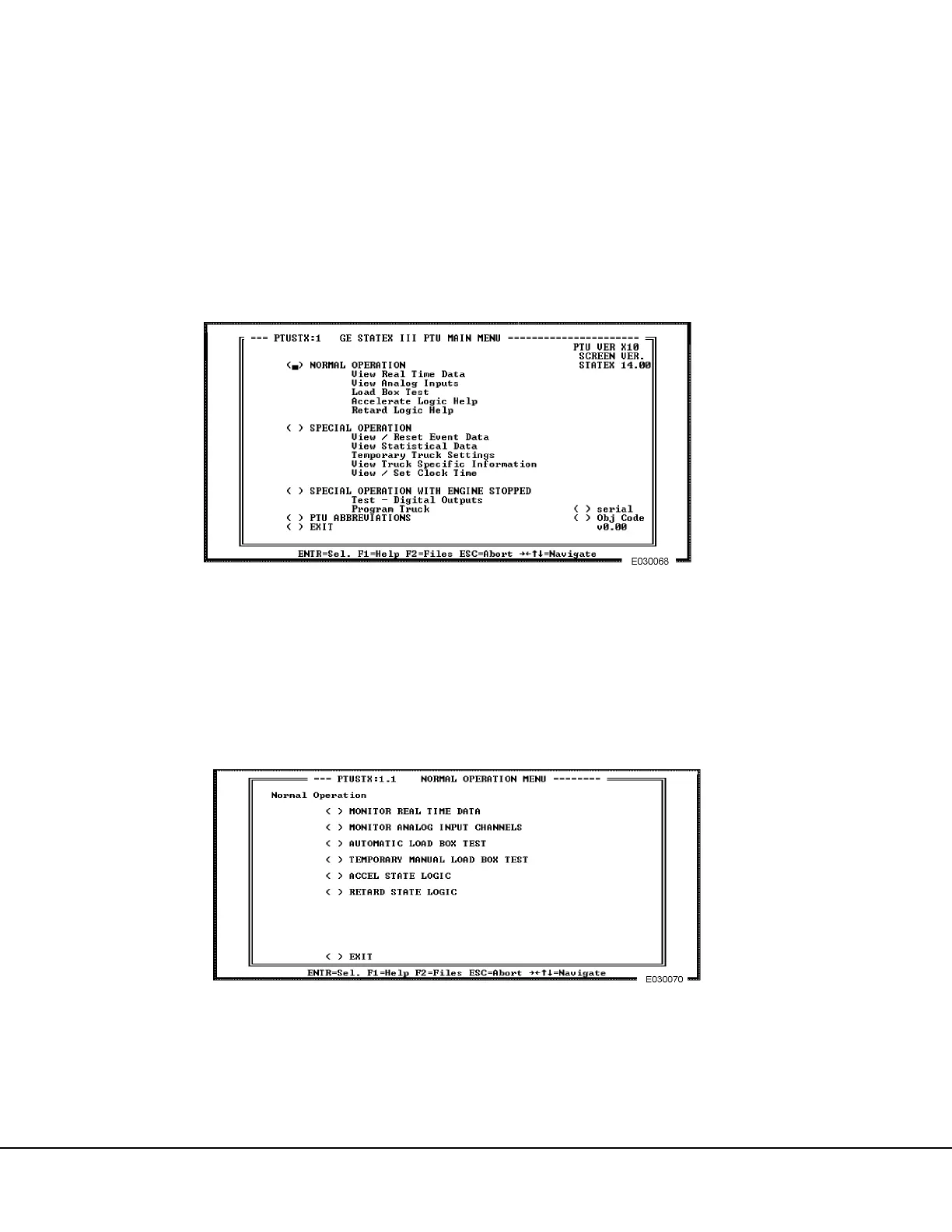
c. When the GE STATEX III PTU MAIN MENU (Figure 3-6.) appears, move the cursor to
“NORMAL OPERATION” and press [ENTER].
d. A screen appears with the message: “Selection of NORMAL OPERATION gives truck con-
trol to the driver - Continue?”. With the cursor at the “Yes” option, press [ENTER].
e. The NORMAL OPERATION MENU (Figure 3-7.) will appear. Select “MONITOR REAL TIME
DATA” and press [ENTER]; the screen shown in Figure 3-8. will appear.
FIGURE 3-6. PTU MAIN MENU (Version 14.00 Shown)
FIGURE 3-7. NORMAL OPERATION MENU



 To Next Page