36
Operating Instructions 10/2020 2010045v10
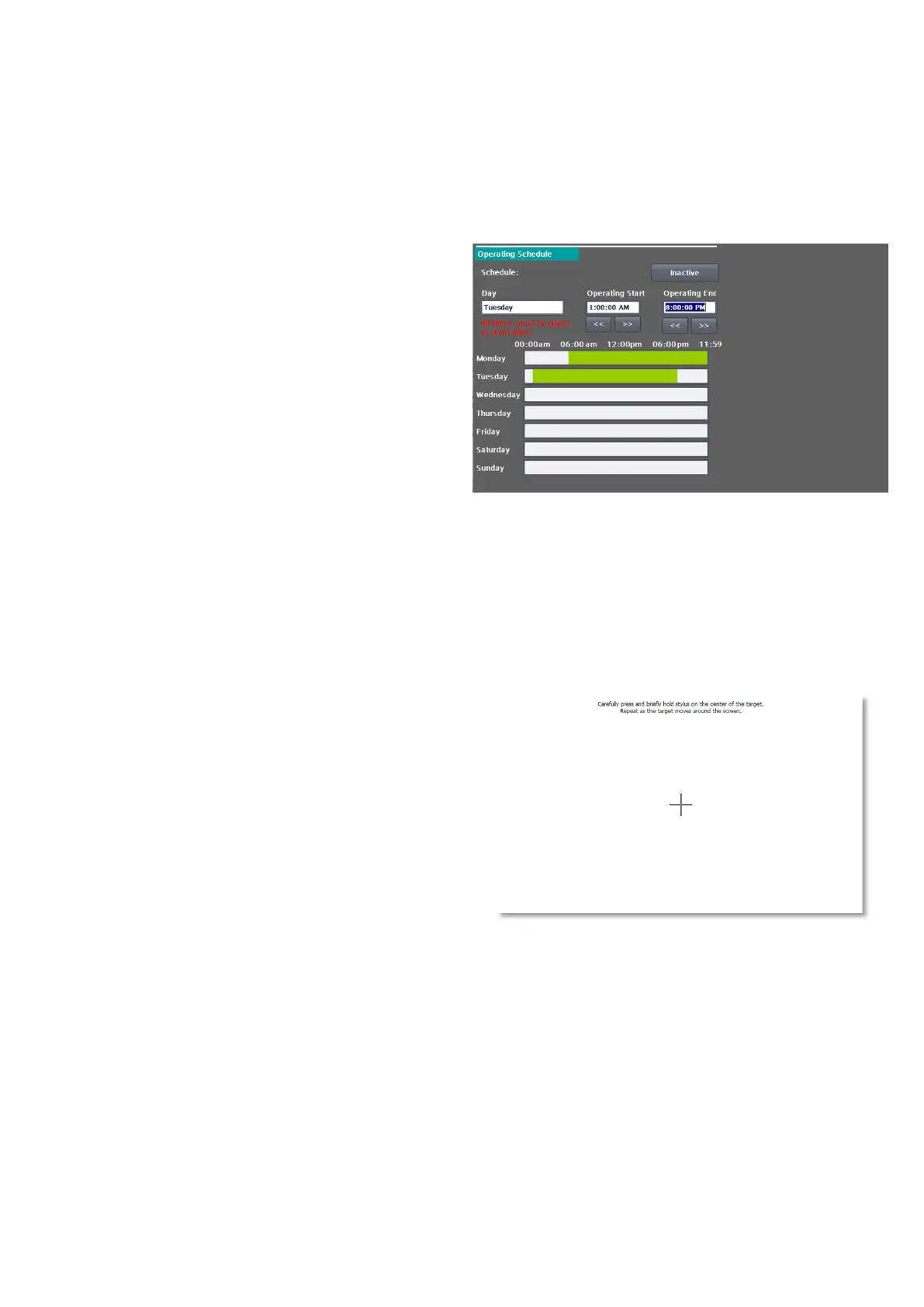
You can only edit the operating schedule if it has
been deactivated beforehand. To edit, select the
day and either enter the start and end time in the
input fields or change the values using the arrow
keys (in 15-minute steps). The seconds are
generally ignored by the software and set to 0 for
the start of operation and 59 seconds for the end
of operation. If the start time is after the end time,
the release is inverted. In this way, operation can
be enabled at night and disabled during the day,
for example.
Public holidays (exceptions):
Via the public holiday entry, you can determine
how a specified public holiday (or exception day)
is to be handled (also a complete release or
blocking of the ward).
In the public holiday table you can now enter the
public holidays or exception days that are to be
handled separately. Public holidays in the future or
still active public holidays are shown in green and
days already in the past are shown in grey. You can
delete the respective day via the <X> button. With
activation, the editing process is completed and
the operating times are set.
7.6 Calibrate
This page is used to calibrate the touch
functionality of the screen. This is usually required
in the field after a display replacement. Follow the
instructions on the display.
Fig 39: Calibration screen for the touch screen
of the HMI
Fig 38: Operating schedule


 To Next Page