37
Operating Instructions 10/2020 2010045v10
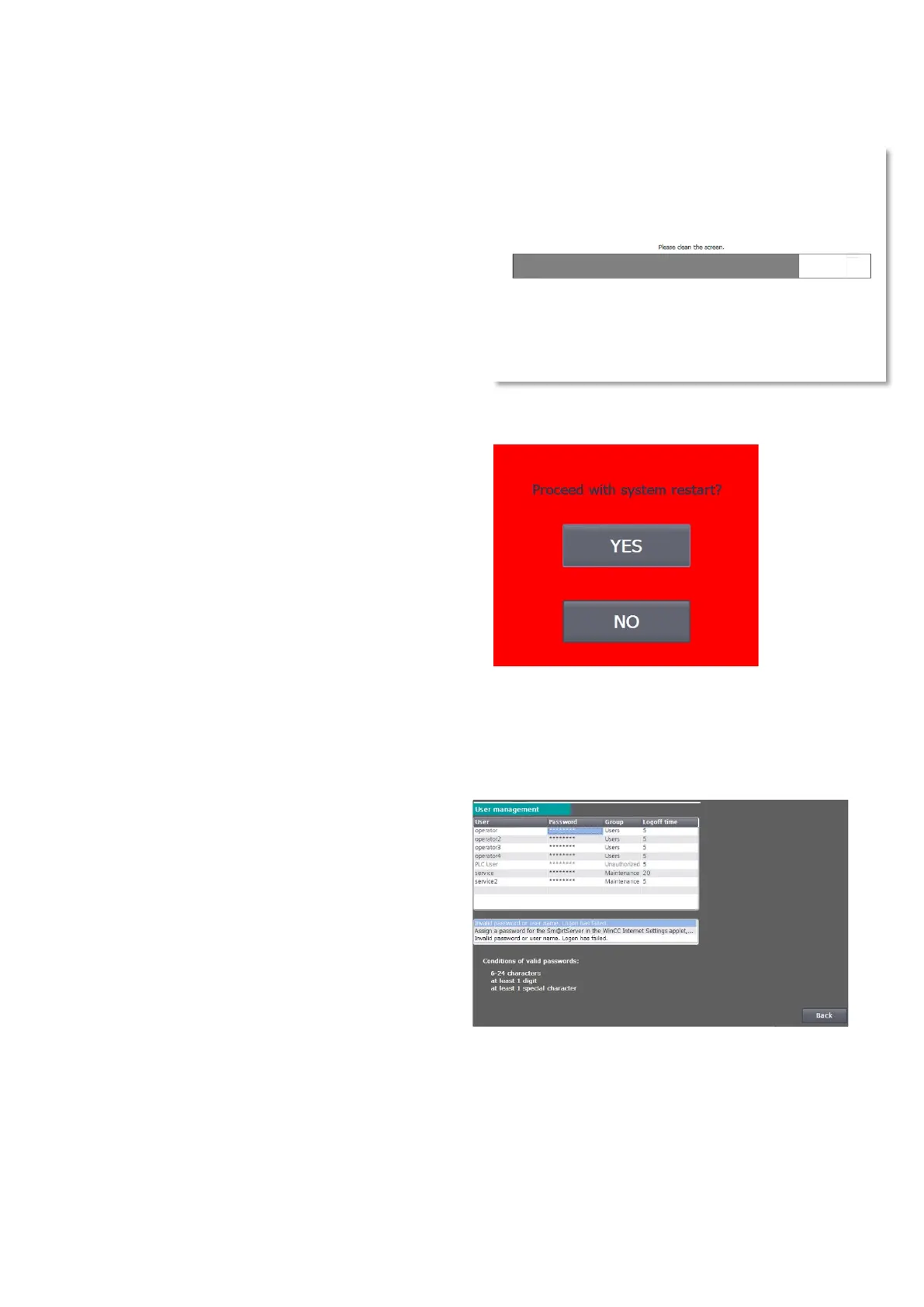
7.7 Cleaning picture
If you have activated the cleaning screen, you can
clean the surface of the screen during the set time
without making any unwanted adjustments.
The progress bar shows you the time period still
available for cleaning the screen. After the time
period has elapsed, the menu is displayed again.
7.8 System restart
You can use the "System restart" command to
perform a system restart of the charging station
(Power-on-RESET). All charging processes in
progress are terminated.
7.9 User
In the user administration you can change the user name, password and the automatic logout time.
Condition for valid passwords:
• 6-24 characters
• Contains at least one digit
• Contains at least one special character
The default user name and the default password
are provided to the charging infrastructure
operator by the manufacturer by default and can
be changed by the operator.
The operator is responsible for the safekeeping of the login information. If you forget your password before
logging in for the first time, the manufacturer can send you this password again by e-mail. However, if you
forget your changed password after logging in for the first time, please contact Kostad Support.
Fig 41: System restart prompt
Fig 42: User administration


 To Next Page