Phone Basics 25
o
Show Voice key:SelecttodisplaythevoicekeyontheSwypekeyboard.
o
Enable handwriting:Selecttoenablethehandwritingfunction.
l My Words:Touchtoconfigurethedictionarymanagementandthedatamanagement
settings.
l Languages:TouchtoselectthelanguagetouseonSwype.
l Gestures:TouchtolearnsomeusefulshortcutsontheSwypekeyboard.
l Help:Touchtoseesomehelpfulinformation,suchashowtousetheSwypekeyboardand
theversioninformation,orenablethetipfunction.
l Updates:Touchtoperformanupdate.
FormoreinformationaboutSwype,visitswype.com.
Google Keyboard
GoogleKeyboardoffersatraditionalQWERTYkeyboardsetupforenteringtextbytouchingkeys
(likeonacomputer),alongwithenhancementsandoptionsthatallowyoutoentertextfasterand
moreaccurately,suchascontinuouskeyinput,personalizedusagedictionaries,andmore.See
TouchscreenKeyboardstoswitchbetweentheSwypeandGoogleKeyboard.
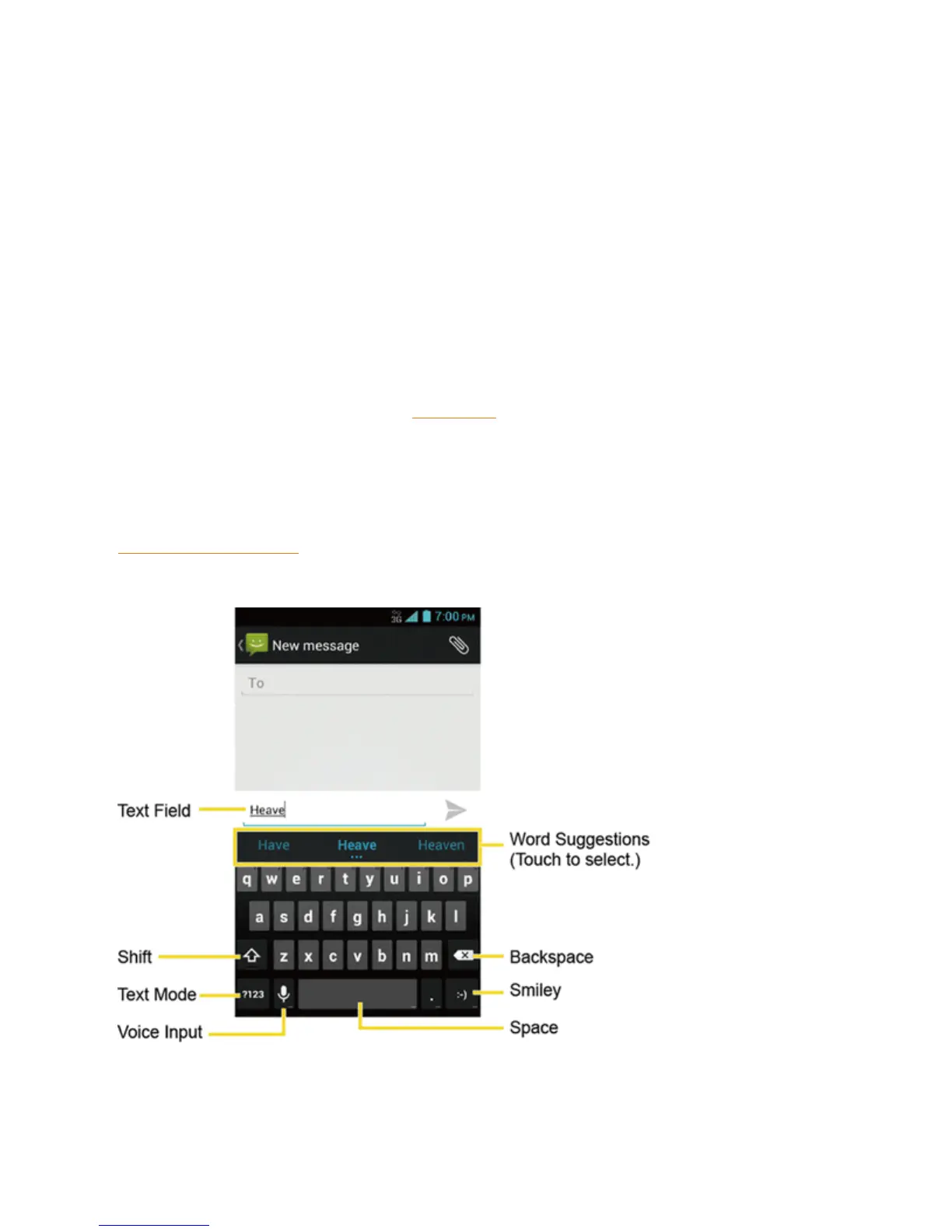
Google Keyboard Overview
Note: Keyappearancemayvarydependingontheselectedapplicationortextfield.
SomeofthekeysontheGoogleKeyboardaregivenbelow:












 To Next Page