Camera and Video 96
Camera and Video
Youcanusethecameraorvideocameratotakeandsharepicturesandvideos.Yourphonecomes
witha5.0megapixelmaincamerawithanautofocusfeaturethatletsyoucapturesharppictures
andvideos.
Take Pictures
Thefollowingtopicsteachyouhowtotakepictureswithyourphone’scamera.
Open or Close the Camera
Youcanopenthecamerathroughtheapplicationslistandcloseitfromthecameramenu.In
additiontousingtheapplicationslisttoopenthecamera,youmaybeabletolaunchthecamera
fromwithinotherapplicationssuchasContactsorMessaging.
Open the Camera
Toopenthecamerainpicturemodeandtakepictures:
n Pressandholdthecamerabuttononthelowerrightsideofthephone.
–or–
TouchHome > >Camera.
Close the Camera
n
Onthecamerascreen,touchHome orBack .
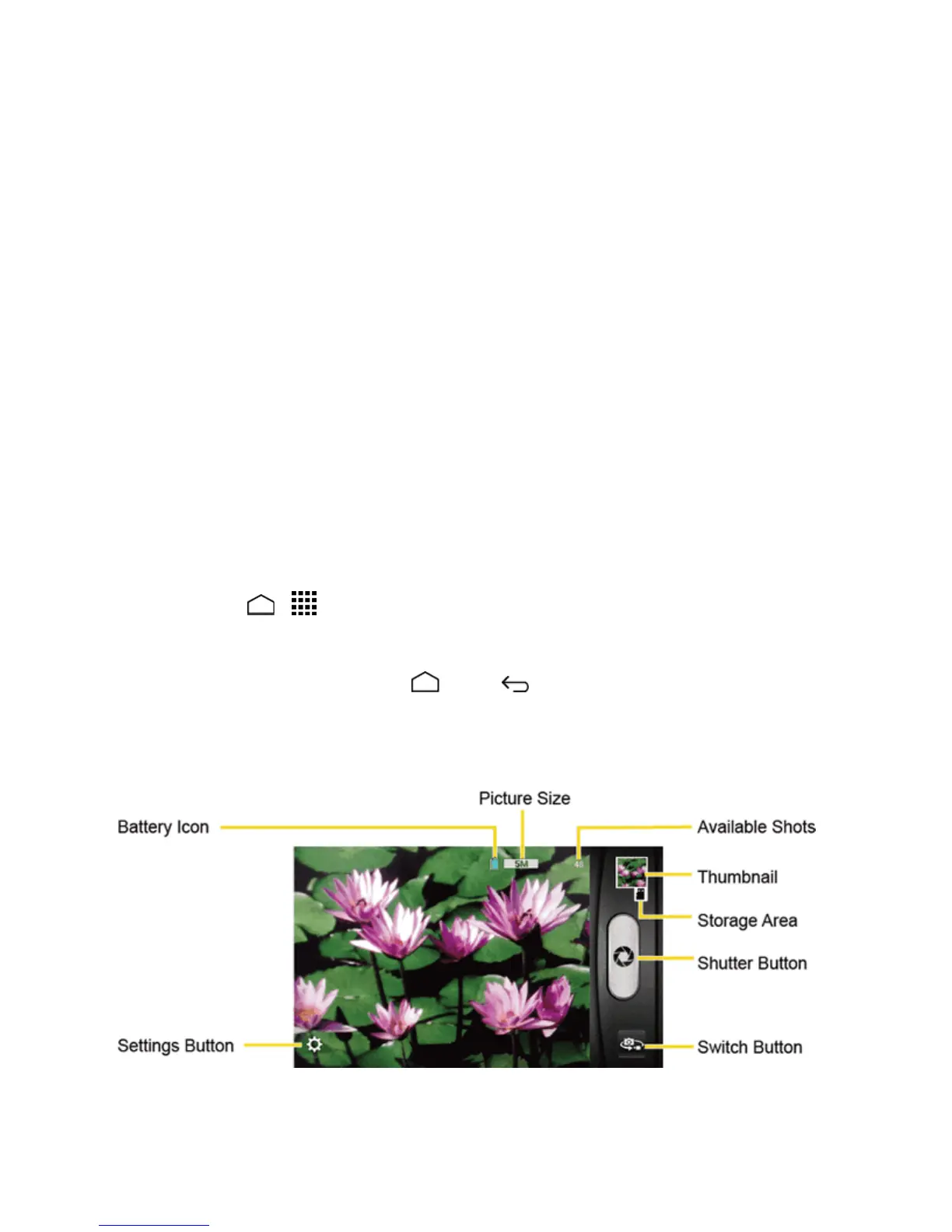
Camera Viewfinder Screen
TheViewfinderscreenletsyouviewyoursubjectandaccesscameracontrolsandoptions.


 To Next Page
 Loading...






