LaCie Ethernet Disk Your LaCie Ethernet Disk
User Manual page 10
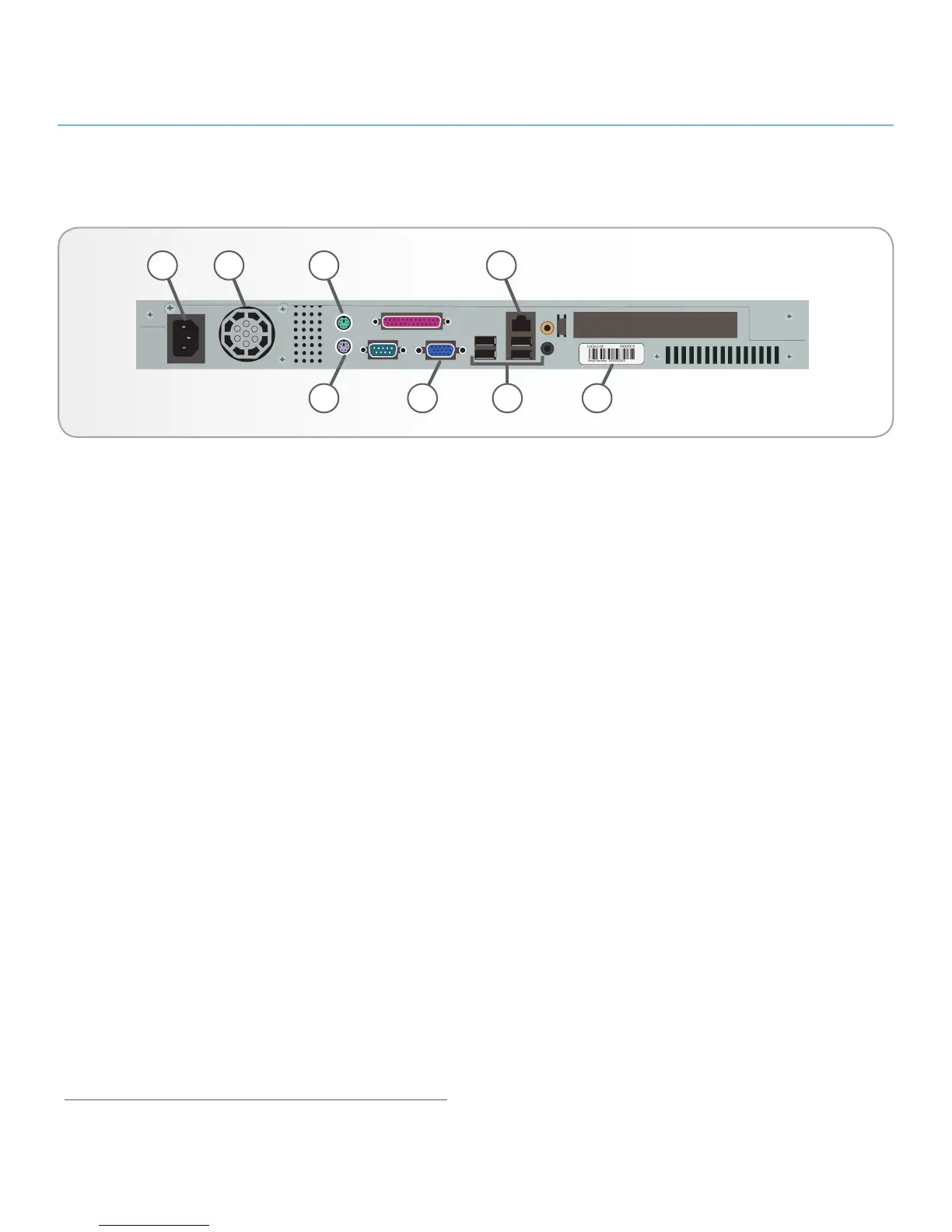
2.4. Rear Panel
1. Power Input – Where you plug in the AC adapter supplied
with the drive. See section 4.1. Connecting the LaCie Ether-
net Disk to Your Network for more details.
2. Ventilation Fan – This fan helps to keep your drive cool
during operation. Be sure not to block this fan when using
your drive..
3. Mouse Port – This port can be used to connect a mouse
(not recommended).
4. Gigabit Ethernet Port – This port is used to connect the
Ethernet cable (included with your drive). See section 4.1.
Connecting the LaCie Ethernet Disk to Your Network for
more details.
5. Keyboard Port – This port can be used to connect a key-
board (not recommended).
6. VGA Video Port – This VGA video port can be used to con-
nect a monitor (not recommended).
7. Hi-Speed USB 2.0 Ports – These ports can be used to at-
tach additional hard drives. Please see section 10. Adding
Additional Storage Space for more information.
8. Serial Number Sticker – This is where you will find your
LaCie Ethernet Disk’s serial number. Write down the serial
number and keep it in a safe place, because you will need
to provide the number in the event you have to call LaCie
Technical Support for any reason in regard to the drive’s
performance. The serial number would also come in handy
if your drive is lost or stolen.














 To Next Page