LaCie Ethernet Disk Using the LaCie Shell
User Manual page 45
11.1. Accessing the LaCie Shell
Using Remote Desktop
(Windows)
First make sure you have the Remote Desktop client installed on
your system. If you have a Windows version earlier than Win-
dows XP you will need to download it from Microsoft’s website
and then install it.
1. Click on Start, point to Programs, point to Accessories, point
to Communications and then click Remote Desktop Con-
nection.
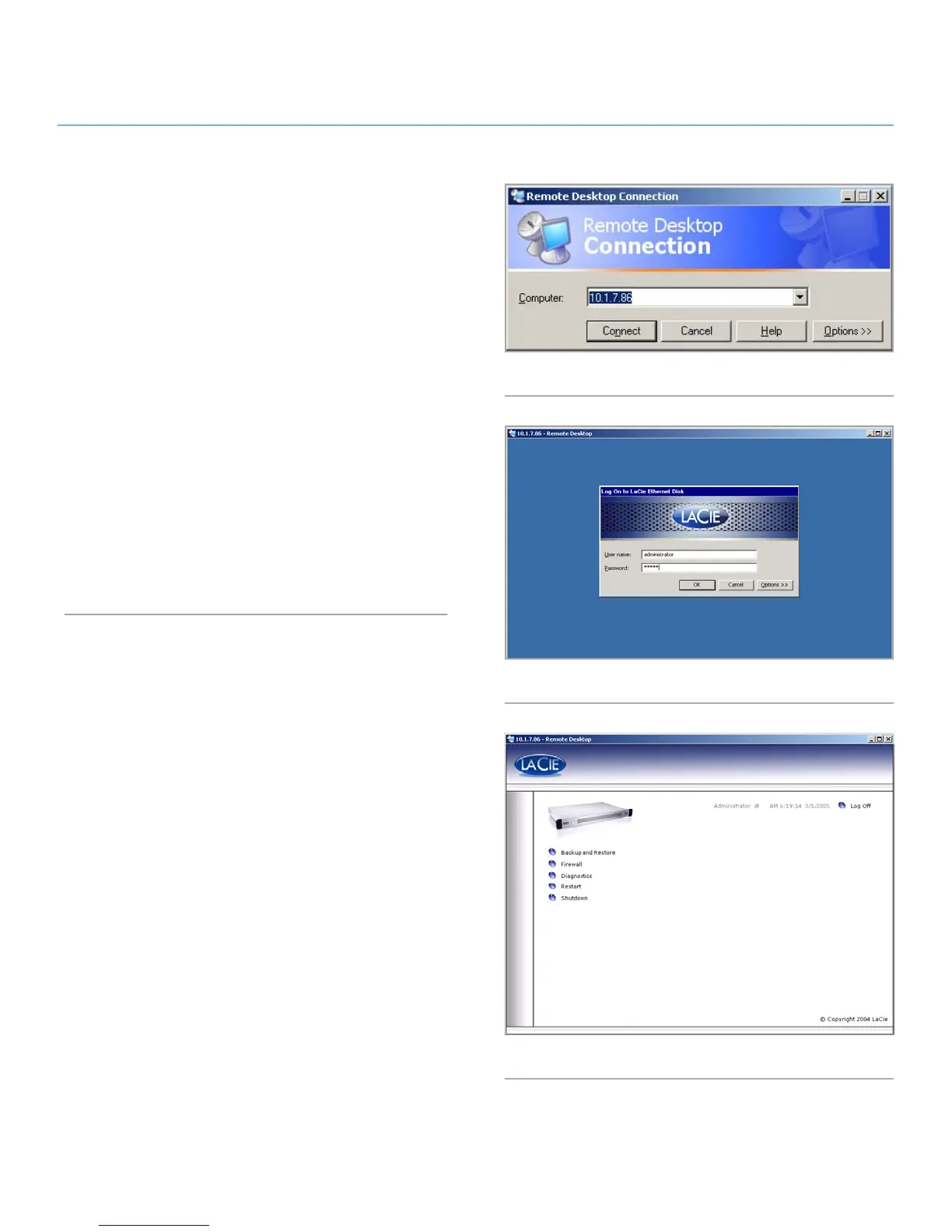
2. In the Remote Desktop Connection dialog Computer field en-
ter the IP address of the LaCie Ethernet Disk, and click Con-
nect (Fig. 55).
3. In the LaCie Log On dialog Type in the Administrator user-
name and password, and click OK (Fig. 56).
The LaCie Shell then appears (Fig. 57).
Fig. 55
Fig. 56
Fig. 57














 To Next Page