LaCie Network Space MAX • DESIGN BY NEIL POULTON Connecting to a Network
User Manual page 14
Connect to the LaCie Network Space MAX:
1. Launch LaCie Network Assistant and use it to open the Dash-
board (user interface).
Windows Users
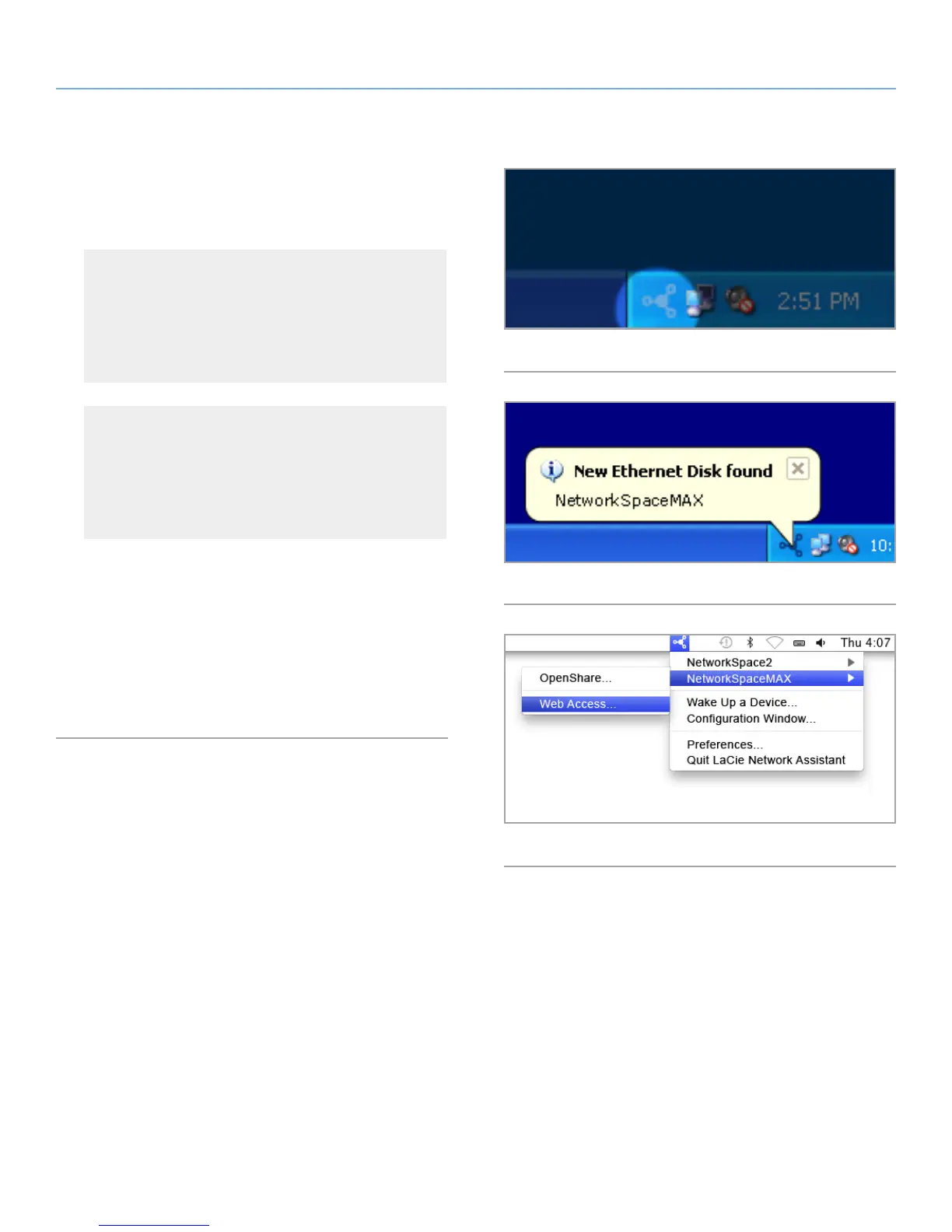
Select LaCie Network Assistant in Start/Programs. A Net-
work Assistant icon will appear in the system tray (Fig. 11)
and Network Assistant will automatically detect your LaCie
Network Space MAX and any other storage devices on your
network (Fig. 12).
Mac Users
Select LaCie Network Assistant in your Applications folder.
A Network Assistant icon will appear in the menu bar and
the Assistant will automatically detect your LaCie Network
Space MAX and any other LaCie storage devices on your
network.
2. Click on the icon in the system tray (Windows) or menu bar
(Mac) and select NetworkSpaceMAX > Web Access... (Fig. 13).
The Dashboard will open in your default web browser.
3. If this is the first time you’ve connected to the Dashboard, pro-
ceed to the next step, 2.4. STEP 4: Completing the Setup Wiz-
ard. For subsequent logins, refer to section 4.1. Dashboard:
Accessing.
Fig. 11
Fig. 12
Fig. 13














 To Next Page