LaCie Network Space MAX • DESIGN BY NEIL POULTON Administering Your LaCie Network Space MAX
User Manual page 45
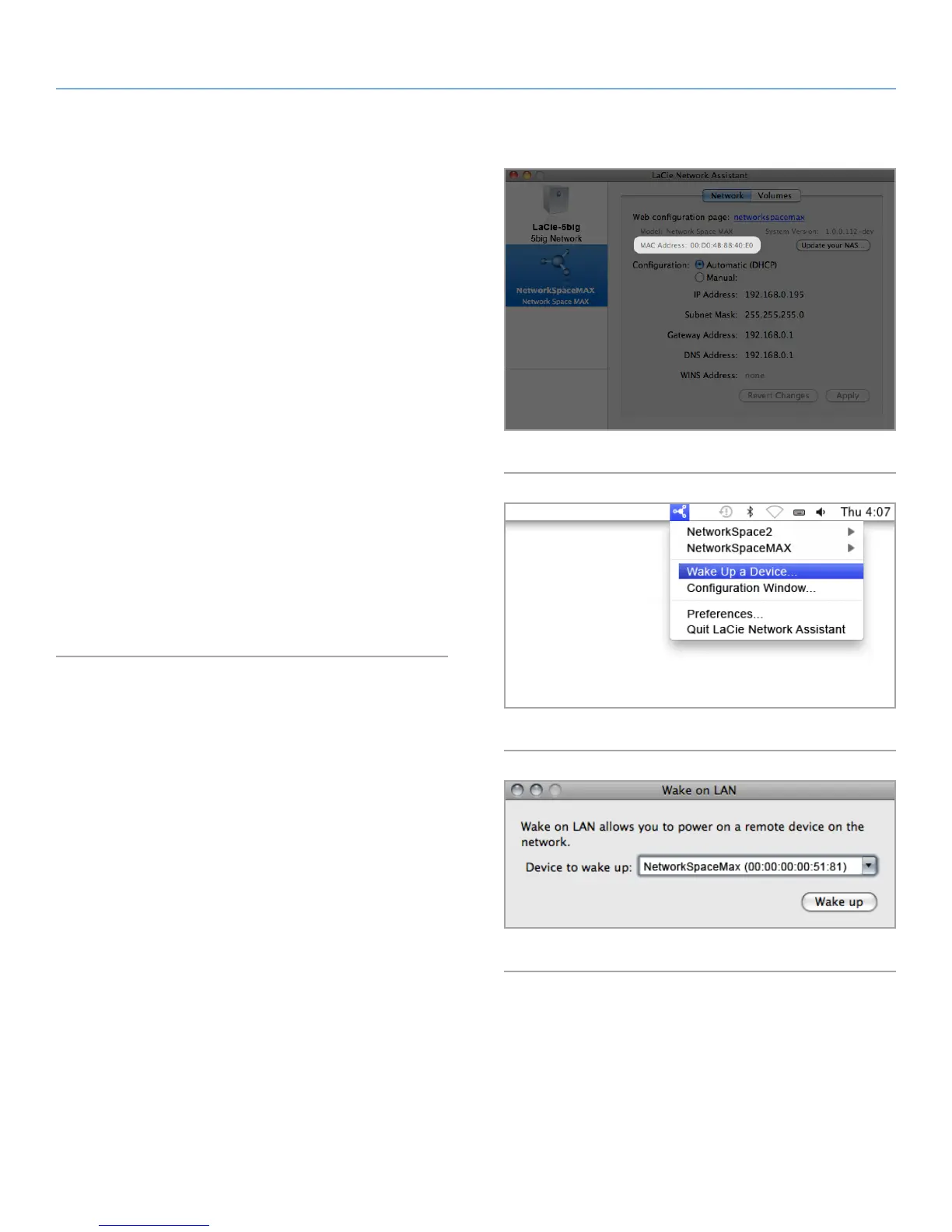
4.10.1. Wake on LAN
You can use LaCie Network Assistant to wake your Network Space
MAX.
First time you use Wake on LAN:
1. You’ll need your drive’s MAC address. Click the LaCie Network
Assistant icon in your system tray (Windows) or menu bar (Mac)
and select Configuration Window.... Select then copy the MAC
address text (Fig. 67).
2. Next, click the LaCie Network Assistant icon in your system tray
(Windows) or menu bar (Mac) and select Wake Up a Device...
(Fig. 68).
3. Paste the MAC address into the field and click Wake Up.
Subsequent use:
1. Click the LaCie Network Assistant icon in your system tray (Win-
dows) or menu bar (Mac) and select Wake Up a Device... (Fig.
68).
2. Choose the NAS product you wish to wake up from the menu
(Fig. 69).
3. Click Wake Up.
Fig. 67
Fig. 68
Fig. 69














 To Next Page