LaCie Network Space MAX • DESIGN BY NEIL POULTON Accessing & Transferring Files
User Manual page 33
3.7.2. Multimedia Server: Windows Media
Player
Once configured, Windows Media Player (WMP) can play files lo-
cated on the Network Space MAX through the network connection.
Follow these steps:
1. Make sure the Network Space MAX is properly connected to
your home network as described in section 2. Connecting to a
Network.
2. Enable Multimedia server on the Network Space MAX Dash-
board (see section 4.6. Dashboard: General Settings) (Fig. 42).
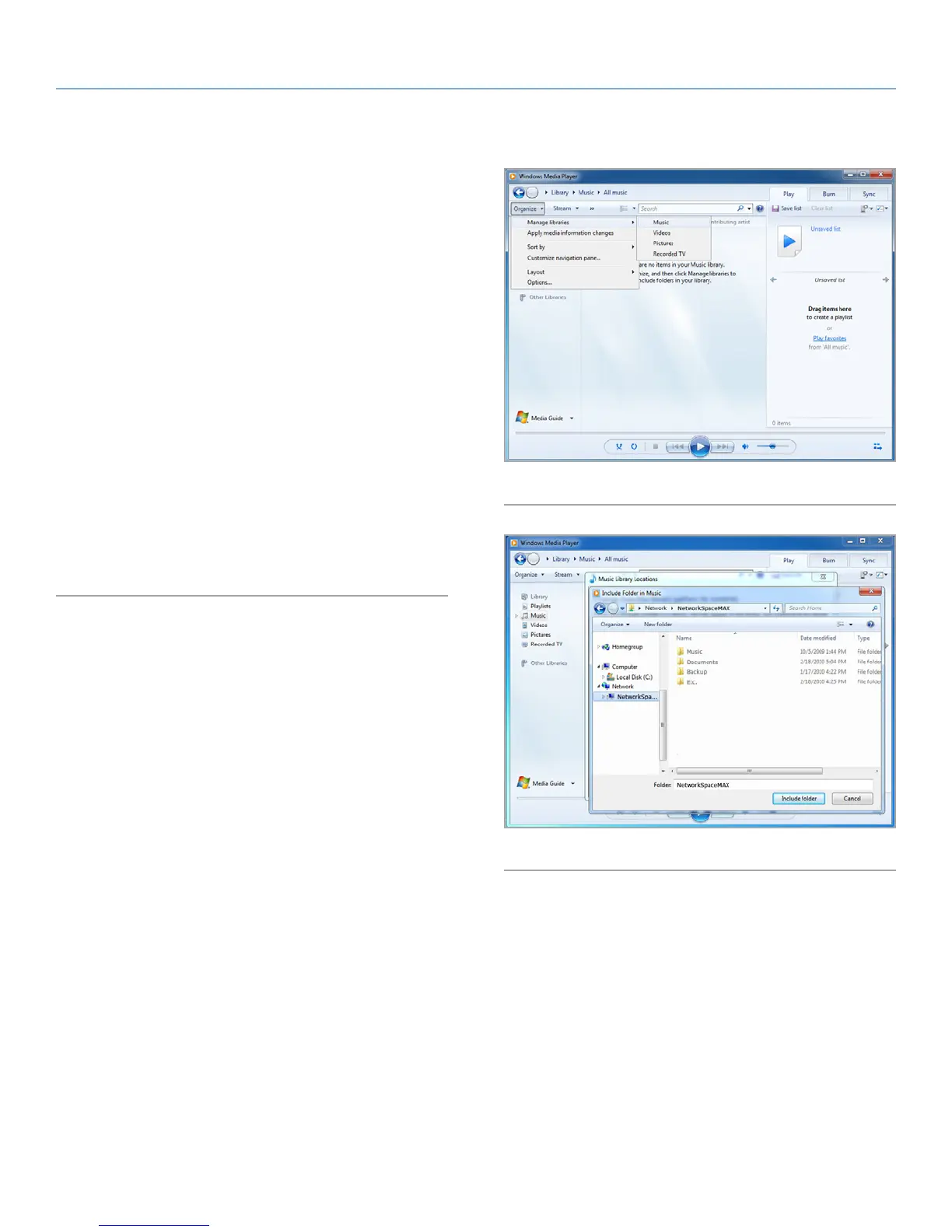
3. In WMP, click Organize > Manage Libraries > Music (or Video
or Pictures) (Fig. 44).
4. In the dialogue window, click Add, select NetworkSpaceMAX
(if you haven’t changed the machine name) under the Network
section, and click Include Folder (Fig. 45).
5. WMP will begin indexing the media files. Once completed, they
will appear in the WMP library.
Fig. 44
Fig. 45














 To Next Page