150 cHAPTER 7: Options and Accessories
Model 336 Temperature Controller
7.6.1 Input Option Card
Installation
The Model 336 input option cards are field-installable. You will need a small Phillips-
head screwdriver and the 5/64-in hex driver. Follow this procedure to install an input
option card.
To avoid potentially lethal shocks, turn off controller and disconnect it from AC power
before performing these procedures.
The components on this board are electrostatic discharge sensitive (ESDS) devices.
Follow ESD procedures in section 8.11 to avoid inducing an electrostatic discharge (ESD)
into the device.
If you are installing the Model 3061, use the instructions for the full rack only. The Model
3060 can be installed in either a full or half rack.
1. Turn the Model 336 power switch Off. Unplug the power cord from the wall out-
let, then from the instrument.
2. Half rack only: Remove the two screws used to attach the ceramic block to the full-
rack adapter plate; set aside the screws, and discard the full-rack adapter plate.
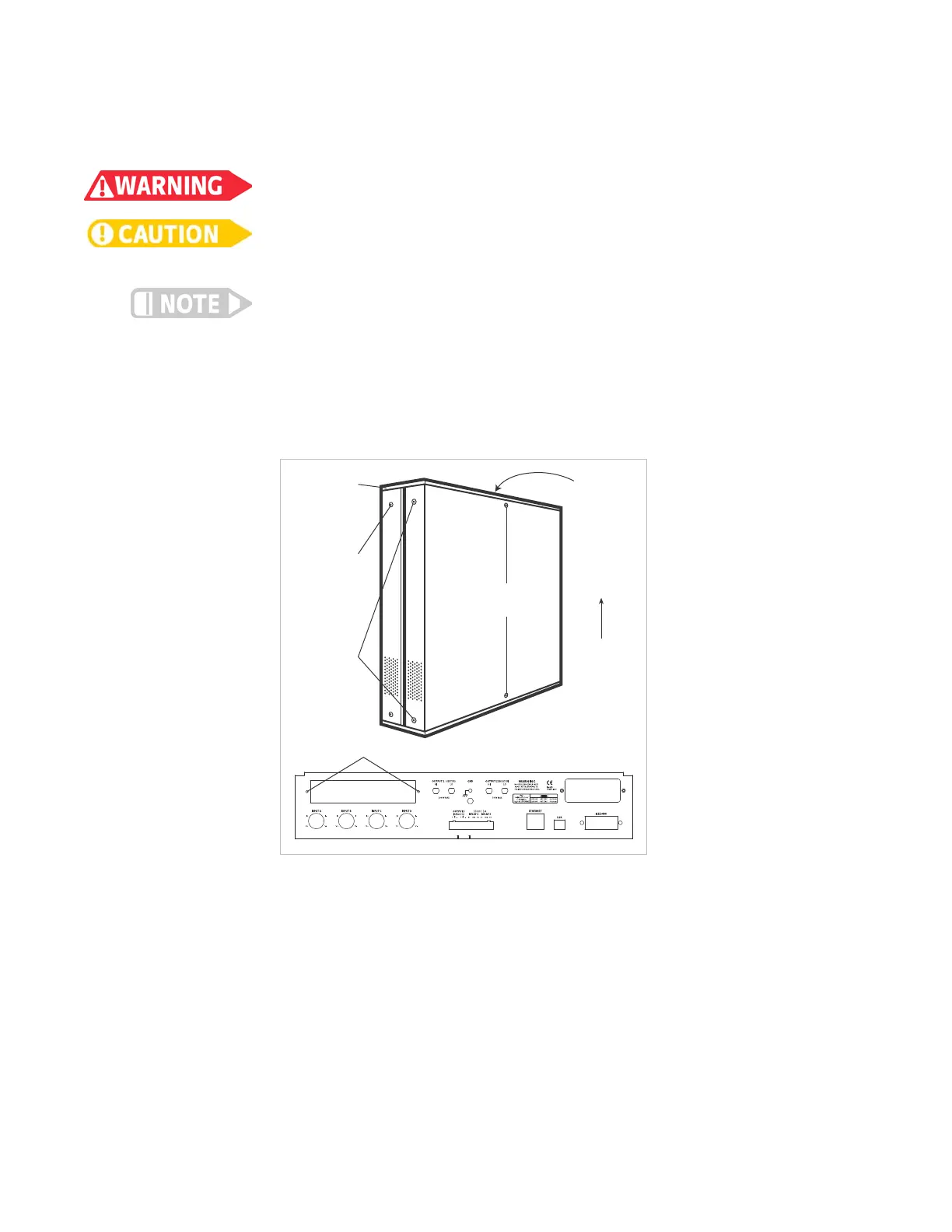
3. Stand the unit on its face. Use the hex driver to remove the 4 screws on both sides
of the top cover. Loosen the 2 rear bottom screws (FIGURE 7-3).
4. Full rack only: use a small Phillips screwdriver to remove the 2 top cover screws
and 1 rear bottom screw (FIGURE 7-3).
5. Remove the rear plastic bezel. The cover is tracked. Slide the top cover to the rear
on the track to remove it.
6. Remove the rear panel option plate screws and set aside. Remove the rear panel
option plate.
7. With the instrument still standing on its face, turn it to view the inside circuit
board.
8. Place the option card into its position in the rear panel from inside the instru-
ment. Orient the card so that the 14-pin ribbon cable connector is toward the
bottom of the instrument, closest to the main circuit board(FIGURE 7-4).
9. Half rack only: use the screws removed in step 1 to attach the card by starting both
screws in a few threads before tightening either.
FIGURE 7-3 Cover and option plate screws (full rack)
Remove
rear
plastic
bezel
Remove top
side cover
screws
(both sides)
Loosen
bottom
rear
side cover
screws
(both sides)
Remove top
cover screws
To remove
top cover,
slide it to
the rear
on the
tracks
Remove
rear
bottom
cover
screw
(unshown)
Rear panel option plate screws


 To Next Page